

Should you test manually or automate? This is one of the oldest and most debated questions in software quality assurance. The answer is rarely one or the other—it’s almost always both. But knowing when to use each approach is the difference between an efficient, high‑confidence testing strategy and a slow, expensive mess.
In this guide, you’ll learn the core differences between manual vs automation testing, the strengths and weaknesses of each, and a practical decision framework to choose the right approach for your project. We’ll also look at real examples and common myths.
Table of Contents
ToggleWhat Is Manual Testing?
Manual testing is the process where a human tester executes test cases step by step without the help of automation tools or scripts. The tester acts as an end user, interacting with the application, entering inputs, observing outputs, and reporting defects.
Manual testing is essential for:
-
Exploratory testing (learning the product while testing)
-
Usability testing (how intuitive and pleasant the interface feels)
-
Ad‑hoc testing (no predefined script)
-
User acceptance testing (UAT) where business users validate workflows
-
Short‑lived or one‑time projects where automation would be overkill
What Is Automation Testing?
Automation testing uses software tools and scripts to execute test cases automatically. The script compares actual outcomes with expected results, generates reports, and can be run repeatedly with minimal human intervention.
Automation is ideal for:
-
Regression testing (re‑running the same tests after code changes)
-
Load and performance testing (simulating thousands of users)
-
Repeated test cases (e.g., login, data validation)
-
Tests that require high precision or large data sets
-
Continuous integration / continuous delivery (CI/CD) pipelines
Manual vs Automation Testing: Key Differences at a Glance
Before diving deeper, here is a quick comparison of manual vs automation testing across critical dimensions:
| Factor | Manual Testing | Automation Testing |
|---|---|---|
| Execution | Done by human testers. | Done by software scripts. |
| Speed | Slow (hours to days for regression). | Fast (minutes for hundreds of tests). |
| Reliability | Prone to human error, especially in repetitive tasks. | Highly consistent and repeatable. |
| Initial Investment | Low (no tooling cost, just time). | High (framework design, script development). |
| Long‑term Cost | Increases with each test cycle (re‑execution cost). | Decreases after initial investment (negligible run cost). |
| Best for | Exploratory, usability, UAT, ad‑hoc, one‑time tests. | Regression, performance, repetitive tests, CI/CD. |
| Return on Investment | Low for repeated runs; high for one‑off. | High for repeated runs; low for one‑off. |
| Required Skills | Domain knowledge, analytical thinking, attention to detail. | Programming, framework knowledge, debugging. |
| Maintenance | Low (no scripts to update). | High (scripts must be updated when application changes). |
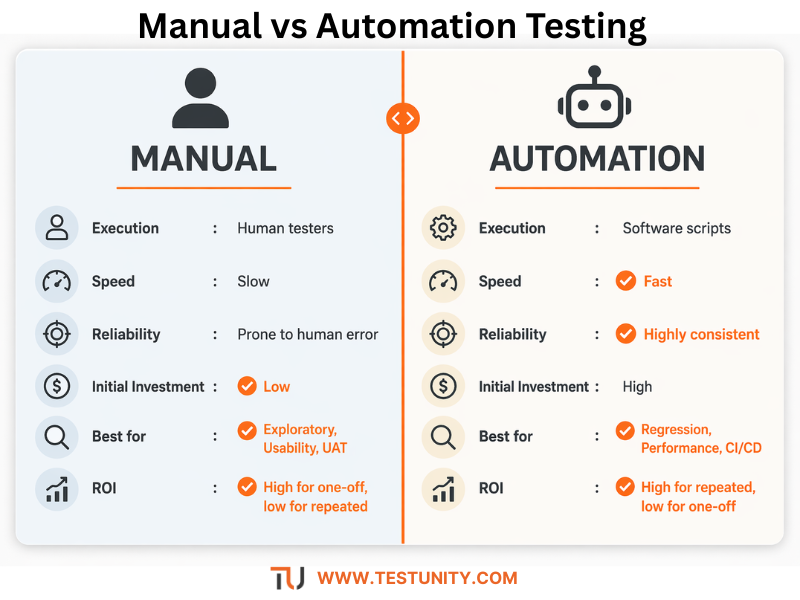
Understanding these differences is the first step in making an informed choice in the manual vs automation testing debate.
When to Use Manual Testing (With Examples)
Manual testing is not a “lesser” approach. It is irreplaceable in many scenarios. Here’s when you should choose manual testing.
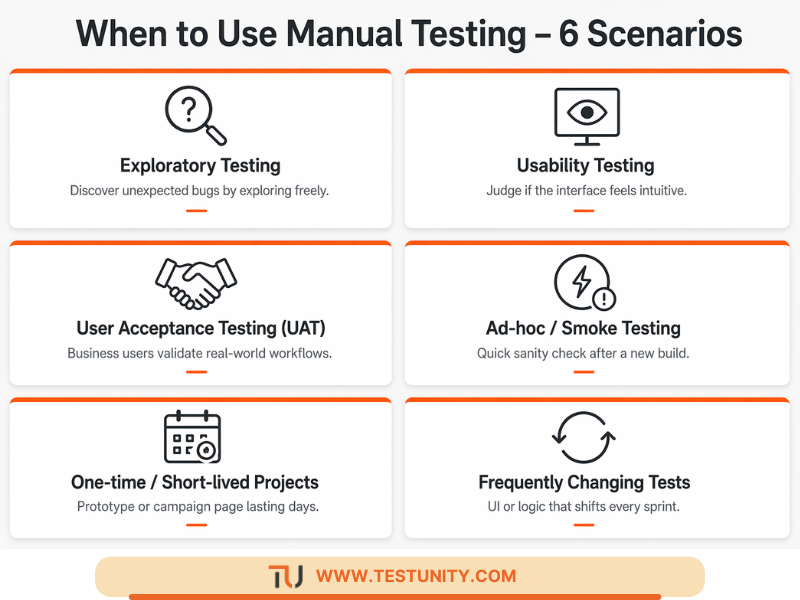
1. Exploratory Testing
Exploratory testing is simultaneous learning, test design, and execution. No script exists. The tester explores the application, trying different paths, inputs, and sequences to uncover unexpected issues. Automation cannot replicate human curiosity and intuition.
Example: You’re testing a new e‑commerce checkout flow. Instead of following a script, you try adding items, removing them, applying expired coupons, clicking the back button, and refreshing the page in different orders. A scripted automation test would miss many of these unscripted sequences.
2. Usability and User Experience (UX) Testing
How does the application feel? Is the button placement intuitive? Are error messages helpful? These subjective questions require human judgment.
Example: You want to know if first‑time users can find the password reset link. You watch a manual tester (or real user) try to locate it. Automation can verify the link exists, but it cannot judge if it’s discoverable.
3. User Acceptance Testing (UAT)
In UAT, business users or product owners validate that the software meets their needs. They use real‑world scenarios and decide if the feature is ready for release. This is inherently human and manual.
Example: A bank’s operations team tests a new loan approval workflow. They need to check that the business rules match their policy, which changes frequently. Automating this would require constant script updates, making manual testing more practical.
4. Ad‑hoc and Smoke Testing
When you need a quick sanity check of a new build, a manual smoke test (clicking through the main flows) takes five minutes. Writing an automated smoke test would take hours.
Example: After a deployment, a tester manually logs in, creates an order, and logs out. If those work, the build is stable enough for further testing.
5. One‑time or Short‑lived Projects
If you are building a prototype, a campaign landing page that will be live for one week, or a legacy system scheduled for retirement, the cost of automation is not justified.
Example: A marketing microsite for a Black Friday sale will exist for 10 days. Manual testing of the forms, links, and images is far cheaper than building an automation framework.
6. Tests That Change Frequently
If the user interface or business logic changes every sprint, automated scripts will break constantly. The maintenance cost outweighs the benefit.
Example: An internal reporting dashboard where new charts and filters are added weekly. Manual testing allows you to keep pace without script upkeep.
When to Use Automation Testing (With Examples)
Automation shines in scenarios where repetition, speed, or scale is required.
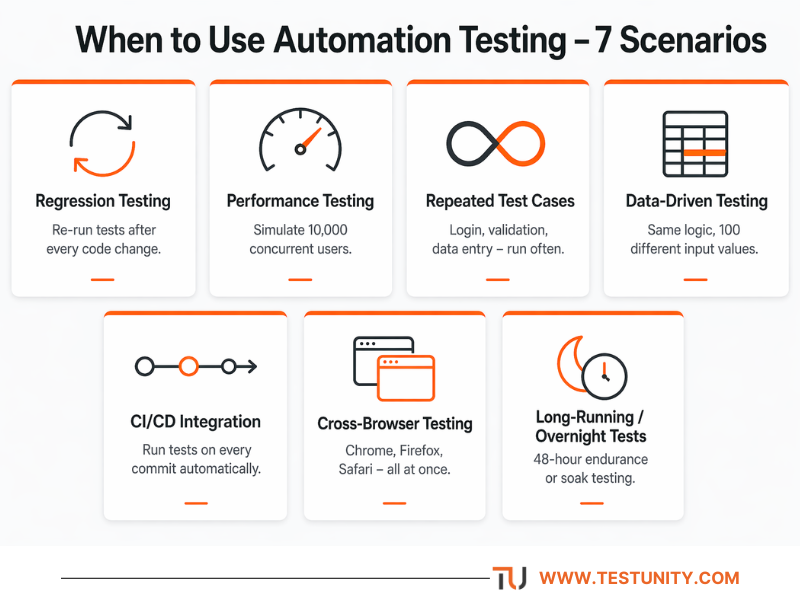
1. Regression Testing
Every time code changes, you must ensure existing features still work. Running hundreds or thousands of regression tests manually is slow, boring, and error‑prone. Automation makes regression fast and reliable.
Example: A payment gateway integration. After adding a new payment method (e.g., Apple Pay), you need to retest all existing methods (credit card, PayPal, bank transfer). Automating these 50 test cases means you can run them in 10 minutes instead of 4 hours.
2. Performance and Load Testing
Simulating 10,000 concurrent users is impossible manually. Automation tools like JMeter, k6, or Gatling generate virtual users and measure response times, throughput, and error rates.
Example: Before a flash sale, you need to verify that your e‑commerce site can handle 5,000 users simultaneously. An automated load test gives you metrics and identifies bottlenecks.
3. Repeated Test Cases
Any test that will be run more than a handful of times is a candidate for automation. The more often you run it, the higher the return on automation.
Example: A login test. You’ll run it after every build, for every environment, across multiple browsers. Automate it once and run it thousands of times for free.
4. Data‑Driven Testing
When you need to run the same test logic with dozens or hundreds of different input values, automation excels. You store the data in a spreadsheet or database and let the script iterate.
Example: A registration form that validates email formats, password rules, and phone numbers. You have 100 test data sets. Automating this takes minutes; manual would take hours and likely miss errors.
5. Integration with CI/CD Pipelines
In modern DevOps, tests must run automatically on every code commit or merge. This is impossible without automation.
Example: Your GitHub Actions pipeline runs unit tests, integration tests, and a small set of UI smoke tests every time a developer pushes code. Developers get feedback in five minutes. This is only possible with automation testing.
6. Cross‑Browser and Cross‑Platform Testing
You need to verify that your web application works on Chrome, Firefox, Safari, Edge, and mobile browsers. Manually testing on each combination is tedious. Automation tools like Selenium Grid, Cypress, or cloud services (BrowserStack) run tests in parallel across many configurations.
Example: A responsive web app must look and function correctly on 10 different browser/OS combinations. An automated script can run the same test suite on all ten in under 30 minutes.
7. Long‑Running or Overnight Tests
Some tests, such as endurance (soak) tests or comprehensive security scans, run for hours. Manual testing cannot sustain that.
Example: You need to verify that an application does not leak memory after 48 hours of continuous use. An automated script runs the same operations in a loop and monitors memory usage.
Manual vs Automation Testing: Cost and ROI Comparison
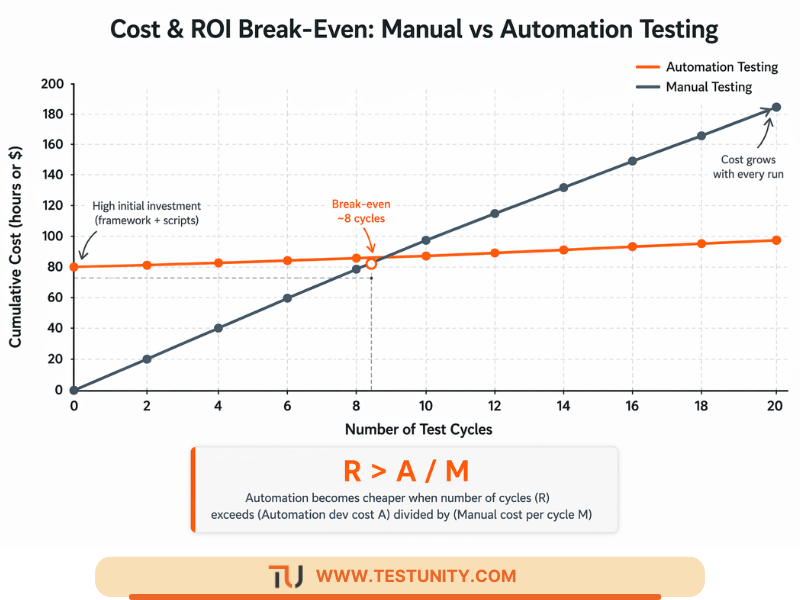
One of the most practical ways to decide between manual vs automation testing is to calculate the break‑even point.
Manual Testing Cost Per Cycle
-
Setup: Low (writing test cases, no code)
-
Execution cost per cycle: Tester’s hourly rate × hours per cycle
Automation Testing Cost
-
Setup: High (framework, scripting, environment)
-
Execution cost per cycle: Negligible (machine time)
Break‑Even Formula
Let:
-
M= manual execution cost per cycle (in hours) -
A= automation development cost (in hours) -
R= number of cycles you will run
Automation becomes cheaper when: A + (R × small) < R × M → approximately R > A / M
Example:
-
Manual regression takes 10 hours (M = 10)
-
Automation development takes 80 hours (A = 80)
-
Break‑even cycles = 80 / 10 = 8 cycles
If you run regression more than 8 times, automation saves money. Most teams run regression every sprint (12–24 times per year), so automation wins.
For a one‑off test (R = 1), manual is always cheaper.
Can You Automate Everything? (And Why the Answer Is No)
A common misconception is that automation can replace manual testing entirely. This is false. Even the most advanced AI‑driven tools cannot:
-
Judge visual aesthetics (e.g., “Does this shade of blue look correct?”)
-
Assess user frustration or delight
-
Make intuitive leaps to find unexpected bugs
-
Understand business context changes (“This policy changed yesterday”)
-
Perform exploratory testing with creative freedom
The best strategy combines both. Automate what is repetitive, stable, and critical. Leave the rest to skilled manual testers.
How to Decide: A Practical Decision Framework
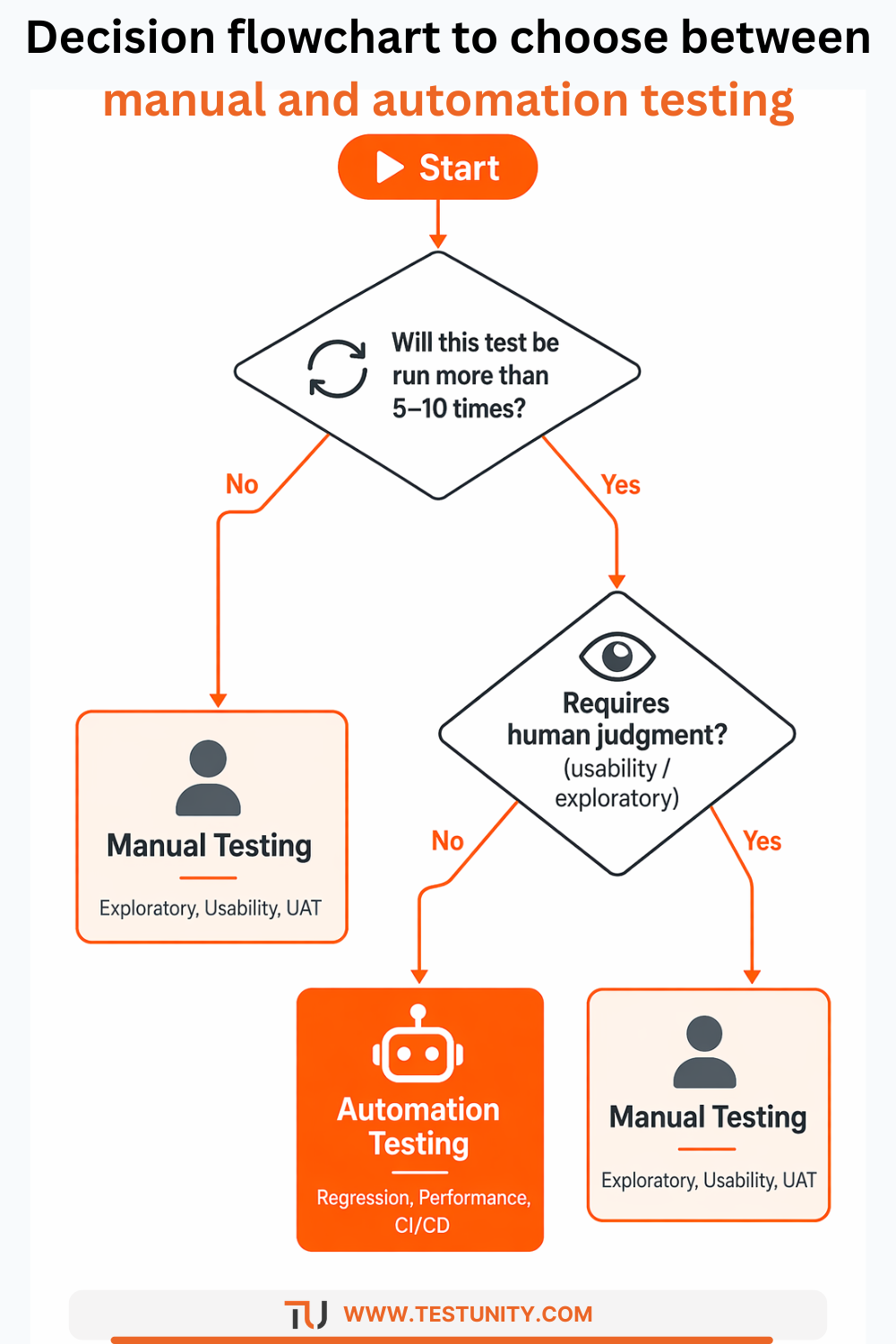
When faced with the manual vs automation testing choice, ask these questions:
| Question | Manual | Automation |
|---|---|---|
| Will this test be run more than 5–10 times? | No | Yes |
| Does it require human judgment (usability, exploratory)? | Yes | No |
| Is the interface or logic likely to change frequently? | Yes | No |
| Does it need to run in CI/CD (on every commit)? | No | Yes |
| Do you need to simulate many users or data sets? | No | Yes |
| Is the test one‑off (e.g., prototype, short campaign)? | Yes | No |
| Does it involve visual validation (layout, color, font)? | Yes (or visual AI tools) | Only with advanced tools |
Score each test case or feature. If automation scores high on the right‑hand side, automate it. Otherwise, test manually.
Common Myths About Manual vs Automation Testing
Myth 1: “Automation is always faster than manual.”
Truth: Automation is faster to execute but slower to create. For a single run, manual is faster. For many runs, automation wins.
Myth 2: “Manual testing is obsolete.”
Truth: Manual testing is not obsolete. Exploratory, usability, and UAT testing are still best done manually. The role of manual testers shifts toward these high‑value activities.
Myth 3: “100% automation coverage is the goal.”
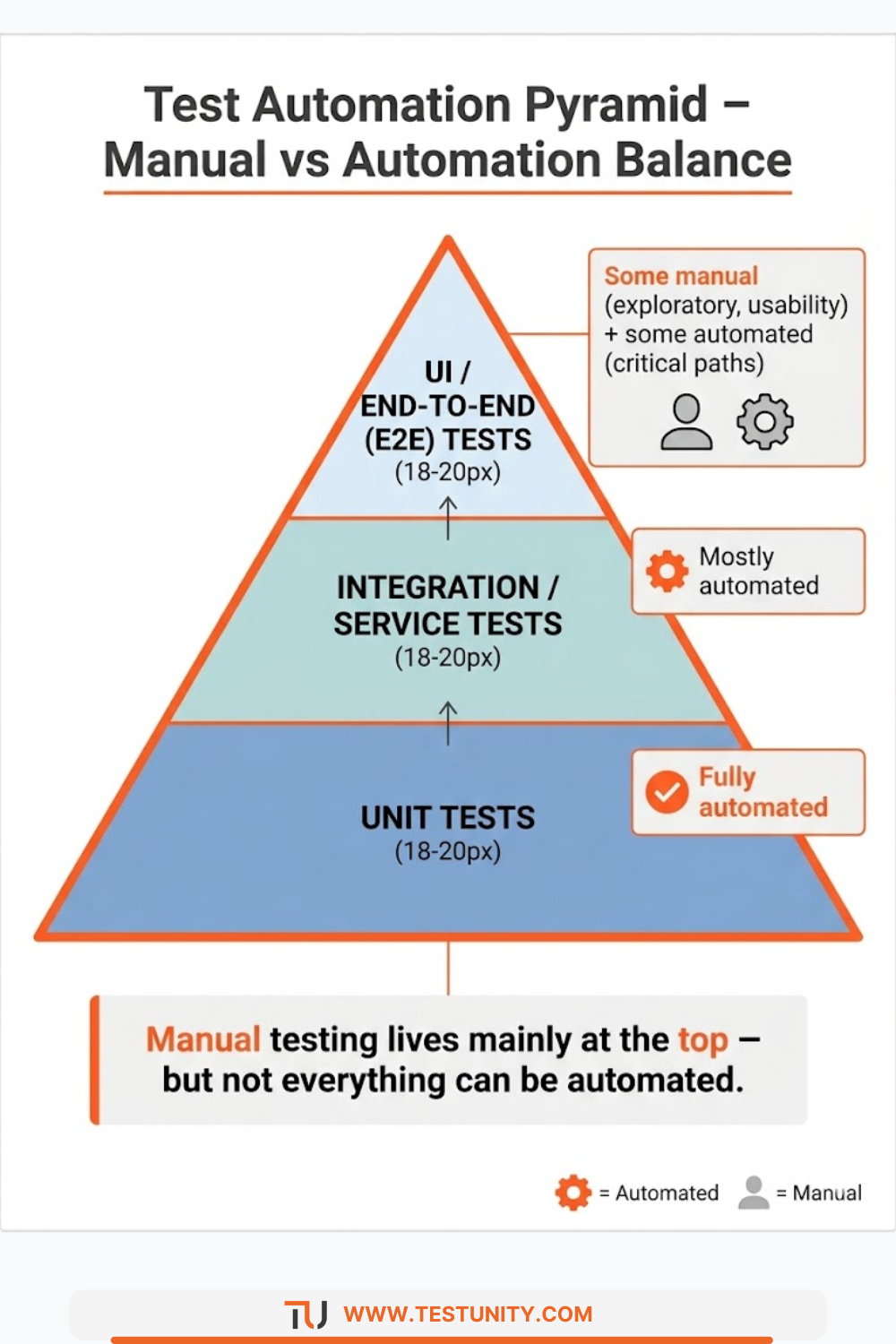
Truth: 100% automation is neither feasible nor desirable. The test automation pyramid recommends many unit tests (automated), fewer integration tests (automated), and even fewer UI tests (some manual). Striving for 100% UI automation leads to high maintenance and flakiness.
Myth 4: “Automation finds more bugs than manual.”
Truth: Automation finds regression bugs (things that worked before but broke). Manual exploratory testing often finds new, edge‑case, or usability bugs that scripts would miss. Both are needed.
Real‑World Hybrid Strategy Example
Consider a typical e‑commerce team:
-
Unit tests (automated): Developers write them for every function. Run on every commit.
-
API tests (automated): Test payment, inventory, and shipping endpoints. Run on merge.
-
Critical UI journeys (automated): Login, search, add to cart, checkout. Run nightly.
-
Exploratory testing (manual): Two hours per sprint. Testers explore new features and edge cases.
-
Usability testing (manual): Once per release, with real users.
-
UAT (manual): Business users validate new promotions and workflows.
This hybrid approach balances speed, coverage, and cost.
When to Automate: A Checklist
Use this checklist to decide if a test case should be automated:
-
The test will be executed many times (more than 5–10).
-
The test is repetitive and doesn’t require human judgment.
-
The application area is stable (UI or API changes infrequently).
-
You have the skills and tools to automate it.
-
The test is part of your regression suite.
-
The test needs to run in a CI/CD pipeline.
-
The test requires high precision or large data sets.
If most boxes are checked, automate. If only a few, keep it manual.
Conclusion: Balance, Not Extremes
The manual vs automation testing debate is not about choosing one winner. It’s about understanding the strengths of each and applying them appropriately. Manual testing provides human insight, flexibility, and creativity. Automation provides speed, repeatability, and scale.
A mature QA strategy uses both. Automate the regression, the repetitive, and the data‑heavy. Test manually the exploratory, the usability, and the ever‑changing. This balanced approach delivers high quality without wasted effort.
At TestUnity, we help organizations design and implement this balance. Whether you need expert manual testing for complex scenarios or robust Test Automation Services to accelerate your regression suite, we have the expertise to guide you.
Ready to optimize your testing mix? Contact TestUnity today to discuss your unique needs and build a strategy that leverages the best of both worlds.
Related Resources
-
Guide to Exploratory Testing – Where manual testing shines.
-
White Box vs Black Box Testing: Choosing the Right Approach – Related methodology decisions.

TestUnity is a leading software testing company dedicated to delivering exceptional quality assurance services to businesses worldwide. With a focus on innovation and excellence, we specialize in functional, automation, performance, and cybersecurity testing. Our expertise spans across industries, ensuring your applications are secure, reliable, and user-friendly. At TestUnity, we leverage the latest tools and methodologies, including AI-driven testing and accessibility compliance, to help you achieve seamless software delivery. Partner with us to stay ahead in the dynamic world of technology with tailored QA solutions.









Leave a Reply