

In modern software development, continuous integration and continuous delivery (CI/CD) have become table stakes. But a CI/CD pipeline is only as reliable as the tests that run inside it. Without a thoughtful CI/CD testing strategy, you risk shipping broken code quickly instead of shipping good code quickly.
CI/CD testing—the practice of running automated tests as part of your pipeline—transforms your deployment automation into a quality gate that catches defects early, provides rapid feedback, and gives your team the confidence to deploy on demand.
This guide provides a step‑by‑step roadmap to embedding CI/CD testing into your workflows. You’ll learn how to structure your pipeline, which tests to run at each stage, how to choose tools, and how to avoid the common mistakes that turn pipelines into bottlenecks.
What Is CI/CD Testing?
CI/CD testing is the integration of automated tests into your continuous integration and continuous delivery pipelines. Instead of testing after development, you define test stages that execute automatically whenever code changes—from a developer’s commit to production deployment.
A well‑executed CI/CD testing strategy provides:
-
Immediate feedback: Developers know within minutes if their change broke something.
-
Consistent quality gates: Every change is evaluated against the same standards.
-
Automated confidence: You can deploy with the assurance that critical tests have passed.
-
Faster delivery: By catching issues early, you reduce the time spent on manual regression and firefighting.
The CI/CD Pipeline: A Quick Refresher
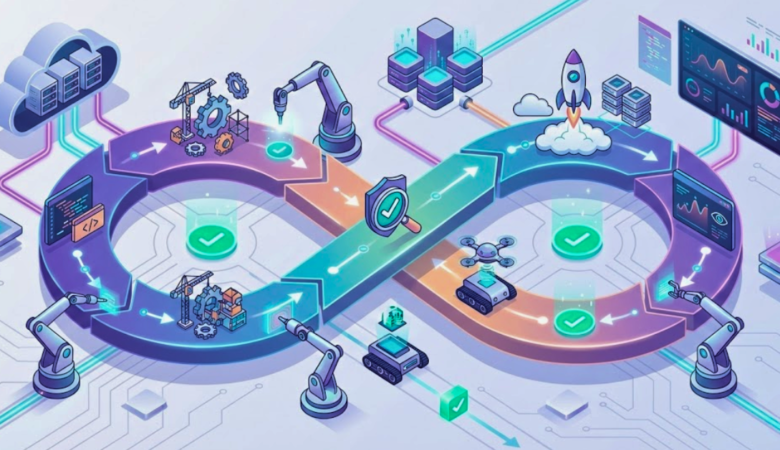
A typical CI/CD pipeline consists of several stages, each with a specific purpose. Effective CI/CD testing maps test suites to these stages:
| Stage | Purpose | Typical CI/CD Testing Activities |
|---|---|---|
| Commit / Build | Validate the change in isolation. | Compile code, run unit tests, static analysis. |
| Integration | Verify the change works with other changes. | Merge to main branch, run integration tests, API tests. |
| Acceptance / E2E | Validate business‑critical user journeys. | Run end‑to‑end UI tests, contract tests. |
| Performance / Security | Ensure non‑functional requirements. | Run smoke performance tests, security scans. |
| Deploy | Promote the artifact to environments. | Deploy to staging or production with canary checks. |
Each stage can contain multiple test suites. The key is to run fast, reliable tests early and deeper, more expensive tests later.
Step 1: Define Your CI/CD Testing Strategy in Code
Before writing any pipeline configuration, decide what you want to test and where. Your test automation strategy (covered in our Test Automation Strategy: How to Plan, Execute, and Scale guide) should define:
-
What tests are automated (unit, integration, API, UI, performance, security).
-
Who owns each test layer.
-
What the pass/fail criteria are.
-
How flaky tests are handled.
Once the strategy is clear, you can express it in code using the “pipeline as code” approach—treating your pipeline configuration like any other software artifact. This is a cornerstone of mature CI/CD testing.
Step 2: Choose the Right CI/CD Tool
Your choice of CI/CD platform affects how you implement CI/CD testing. Popular options include:
-
Jenkins: Highly customizable, open‑source, extensive plugin ecosystem.
-
GitHub Actions: Tightly integrated with GitHub repositories, easy to configure with YAML.
-
GitLab CI: Native to GitLab, supports complex pipelines, good for all‑in‑one DevOps.
-
CircleCI: Cloud‑native, fast, good for containerized workflows.
-
Azure Pipelines / AWS CodePipeline: Cloud‑provider specific, good for hybrid teams.
Pick the tool that best fits your existing stack, team skills, and scalability needs. The principles of CI/CD testing remain the same across platforms.
Step 3: Structure Your Pipeline with Quality Gates
A quality gate is a checkpoint that must pass before the pipeline proceeds. Map your CI/CD testing strategy to pipeline stages:
Stage 1: Pre‑Merge / Pull Request
Goal: Provide fast feedback to developers before changes are merged.
CI/CD testing tasks:
-
Unit tests (must be fast, < 5 minutes).
-
Static analysis / linters (style, security, complexity).
-
Code coverage (fail if coverage drops below threshold).
-
Lightweight integration tests (if they can run quickly).
Tip: Run the fastest tests first so failures surface early. Use parallel execution to speed up the feedback loop.
Stage 2: Post‑Merge / Integration
Goal: Validate that the change integrates with the main branch and existing code.
CI/CD testing tasks:
-
Full unit test suite.
-
Integration tests (database, API, service‑to‑service).
-
API contract tests (consumer‑driven contracts).
-
Build and package (create deployable artifact).
Tip: If the pre‑merge stage already passed unit tests, you may skip them here or run only a subset to save time. However, sometimes merging can introduce issues (e.g., merge conflicts), so re‑running critical tests is wise.
Stage 3: Acceptance / End‑to‑End
Goal: Validate that the application meets business requirements and works as a whole.
CI/CD testing tasks:
-
End‑to‑end (E2E) UI tests (critical user journeys only).
-
User acceptance tests (UAT) scripts (if automated).
-
Smoke tests (deployment verification).
Tip: Keep the number of E2E tests small (the top of the test automation pyramid). Run them in parallel across browsers and devices if needed.
Stage 4: Non‑Functional Validation
Goal: Ensure performance, security, and resilience.
CI/CD testing tasks:
-
Performance tests (lightweight load tests, API‑level performance).
-
Security scans (SAST, DAST, dependency scanning).
-
Chaos experiments (if part of your maturity, see our Chaos Testing Guide).
Tip: These tests may take longer, so run them as optional or post‑deployment stages, but set clear thresholds to block releases if they fail.
Stage 5: Deployment and Post‑Deployment Verification
Goal: Safely deploy and verify the live environment.
CI/CD testing tasks:
-
Smoke tests against the deployed environment.
-
Canary tests (monitor metrics after incremental rollout).
-
Synthetic monitoring (simulated user journeys).
Tip: Use blue‑green or canary deployments to minimize risk. If tests fail, automatically roll back.
Step 4: Implement Pipeline as Code
Write your pipeline configuration in a version‑controlled file (e.g., Jenkinsfile, .github/workflows/ci.yml, .gitlab-ci.yml). This allows you to:
-
Review changes to the pipeline.
-
Reuse pipeline logic across branches.
-
Apply the same testing discipline as application code.
Here’s a simplified example for a GitHub Actions workflow that includes CI/CD testing stages:
name: CI/CD Pipeline

on:
  push:
    branches: [ main ]
  pull_request:
    branches: [ main ]

jobs:
  pre-merge:
    runs-on: ubuntu-latest
    steps:
      - uses: actions/checkout@v3
      - name: Install dependencies
        run: npm ci
      - name: Run unit tests
        run: npm test
      - name: Run linter
        run: npm run lint
      - name: Check coverage
        run: npm run coverage -- --threshold=80

  integration:
    needs: pre-merge
    runs-on: ubuntu-latest
    steps:
      - uses: actions/checkout@v3
      - name: Start test database
        run: docker-compose up -d db
      - name: Run integration tests
        run: npm run test:integration

  e2e:
    needs: integration
    runs-on: ubuntu-latest
    steps:
      - uses: actions/checkout@v3
      - name: Start application
        run: docker-compose up -d app
      - name: Run E2E tests
        run: npm run test:e2e
Step 5: Manage Test Data and Environments
One of the biggest challenges in CI/CD testing is ensuring consistent, isolated test data and environments. Use these strategies:
-
Containers: Run your application and dependencies in Docker containers that are spun up fresh for each pipeline run.
-
Test databases: Use in‑memory databases (e.g., H2, SQLite) for unit and integration tests, or spin up a temporary database instance from a clean snapshot.
-
Service virtualization: Mock external APIs that are not under your control (tools like WireMock, Mountebank).
-
Secrets management: Store credentials and API keys securely in the CI/CD tool’s secrets store.
For more on this, refer to our Integration Testing Guide which covers environment strategies.
Step 6: Handle Flaky Tests
Flaky tests (tests that sometimes pass, sometimes fail without code changes) erode trust in your CI/CD testing pipeline. When a pipeline fails randomly, teams start ignoring failures—defeating the purpose of quality gates.
Best practices for flaky tests:
-
Isolate and quarantine: Move flaky tests to a separate, non‑blocking stage. Tag them (e.g.,
@flaky) and run them with alerts only. -
Retry with caution: Automatically retry failing tests once or twice, but track retry rates to identify problem tests.
-
Fix or remove: Dedicate a sprint to fixing flaky tests. If a test cannot be stabilized, remove it.
Step 7: Optimize Pipeline Speed
Slow pipelines hurt productivity. Aim for a CI/CD testing pipeline that gives feedback within 5–10 minutes for most changes.
Optimization techniques:
-
Parallel execution: Run test suites across multiple machines or containers.
-
Selective testing: Run only the tests that are relevant to the changed code (e.g., using test impact analysis).
-
Caching dependencies: Cache package managers (npm, Maven, pip) to avoid re‑downloading on every run.
-
Fail fast: Run the fastest, most critical tests first. Fail the pipeline as soon as a critical test fails.
Step 8: Integrate Performance and Chaos Testing
As you mature, integrate non‑functional testing into your CI/CD testing pipeline. For performance, run lightweight API‑level load tests (e.g., with k6) in the integration stage. For resilience, incorporate chaos experiments—but start with non‑production environments and use targeted blast radius, as described in our Chaos Testing Guide.
Example: Add a performance job in GitHub Actions that runs a short load test using k6:
performance:
  needs: integration
  runs-on: ubuntu-latest
  steps:
    - uses: actions/checkout@v3
    - name: Run k6 load test
      run: k6 run scripts/load_test.js
Step 9: Set Up Monitoring and Alerts
CI/CD testing doesn’t stop after deployment. Use post‑deployment monitoring to validate that the application behaves correctly under real traffic.
-
Synthetic monitoring: Run smoke tests against production every few minutes to detect outages.
-
APM (Application Performance Monitoring): Use tools like New Relic or Datadog to correlate deployments with performance metrics.
-
Alert on test failures: Configure alerts (e.g., Slack, PagerDuty) when critical tests fail in the pipeline or in production monitoring.
Step 10: Continuously Improve
Your CI/CD testing strategy should evolve with your application and team.
-
Review pipeline metrics: Track build times, failure rates, and flaky test counts. Set goals to reduce them.
-
Conduct post‑mortems: When a bug escapes to production, analyze why your CI/CD testing didn’t catch it and add a test to prevent recurrence.
-
Regularly prune dead tests: Remove tests that no longer add value or are consistently skipped.
Common Pitfalls and How to Avoid Them
| Pitfall | Solution |
|---|---|
| Running every test in every build | Use selective testing and parallel execution. Keep the pre‑merge stage fast. |
| Ignoring flaky tests | Quarantine them, track flakiness metrics, and fix systematically. |
| Lack of environment parity | Use containerization and infrastructure as code to keep test environments close to production. |
| Hard‑coded credentials | Use secrets management; never commit credentials to source. |
| Pipeline as code not reviewed | Treat pipeline changes like code changes: require pull request reviews. |
| No performance or security gates | Add lightweight non‑functional tests early; they catch expensive issues. |
Real‑World Example: E‑commerce Pipeline
An e‑commerce company implemented the following CI/CD testing stages:
-
Pull request: Run unit tests, linter, and API contract tests (5 minutes).
-
Merge to main: Run full unit tests, integration tests with test database, and build container image (8 minutes).
-
Staging deployment: Deploy to staging, run smoke tests and a small set of E2E tests (10 minutes).
-
Performance test (nightly): Run load tests and report results; failures create tickets but don’t block deployment.
-
Production deployment (blue/green): After successful staging, deploy to production with canary analysis.
Result: Deployment frequency increased from weekly to multiple times per day, while production incidents decreased by 40%.
Conclusion: Building a Test‑First Pipeline
Integrating CI/CD testing into your pipeline is not a one‑time project—it’s a continuous investment in quality and speed. By carefully structuring your pipeline, automating the right tests, and treating pipeline code as first‑class citizens, you create a safety net that allows your team to move fast without breaking things.
Start small. Pick one stage (like pre‑merge) and add the tests that matter most. Then expand. With each improvement, you’ll gain confidence to release more frequently and with fewer surprises.
At TestUnity, we help organizations design and implement CI/CD testing pipelines that deliver quality at speed. Our Continuous Testing Services provide the expertise to integrate automated tests seamlessly into your development workflow.
Ready to transform your pipeline? Contact TestUnity today to discuss how we can help you build a robust CI/CD testing strategy.
Related Resources

TestUnity is a leading software testing company dedicated to delivering exceptional quality assurance services to businesses worldwide. With a focus on innovation and excellence, we specialize in functional, automation, performance, and cybersecurity testing. Our expertise spans across industries, ensuring your applications are secure, reliable, and user-friendly. At TestUnity, we leverage the latest tools and methodologies, including AI-driven testing and accessibility compliance, to help you achieve seamless software delivery. Partner with us to stay ahead in the dynamic world of technology with tailored QA solutions.








Leave a Reply