
In today’s digital ecosystem, your application doesn’t just live on one screen; it exists across a fragmented universe of browsers, operating systems, devices, and network conditions. A feature that works flawlessly on a Chrome browser on Windows may break on Safari on macOS or appear distorted on a mobile device. This fragmentation is the core challenge that compatibility testing exists to solve. It is the systematic process of validating that your software application performs consistently and provides an optimal user experience across all intended combinations of hardware, software, and networks. For businesses, neglecting compatibility testing means risking brand reputation, user frustration, and significant revenue loss, as potential customers abandon a buggy or unusable experience.
Think of compatibility testing not as a final checkbox, but as a core quality assurance discipline that acknowledges the diverse reality of your end-users. It answers critical questions: Can our e-commerce checkout process be completed on an older iPhone? Does our SaaS dashboard render correctly on the latest version of Firefox and Microsoft Edge? Does our mobile game overheat on a specific Android model? This guide serves as a comprehensive roadmap for QA engineers, developers, and product managers to build a robust compatibility testing strategy that ensures your software’s resilience and appeal in a multi-platform world.
The “Why”: The Business Imperative of Compatibility Testing
The need for rigorous compatibility testing is driven by inescapable market realities:
-
Explosion of Device and Browser Variants: Users access software from thousands of device models (smartphones, tablets, desktops, laptops), each with different screen resolutions, hardware capabilities, and operating system versions. Browsers like Chrome, Safari, Firefox, and Edge have their own rendering engines and frequent update cycles.
-
User Expectations for Seamless Experience: Modern users have zero tolerance for inconsistency. They expect a website or app to work perfectly regardless of how they access it. A single bad experience can lead to immediate abandonment and negative reviews.
-
Direct Impact on Key Metrics: Compatibility issues directly affect crucial business metrics—conversion rates, bounce rates, average session duration, and customer retention. A form that doesn’t submit on a specific browser is a direct revenue leak.
-
Inclusive Accessibility: Ensuring compatibility across devices and assistive technologies (like screen readers) is also a step towards digital inclusivity, broadening your potential user base.
This makes compatibility testing a non-negotiable pillar of modern quality assurance, as fundamental as functional or performance testing.
The Compatibility Testing Universe: Key Dimensions
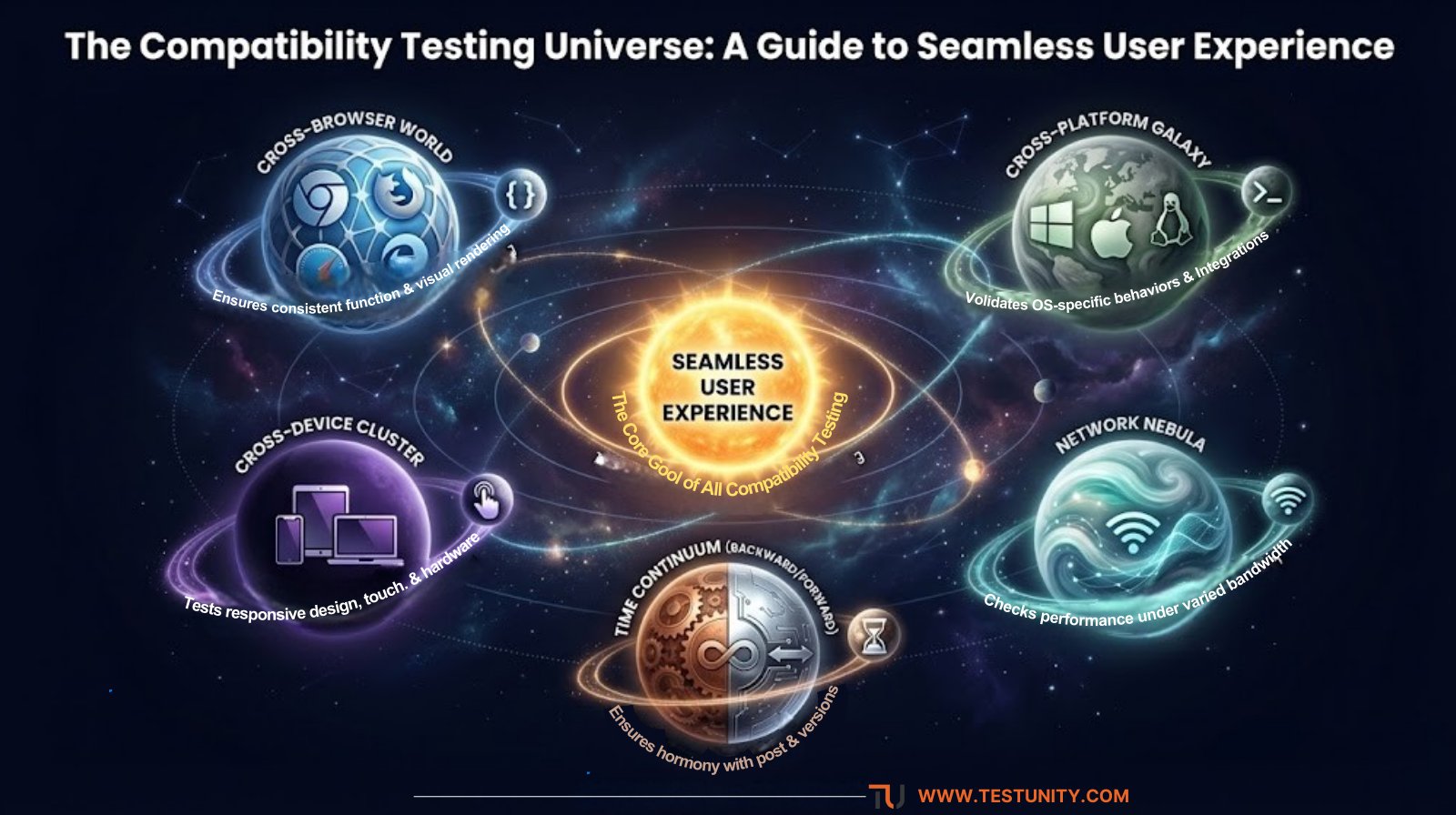
Effective compatibility testing is multi-faceted. It breaks down into several focused types, each addressing a specific axis of variation.
1. Cross-Browser Testing
This is the most common form, ensuring your web application functions and appears correctly across different web browsers and their versions.
-
Core Challenge: Each browser (Chrome’s Blink, Safari’s WebKit, Firefox’s Gecko) interprets HTML, CSS, and JavaScript slightly differently. CSS flexbox, grid layouts, or JavaScript APIs may have inconsistent support.
-
What to Test: Visual rendering, alignment, font display, JavaScript execution, cookie/session handling, and plugin functionality (if any).
-
Strategic Link: This is a subset of the broader cross-browser testing discipline, which focuses specifically on browser variance.
2. Cross-Platform/OS Testing
This validates application behavior across different operating systems, such as Windows, macOS, Linux, iOS, and Android.
-
Core Challenge: OS-specific behaviors, file system paths, keyboard shortcuts, notification systems, and security permissions can cause functional discrepancies. A desktop application built for Windows may have font rendering or printing dialog issues on macOS.
-
What to Test: Installation/uninstallation, core functionality, OS integration features, and system-level interactions.
3. Cross-Device Testing (Mobile & Responsive)
This ensures your application provides an optimal experience on various devices—smartphones, tablets, desktops, and even wearables or smart TVs.
-
Core Challenge: Screen sizes, resolutions, pixel density (DPI), touch vs. mouse input, hardware performance (CPU, GPU, memory), and sensors (GPS, accelerometer).
-
What to Test: Responsive web design (layout adapts correctly), touch-target sizes, viewport scaling, orientation changes (portrait/landscape), and device-specific features. This is intrinsically linked to specialized mobile testing practices for native apps.
-
Strategic Link: For deep insights into ensuring app success across devices, see our guide on mobile performance testing.
4. Network Compatibility Testing
Software must perform reliably under diverse network conditions that simulate real-world user environments.
-
Core Challenge: Varying bandwidth (3G, 4G, 5G, slow WiFi), latency, packet loss, and offline functionality.
-
What to Test: Application load times, functionality under slow networks, data synchronization, offline mode behavior, and recovery when the connection is restored.
5. Backward & Forward Compatibility Testing
-
Backward Compatibility: Ensures the new version of your software works seamlessly with data, files, or systems created by older versions. (e.g., Can the 2024 software open files saved by the 2023 version?).
-
Forward Compatibility: Designing software to be reasonably compatible with future versions of underlying systems or standards, though this is more challenging.
| Testing Type | Primary Focus | Key Challenges | Common Tools/Approaches |
|---|---|---|---|
| Cross-Browser | Browser Rendering & JS Execution | CSS/JS implementation differences, vendor prefixes | Selenium Grid, BrowserStack, LambdaTest |
| Cross-Platform/OS | OS-Specific Behaviors & Integration | File systems, security models, UI frameworks | Virtual Machines, Cloud-based OS Farms |
| Cross-Device (Mobile) | Responsive Design & Touch Interface | Screen fragmentation, touch targets, performance | Real Devices, Emulators, Appium, Xcode/Android Studio |
| Network | Performance Under Varied Conditions | Bandwidth throttling, latency, offline behavior | Network Link Conditioner, Chrome DevTools |
Building a Strategic Compatibility Testing Framework
A haphazard approach to compatibility testing is inefficient and unsustainable. A strategic framework ensures comprehensive coverage and optimal resource use.
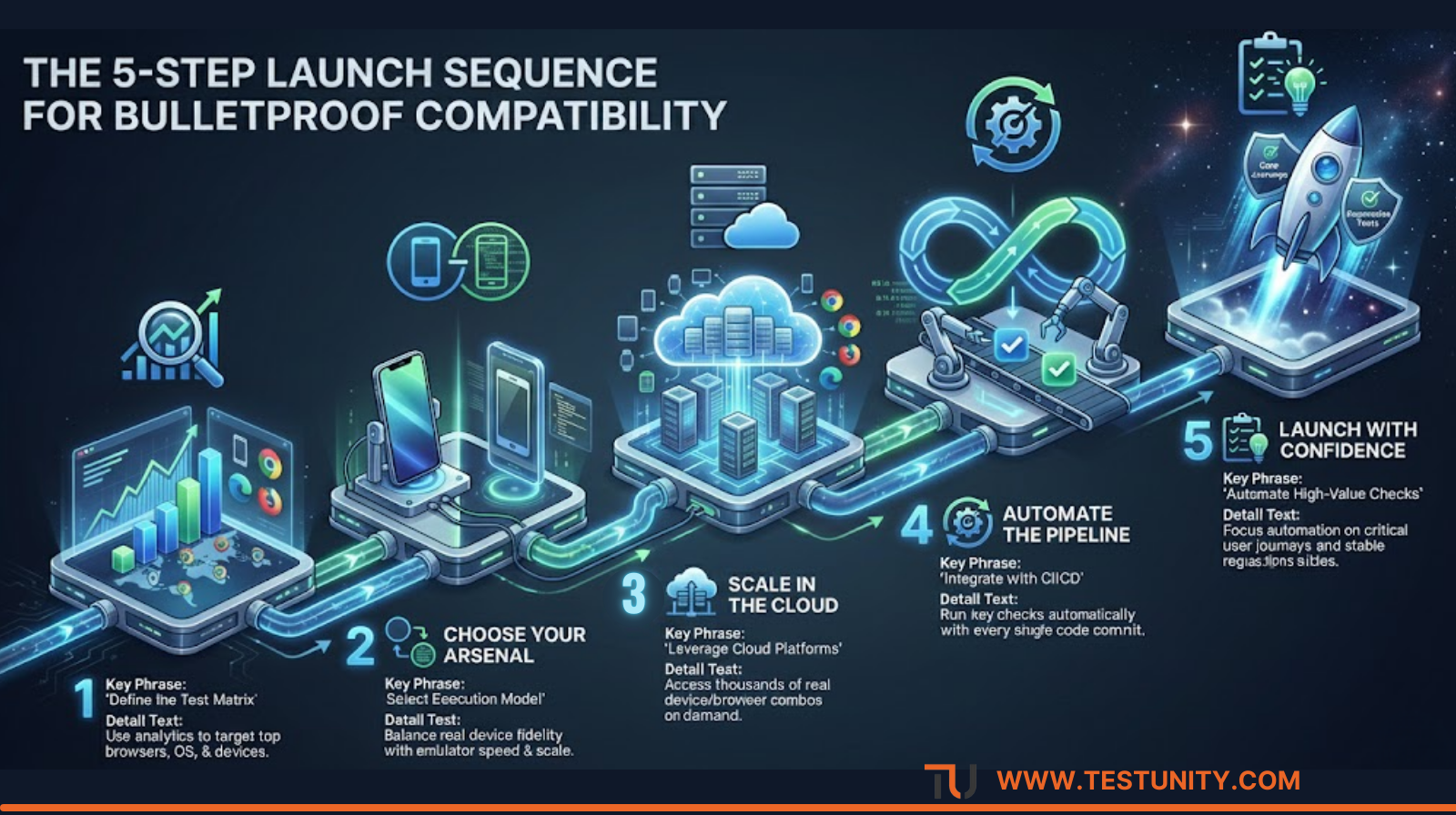
Step 1: Define the “Test Matrix” – Be Strategic, Not Exhaustive
Testing every possible combination is impossible. Instead, create a prioritized test matrix based on:
-
Market Analytics: Use tools like Google Analytics or market reports to identify the top browsers, devices, and OS versions your actual users employ. Prioritize these combinations.
-
Business Requirements: Does the product cater to enterprises likely using older Windows versions? Or is it a consumer app for the latest iOS/Android devices?
-
Risk Assessment: Prioritize combinations for critical user journeys (login, payment, data submission).
Step 2: Choose the Right Execution Model: Real Devices vs. Emulators/Simulators
-
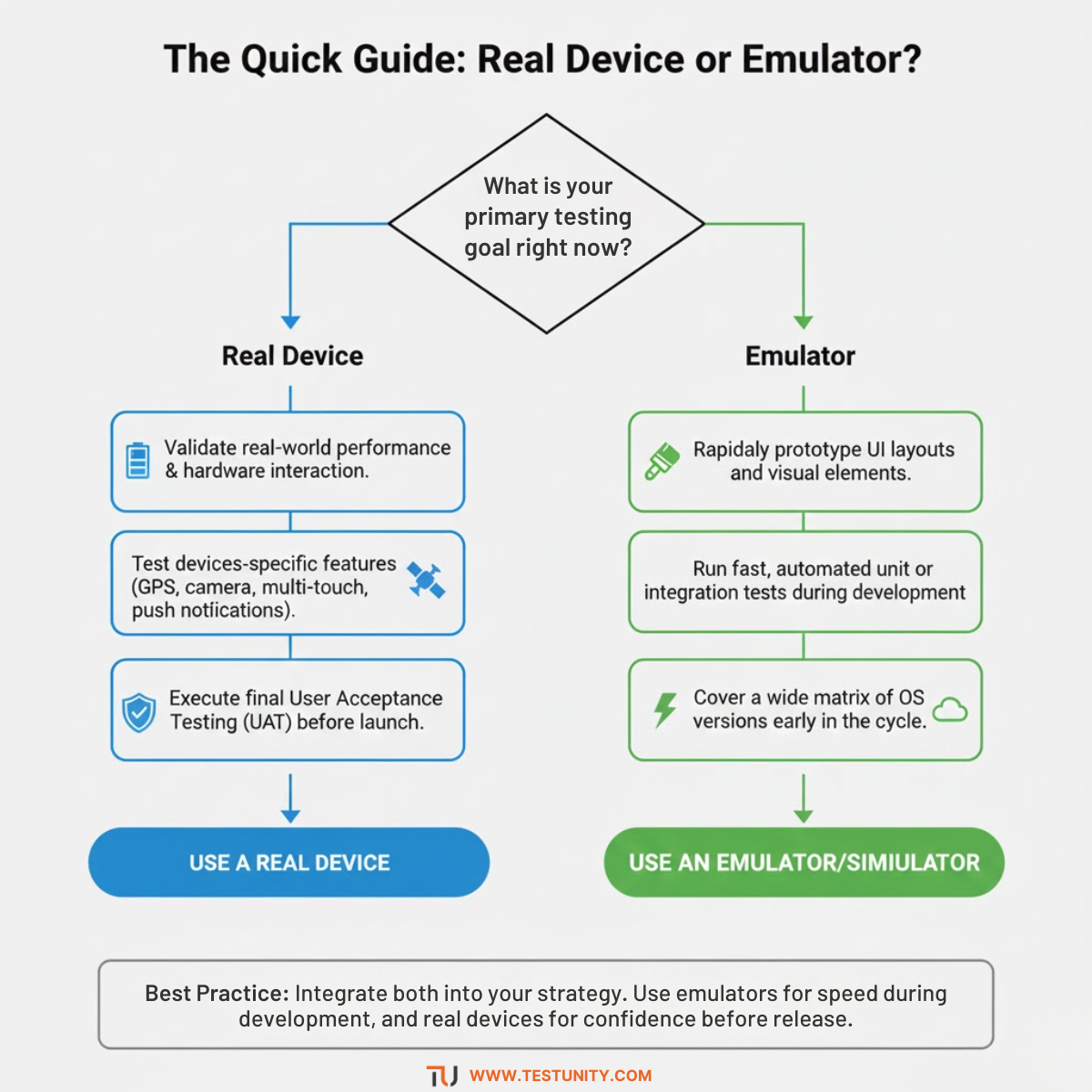
Real Devices: Provide the highest fidelity, capturing true performance, battery, thermal, and multi-touch behavior. Essential for final validation. However, they are costly to acquire and maintain at scale.
-
Emulators/Simulators: Software-based versions of devices/OSs. They are excellent for rapid development and early-stage testing (especially for screen sizes and basic flows) but cannot replicate hardware-specific issues. A balanced strategy uses simulators for breadth early on and real devices for depth later.
Step 3: Leverage Cloud-Based Testing Platforms
For scalable and efficient compatibility testing, cloud platforms (like BrowserStack, Sauce Labs, AWS Device Farm) are indispensable. They provide instant access to thousands of real browsers and devices hosted in the cloud, allowing you to run automated or manual tests in parallel without maintaining a physical lab.
Step 4: Integrate with CI/CD for “Continuous Compatibility”
Incorporate key compatibility testing suites into your Continuous Integration pipeline. For example, run a core set of cross-browser tests on the top 3 browser/OS combinations with every code commit. This “shift-left” approach catches regression early. Our resources on CI/CD integration services can help set this up.
Step 5: Automate Where It Makes Sense
Automate repetitive, high-value compatibility checks—especially for regression testing core functionalities across key platforms. Tools like Selenium WebDriver (for web) and Appium (for mobile) are industry standards. However, remember that visual validation and certain UX aspects often still require a human eye. For automating complex web interactions, our analysis of Playwright, Cypress, and Selenium offers a detailed comparison.
Best Practices for Effective and Efficient Testing
-
Start with a Responsive Foundation: Use a mobile-first, responsive web design (RWD) approach from the start. This CSS/HTML foundation dramatically reduces layout compatibility issues.
-
Use Feature Detection, Not Browser Detection: Instead of coding for specific browsers (“If Chrome, do X”), use modern techniques like CSS
@supportsor JavaScript feature detection to check if a browser supports a specific capability. -
Establish a Baseline and Use Checklists: Define a “golden configuration” (e.g., latest Chrome on Windows) as your baseline. Create detailed checklists for each testing type to ensure consistency.
-
Prioritize User Journeys, Not Just Screens: Don’t just test isolated pages. Test complete critical user journeys (e.g., “search product, add to cart, checkout”) across platforms to ensure the entire experience holds up.
-
Don’t Forget Accessibility Compatibility: Ensure your application is compatible with assistive technologies like screen readers (VoiceOver, NVDA, JAWS) across different platforms, which is part of accessibility testing.
Common Pitfalls and How to Avoid Them
-
Pitfall 1: The “Latest Version Only” Trap. Testing only on the latest OS/browser versions ignores a significant portion of your user base that updates slowly.
-
Solution: Base your test matrix on real user analytics, not convenience.
-
-
Pitfall 2: Ignoring Performance Compatibility. An app might function correctly but run sluggishly or overheat on a lower-end device.
-
Solution: Integrate performance testing benchmarks into your device compatibility checks. Monitor metrics like load time, FPS, and CPU usage.
-
-
Pitfall 3: Underestimating Network Impact. Assuming all users have high-speed WiFi leads to apps that fail in real-world mobile conditions.
-
Solution: Actively test under throttled network conditions (3G speeds, high latency) as part of your compatibility cycle.
-
-
Pitfall 4: Siloed Testing. Having the dev team test on Mac, QA on Windows, and assuming compatibility.
-
Solution: Use shared, cloud-based platforms for testing to ensure everyone sees the same behavior and can collaborate on bug reports.
-
Conclusion: Compatibility as a Cornerstone of Quality
Compatibility testing is far more than a technical exercise; it is a fundamental commitment to user-centric quality. In a world defined by choice and variety, it ensures your software adapts to the user’s environment, not the other way around. A robust compatibility strategy, leveraging strategic prioritization, the right mix of real and virtual devices, and integrated automation, transforms compatibility from a release bottleneck into a seamless component of your development flow.
By investing in comprehensive compatibility testing, you build more than just software; you build trust, accessibility, and resilience. You guarantee that every user, regardless of their chosen platform, has a positive, professional, and productive experience with your product—and that is a decisive competitive advantage.
Struggling to manage the complexity of cross-platform and cross-browser compatibility? TestUnity’s experts can help you design and execute a precise, efficient compatibility testing strategy. We provide access to vast device clouds, tailored automation frameworks, and seasoned QA engineers who ensure your application delivers a flawless experience everywhere it needs to.
Contact us today for a free consultation to assess your compatibility testing needs and ensure your application’s performance is consistent, professional, and perfect on every platform.

TestUnity is a leading software testing company dedicated to delivering exceptional quality assurance services to businesses worldwide. With a focus on innovation and excellence, we specialize in functional, automation, performance, and cybersecurity testing. Our expertise spans across industries, ensuring your applications are secure, reliable, and user-friendly. At TestUnity, we leverage the latest tools and methodologies, including AI-driven testing and accessibility compliance, to help you achieve seamless software delivery. Partner with us to stay ahead in the dynamic world of technology with tailored QA solutions.








I liked how you framed compatibility testing as a crucial part of QA, not just a final checklist. It’s easy to assume everything works fine in one environment, but real-world user diversity requires thorough testing.
Thank you for your comment! We appreciate your recognition of compatibility testing as a vital part of QA. Thorough testing across diverse environments is crucial for ensuring a seamless user experience. Your feedback encourages us to continue emphasizing this important aspect of quality assurance!
I really enjoy reading through on this website , it has wonderful content. “Wealth and children are the adornment of life.” by Koran.
Have you ever thought about writing an e-book or guest authoring on other blogs? I have a blog based on the same information you discuss and would really like to have you share some stories/information. I know my subscribers would appreciate your work. If you are even remotely interested, feel free to send me an email.
I was very pleased to find this web-site.I wanted to thanks for your time for this wonderful read!! I definitely enjoying every little bit of it and I have you bookmarked to check out new stuff you blog post.