
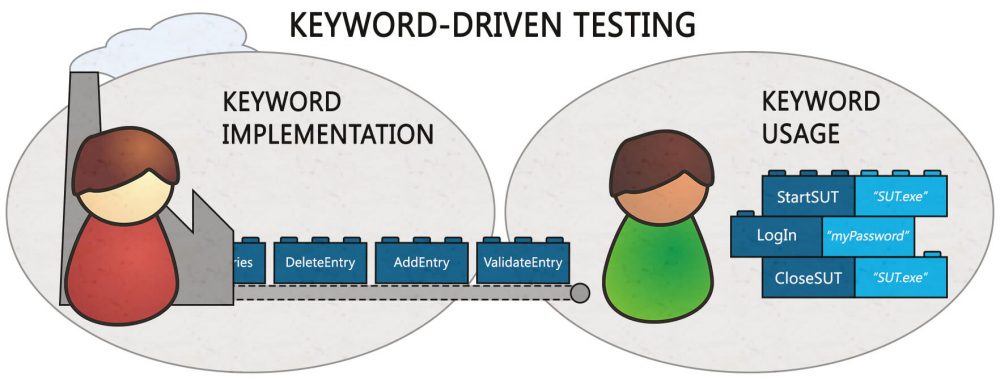
Every software company wants to deliver high-quality applications quickly. As codebases grow and release cycles shrink, manual testing alone becomes a bottleneck. This is why organizations have shifted to test automation. Among the various automation methodologies, keyword-driven testing stands out as a powerful approach that bridges the gap between technical and non-technical team members.
Keyword-driven testing is a software testing methodology where you describe test steps using action words (keywords) and execute them through a driver script. Each keyword maps to a function in a shared library, and the test data and objects live outside the code—usually in a table or spreadsheet. This separation of intent from implementation makes tests readable, maintainable, and reusable.
For a broader view of test automation strategies, read our guide on 7 Tips for Developing the Ultimate Test Automation Strategy.
What Is Keyword-Driven Testing?
Keyword-driven testing (also known as action-word-based testing) is a functional automation approach where you represent test steps using a set of predefined keywords. Keywords are action words like Login, Click, EnterText, or Verify. Each keyword is a reusable building block that abstracts a specific action on the application under test.
A typical keyword‑driven test case might look like this:
text
Keyword           | Target              | Data
OPEN_BROWSER      |                     | chrome
NAVIGATE_TO       |                     | https://example.com/login
ENTER_TEXT        | username_field      | user@test.com
ENTER_TEXT        | password_field      | mypassword
CLICK_BUTTON       | login_button        |
VERIFY_TEXT       | welcome_message     | Welcome back
CLOSE_BROWSER      |                     |
The key idea is that keywords represent what to do, not how to do it. The underlying automation code handles the how, and non‑technical team members can write or review tests without understanding programming languages or automation frameworks.
For a foundational understanding of automation testing, read our guide on Manual vs Automation Testing: What Is the Difference?.
The 4 Core Components of a Keyword-Driven Framework
A robust keyword-driven testing framework consists of several interdependent components that work together seamlessly.
1. Test Steps Table
Each test case is represented as a sequence of rows, each containing a keyword, a target (UI element), and data (input values). This structure makes test cases easy to read, review, and track. Non‑programmers can write steps using a controlled vocabulary stored in external files like Excel or CSV. As one guide notes, “a typical schema includes Step ID, Keyword (action word), Target (object reference), Data (input or expected value), and Notes (optional).”
2. Object Repository
Instead of hard‑coding selectors in test scripts, a keyword‑driven framework centralises UI element definitions in an object repository. This can be a JSON or YAML file, or even a spreadsheet. The key is a stable alias (e.g., login.submit_button) rather than a literal selector in every test row. If a button label changes, you edit it once, in one place.
3. Data Sheets
Data is kept in separate sheets or files so the same keywords can run across different environments or user personas. Data sheets encode edge cases: empty values, long strings, malformed emails, or boundary numbers. This separation allows you to run the same test logic with multiple datasets – a capability known as data‑driven testing.
4. Function Library (Keyword Repository)
The function library is where keywords map to executable code. If your keyword is LOGIN, it maps to a function that fills the username and password fields and clicks the login button. This is where automation engineers do their work – implementing each keyword once. When the application changes, they update the keyword implementation, not every test case that uses it.
Keyword-Driven Testing vs. Data-Driven Testing: Understanding the Difference
Many teams confuse keyword‑driven testing with data‑driven testing. While they can be used together, they serve different purposes.
| Aspect | Keyword-Driven Testing | Data-Driven Testing |
|---|---|---|
| Core concept | Actions (keywords) drive the test flow. | Data (inputs) drive the test logic. |
| What is externalised | Test steps (keywords) + sometimes data. | Test data (inputs and expected outputs). |
| Primary benefit | Reusability of actions, readability. | Testing multiple data combinations with the same script. |
| Target user | Teams with mixed skill levels (non‑technical testers can contribute). | Teams focused on covering many input permutations. |
| Example | ENTER_TEXT username_field user1@test.com | Test login with 10 different credential sets. |
| Can they combine? | Yes – hybrid frameworks use keywords with externalised data. | Yes – hybrid frameworks use data with keyword-driven flows. |
In essence, data‑driven frameworks excel at testing multiple data combinations, while keyword‑driven frameworks provide better reusability and team collaboration. The choice depends on your testing requirements and team structure.
Why You Should Use Keyword-Driven Testing in 2026
1. Maximum Code Reuse and Lower Maintenance
The cardinal rule of keyword‑driven testing is that a keyword is implemented once and reused indefinitely. A single automation engineer’s work supports an unlimited number of test cases across every future release. When the application changes, you update the keyword – not every test that uses it. This containment of change is a game‑changer for regression suites.
Case in point: SDT’s Keyword Automation framework has demonstrated a return on investment of approximately 330% for automated regression testing, compounding with every future release.
2. Empowers Non-Technical Team Members
Perhaps the most compelling benefit of keyword-driven testing is that it allows manual testers, business analysts, and domain experts to create and maintain automated tests without writing code. Test cases are expressed in plain business language using reusable keywords. According to industry reports, adopting keyword‑driven automation can reduce repetitive manual work by up to 75%, freeing QA teams to focus on exploratory testing and complex scenarios.
3. Easy Tool Switching (Future‑Proofing)
Because your tests are expressed as a table of keywords and data, switching automation tools becomes far less painful. The test cases remain almost the same; only the keyword implementations need to be rewritten. This abstraction layer protects your investment in test assets when tools evolve or become obsolete.
4. Supports Hybrid and Data‑Driven Approaches
Keyword‑driven testing can incorporate data‑driven methods, enabling scripts to pull test data from external sources (CSV files, databases) rather than hard‑coding values. This gives you the best of both worlds: the reusability of keywords and the flexibility of externalised data.
5. Enables Early Stage Testing
With keyword‑driven testing, you can build and execute functional tests even before the user interface is complete. As one expert notes, you can build tests before the UI is even complete, reusing the same keyword across many scenarios without copy‑pasting logic. Testers can design test cases based on requirements while developers are still coding, accelerating the testing lifecycle.
6. Facilitates a Roles‑Based Approach
Keyword‑driven frameworks support a clean separation of responsibilities:
- Test Designers (business experts) design tests using keywords – no coding required.
- Automation Engineers implement the underlying keyword logic – this is where coding happens.
- Test Executors assemble test sets and run regression – no technical knowledge needed.
- Administrators manage projects, roles, and enterprise settings.
This role‑based structure, pioneered by SDT’s patented Keyword Automation framework, allows each stakeholder to work within their area of expertise.
Step-by-Step Implementation of Keyword-Driven Testing
Step 1: Analyse and Model the Application
First, identify all the actions that will be performed for automated testing. Create a comprehensive list of user actions (e.g., Login, Search, AddToCart, Checkout, VerifyOrderConfirmation). Use the existing manual test cases as your starting inventory.
Step 2: Design the Keyword Library
Define a consistent naming convention for keywords (e.g., ENTER_TEXT, CLICK_BUTTON, VERIFY_TEXT). Each keyword should represent a single, well-defined action. Store the keyword definitions in a central location (Excel, JSON, or a test management platform).
Step 3: Create the Object Repository
Define a stable alias for each UI element (e.g., username_field, password_field, login_button). Store these aliases with their actual selectors (XPath, CSS, ID) in a separate file.
Step 4: Implement Keyword Functions (Automation Engineers)
For each keyword, write the corresponding automation code using your chosen framework (Selenium, Playwright, Cypress). Implement each keyword once, make it reusable, and handle edge cases and error conditions. Use variables for test data instead of hard‑coded values.
Step 5: Create Test Cases (Test Designers)
Using the keyword library, assemble test cases as sequences of keywords in external files (Excel, CSV). Each test case should be a separate sheet or file. Incorporate data variables to support multiple datasets.
Step 6: Build the Driver Script
Create a driver script that reads the test case file, parses the keywords and data, and executes the corresponding keyword functions in order. The driver script is usually a small, generic piece of code that works for all test cases. Log results and generate reports.
Step 7: Run and Maintain
Execute the driver script. When the application changes, update the keyword implementation (or the object repository) – not the individual test cases. Review and refactor the keyword library periodically.
Top Tools for Keyword-Driven Testing in 2026
Robot Framework remains the most popular open‑source keyword‑driven framework. It uses a readable, table‑based syntax and requires no deep scripting knowledge.
Best Practices for Keyword-Driven Testing
1. Choose the Right Level of Abstraction
The more abstract your keywords, the easier they are to reuse, and the less maintenance you will have. However, overly abstract keywords may become brittle. Strike a balance based on your application’s stability.
2. Keep Data and Keywords Separate
Store test data in external files (CSV, Excel, JSON). Avoid hard‑coding values inside keyword implementations. This allows the same test logic to be executed with multiple datasets.
3. Design for Reusability from Day One
When a keyword is about to be written for a second time, stop and refactor. Extract reusable keyword building blocks for common actions like clicking, entering text, and navigating. This prevents code duplication.
4. Use a Version Control System
Store your keyword library, object repository, and test data files in Git. This provides collaboration, change tracking, and rollback capabilities.
5. Create a Clear Naming Convention
Use consistent naming (VERIFY_TEXT, WAIT_FOR_ELEMENT, CLICK_BUTTON) and document each keyword’s purpose, parameters, and expected behaviour.
6. Start Small, Then Scale
Begin with a pilot project – automate a small set of critical user journeys. Validate the framework, refine the keyword library, and then expand gradually.
7. Combine with Data-Driven Testing
Incorporate externalised data sources to maximise coverage. The same keyword sequence can be executed with 10 different data sets by keeping the data in a separate sheet.
Common Pitfalls to Avoid
| Pitfall | Why It’s a Problem | Solution |
|---|---|---|
| Creating too many low‑level keywords | Defeats the purpose of abstraction; tests become as complex as code. | Create higher‑level, business‑oriented keywords (e.g., LoginWithValidCredentials). |
| Hard‑coding test data | Reduces reusability and makes maintenance harder. | Use externalised data sources. |
| No version control for test assets | Collaboration becomes chaotic; changes are lost. | Store everything in Git. |
| Ignoring object repository maintenance | Obsolete or duplicate selectors cause test failures. | Regularly audit and refactor the object repository. |
| Over‑automating UI | UI tests are brittle and slow. | Apply the test automation pyramid – many unit tests, fewer UI tests. |
For more automation pitfalls, read our guide on Top Test Automation Anti‑Patterns and Ways to Evade Them.
The Future: Keyword-Driven Testing Meets AI
Keyword‑driven testing is evolving rapidly. In 2026, AI is transforming how keywords are created and maintained:
- Natural language test generation: AI tools like Virtuoso QA allow testers to write tests in conversational English, with the AI automatically converting natural language into executable keyword sequences. This eliminates the need for manual keyword library creation.
- Self‑healing keywords: AI‑powered platforms automatically update element locators when the UI changes, reducing the maintenance burden of the object repository. Virtuoso’s platform, for example, achieves 95% self‑healing, requiring human intervention for only 5% of changes.
- Autonomous test generation: Agentic QA tools analyse applications, understand workflows, and generate complete test suites – including keyword sequences – without human input. These agents read user stories, generate scenarios, and push executable test cases directly into CI/CD pipelines.
- AI‑assisted keyword creation: AI suggests new keywords based on application logs and usage patterns, accelerating framework development. AI can also predict which keywords will be most valuable based on historical defect data.
However, AI augments, not replaces, the core principles of keyword‑driven testing. The separation of test design from implementation remains the bedrock of maintainable automation. AI simply makes that separation more powerful and less labour‑intensive.
To understand the broader impact of AI on testing, read our guide on The AI Impact on Software Testing in 2026.
How TestUnity Helps with Keyword-Driven Testing
At TestUnity, we specialise in building and maintaining test automation frameworks, including keyword‑driven frameworks, tailored to your technology stack and team structure. Our services include:
- Framework design and implementation – We build scalable, maintainable keyword‑driven frameworks using Selenium, Playwright, Robot Framework, or custom solutions.
- Object repository and data management – We design and implement externalised object and data storage for maximum reusability.
- CI/CD integration – We embed keyword‑driven test suites into your CI/CD pipeline for continuous validation.
- Training and knowledge transfer – We upskill your team on keyword‑driven testing best practices.
- Migration services – We convert existing scripted test suites into maintainable keyword‑driven frameworks.
- On‑demand automation engineers – We provide expert resources to build and maintain your keyword library.
Whether you are just starting with automation or looking to rescue a brittle, unmaintainable suite, TestUnity delivers the expertise to help you succeed.
Conclusion
Keyword-driven testing is a proven, scalable methodology for test automation. By separating test design from test implementation, it enables non‑technical team members to contribute, dramatically reduces maintenance costs, and future‑proofs your test assets against tool changes.
Key takeaways:
- Keywords represent actions, not implementation details.
- Externalised test data and object repositories are essential for scalability.
- Keyword‑driven testing excels at reusability and team collaboration.
- Combine it with data‑driven techniques for maximum coverage.
- AI is transforming keyword creation and maintenance but not replacing the core principles.
- The ROI is substantial – teams report up to 330% return on automated regression investment.
In an era of accelerating release cycles and growing technical debt, keyword‑driven testing offers a path to sustainable, maintainable, and scalable automation. Whether you are a startup or a global enterprise, this methodology can help you deliver high‑quality software faster, with less friction and lower long‑term costs.
Ready to build a maintainable test automation framework? Contact TestUnity today to discuss how our keyword‑driven testing experts can help you achieve sustainable, scalable automation.
Related Resources
- 7 Tips for Developing the Ultimate Test Automation Strategy – Read more
- Top Test Automation Anti‑Patterns and Ways to Evade Them – Read more
- Manual vs Automation Testing: What Is the Difference? – Read more
- Is There Any Right Level of Automation? – Read more
- A Comprehensive Guide to SAP Testing – Read more
- The AI Impact on Software Testing in 2026 – Read more

TestUnity is a leading software testing company dedicated to delivering exceptional quality assurance services to businesses worldwide. With a focus on innovation and excellence, we specialize in functional, automation, performance, and cybersecurity testing. Our expertise spans across industries, ensuring your applications are secure, reliable, and user-friendly. At TestUnity, we leverage the latest tools and methodologies, including AI-driven testing and accessibility compliance, to help you achieve seamless software delivery. Partner with us to stay ahead in the dynamic world of technology with tailored QA solutions.




Leave a Reply