

In the complex landscape of modern software development, where applications comprise numerous integrated components and external dependencies, system testing emerges as the critical gateway between technical implementation and business value delivery. This comprehensive testing phase represents the first time all application elements come together as a complete, integrated system, revealing how well they collaborate to deliver the intended user experience and business functionality.
System testing serves as the ultimate quality checkpoint before applications reach real users, validating that all individual components—each potentially perfect in isolation—work together harmoniously to meet business requirements and user expectations. It’s the crucial bridge where technical validation meets business validation, ensuring that what developers built aligns with what stakeholders actually need.
Understanding System Testing Fundamentals
What Exactly is System Testing?
System testing represents the comprehensive evaluation of a complete, integrated software application to verify that it meets specified requirements and functions correctly as a whole. Unlike unit testing that validates individual components or integration testing that focuses on component interactions, system testing examines the entire application from an end-user perspective, treating it as a black box where testers evaluate external behavior without considering internal code structure.
This testing phase occurs after integration testing but before user acceptance testing, serving as the final validation from the development team’s perspective before handing the application to business stakeholders for final approval. System testing answers the fundamental question: “Does the complete system deliver what we promised to build?”
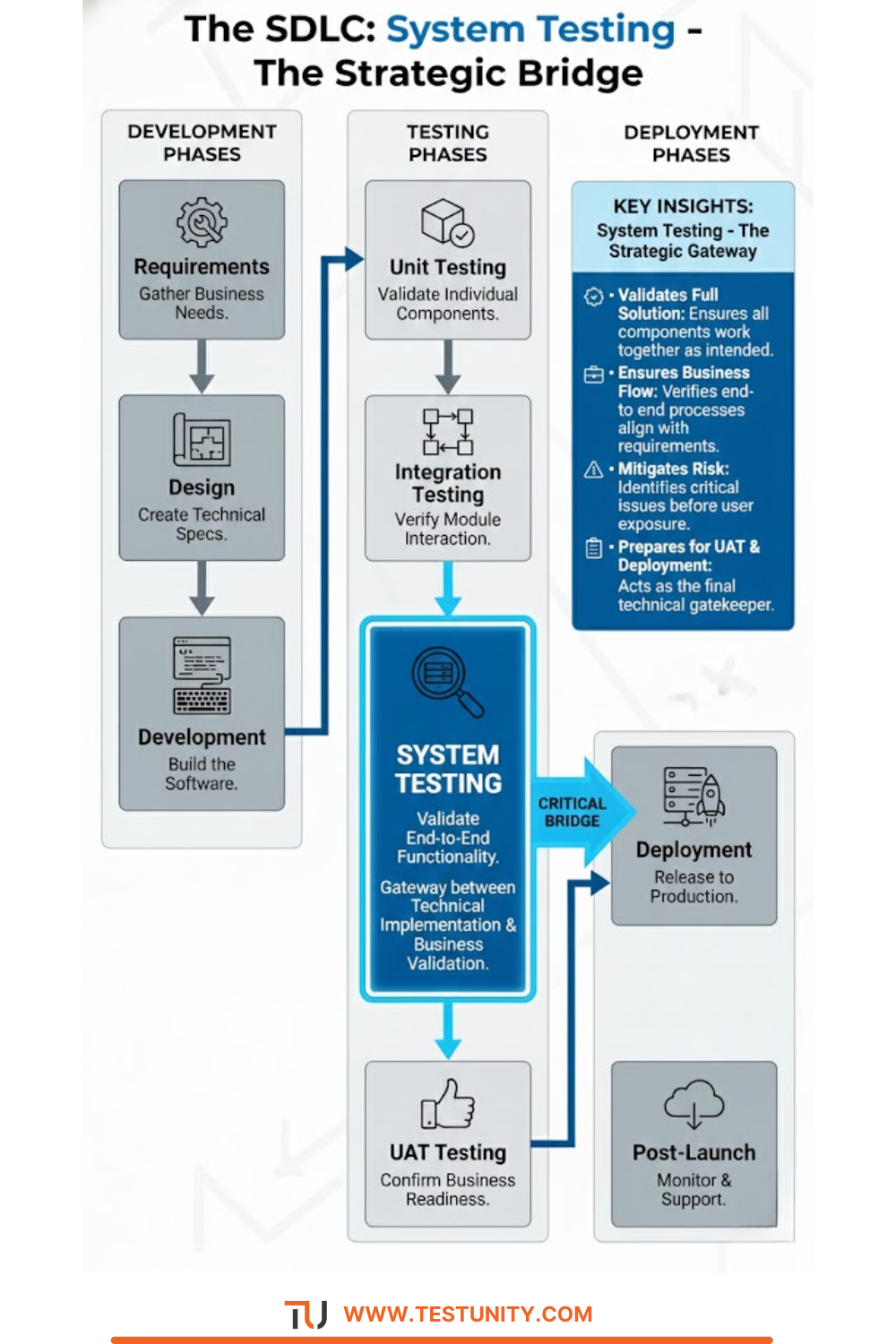
The Strategic Importance of System Testing
Why does system testing deserve such focused attention in the software development lifecycle?
Risk Mitigation: Identifying critical issues before applications reach production prevents business disruptions, financial losses, and reputational damage.
Requirements Validation: Ensuring the implemented system actually meets the documented requirements and business objectives.
User Experience Assurance: Verifying that the complete application delivers a seamless, intuitive experience rather than just technically working components.
Stakeholder Confidence Building: Providing evidence that the application is ready for business use and user acceptance testing.
Quality Benchmark Establishment: Creating baseline quality standards that the application must meet before progressing to subsequent phases.
Comprehensive System Testing Types and Methodologies
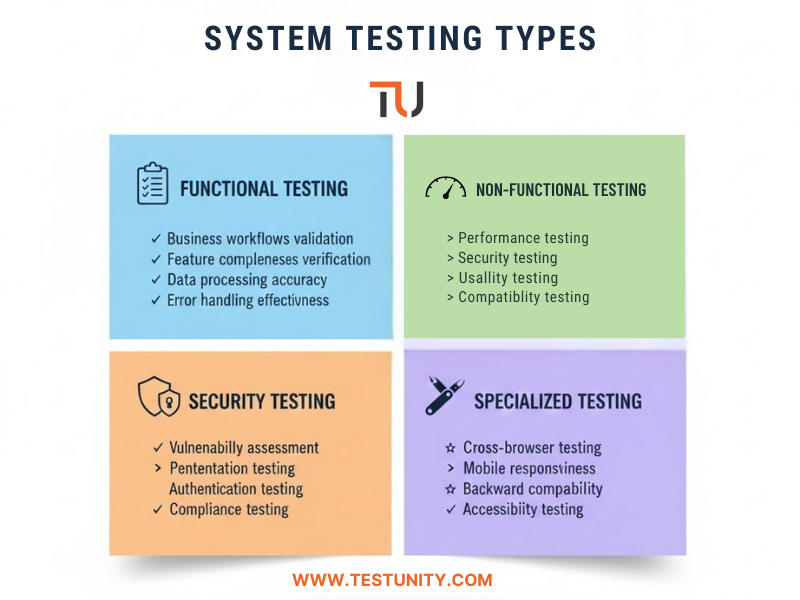
Functional System Testing
Functional testing validates that the complete system performs all required functions correctly according to specification documents:
Business Process Validation: Testing complete business workflows from start to finish, ensuring all process steps execute correctly in sequence.
Feature Completeness Verification: Confirming that all specified features are present and functional within the integrated system.
Data Processing Accuracy: Ensuring the system correctly processes, transforms, and stores data throughout complete business cycles.
Error Handling Effectiveness: Validating that the system gracefully handles invalid inputs, exceptional conditions, and edge cases.
Interface Consistency: Testing that all user interfaces and external interfaces work cohesively to deliver seamless user experiences.
Functional system testing ensures that what was specified is what was built and that it works correctly when all components operate together.
Non-Functional System Testing
While functional testing addresses “what” the system does, non-functional testing validates “how well” it performs these functions:
Performance Testing: Measuring system responsiveness, throughput, and stability under various load conditions to ensure it meets performance requirements.
Load Testing: Validating system behavior under expected normal and peak user loads to identify performance bottlenecks.
Stress Testing: Pushing the system beyond its designed capacity to understand breaking points and recovery mechanisms.
Scalability Testing: Ensuring the system can handle growth in user numbers, data volumes, and transaction frequencies.
Reliability Testing: Verifying consistent operation over extended periods under normal operating conditions.
Availability Testing: Confirming the system meets its uptime requirements and service level agreements.
Our comprehensive guide to non-functional testing provides additional insights into these critical quality aspects.
Specialized System Testing Approaches
Security System Testing: Comprehensive security validation across the entire application:
Vulnerability Assessment: Identifying potential security weaknesses across the complete system surface.
Penetration Testing: Simulating real-world attacks to evaluate system resilience against security threats.
Authentication and Authorization Testing: Validating that access controls work correctly across all system components.
Data Protection Verification: Ensuring sensitive data remains protected throughout system processing and storage.
Compliance Testing: Verifying adherence to regulatory requirements and security standards.
Usability System Testing: Evaluating the complete user experience:
User Interface Intuitiveness: Testing how easily users can navigate and accomplish tasks within the system.
Workflow Efficiency: Validating that common user journeys are efficient and logical.
Accessibility Compliance: Ensuring the system meets accessibility standards for users with disabilities.
Learning Curve Assessment: Evaluating how quickly new users can become proficient with the system.
Compatibility System Testing: Ensuring consistent operation across different environments:
Cross-Browser Testing: Validating consistent behavior across different web browsers and versions.
Multi-Platform Testing: Ensuring functionality across different operating systems and devices.
Mobile Responsiveness: Testing adaptive interfaces across various screen sizes and mobile devices.
Backward Compatibility: Verifying that the system works with supported older systems and data formats.
The System Testing Process: A Step-by-Step Approach
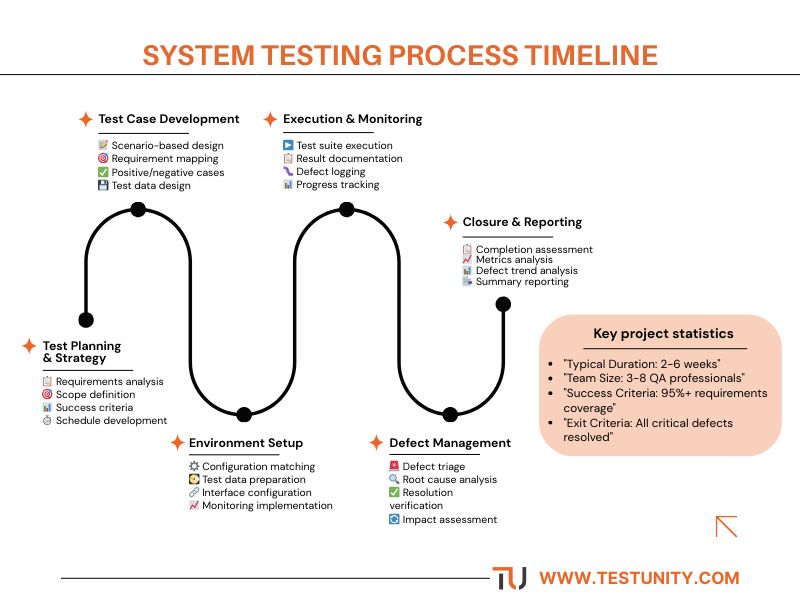
Phase 1: Test Planning and Strategy
Effective system testing begins with comprehensive planning:
Requirement Analysis: Thoroughly reviewing system requirements, specifications, and design documents to understand what needs testing.
Test Scope Definition: Clearly defining what will be tested (in-scope) and, equally importantly, what won’t be tested (out-of-scope).
Success Criteria Establishment: Defining clear, measurable criteria that determine when system testing is complete and successful.
Resource Planning: Identifying required testing environments, tools, data, and personnel with appropriate skill sets.
Schedule Development: Creating realistic timelines that account for test preparation, execution, defect resolution, and retesting.
Risk Assessment: Identifying potential testing risks and developing mitigation strategies for each.
Phase 2: Test Case Development
Creating comprehensive test cases that validate complete system behavior:
Scenario-Based Test Design: Developing test cases based on real-world usage scenarios and business processes.
Requirement Coverage Mapping: Ensuring each requirement has corresponding test cases that validate its implementation.
Positive and Negative Test Cases: Creating tests for both expected behaviors (positive testing) and error conditions (negative testing).
Data Design: Preparing test data that represents realistic production scenarios while maintaining data privacy.
Test Case Documentation: Documenting test cases with clear steps, expected results, and preconditions.
Phase 3: Test Environment Setup
Preparing environments that closely mirror production:
Environment Configuration: Setting up hardware, software, network, and database configurations matching production specifications.
Test Data Preparation: Loading representative data volumes and varieties that reflect production usage patterns.
Interface Configuration: Configuring connections to external systems, APIs, and third-party services.
Monitoring Implementation: Deploying tools to monitor system performance, resource usage, and errors during testing.
Access Provisioning: Setting up appropriate user accounts, permissions, and security settings.
Our expertise in performance testing environment setup provides valuable insights for creating optimal testing infrastructure.
Phase 4: Test Execution and Monitoring
Systematically executing tests and monitoring results:
Test Suite Execution: Running predefined test suites according to the test plan and schedule.
Result Documentation: Recording actual results, including pass/fail status, evidence, and detailed observations.
Defect Logging: Documenting any discrepancies between expected and actual results with sufficient detail for reproduction and resolution.
Progress Tracking: Monitoring testing progress against plans and adjusting approaches based on findings.
Quality Metrics Collection: Gathering data on defect rates, test coverage, and requirement validation status.
Phase 5: Defect Management and Resolution
Managing the lifecycle of identified issues:
Defect Triage: Prioritizing defects based on severity, impact, and business criticality.
Root Cause Analysis: Investigating underlying causes rather than just addressing symptoms.
Resolution Verification: Confirming that fixes actually resolve reported issues without introducing new problems.
Impact Assessment: Evaluating how changes affect existing functionality through regression testing.
Phase 6: Test Closure and Reporting
Completing the testing cycle with comprehensive reporting:
Test Completion Assessment: Verifying that all planned testing activities have been completed.
Quality Metrics Analysis: Analyzing collected data to assess overall system quality and readiness.
Defect Trend Analysis: Identifying patterns in defect occurrences to guide process improvements.
Test Summary Reporting: Documenting testing activities, results, and recommendations for stakeholders.
Knowledge Transfer: Sharing testing insights with other teams, including development and user acceptance testing.
Best Practices for Effective System Testing
Comprehensive Test Coverage Strategy
Ensuring testing addresses all critical aspects of system behavior:
Requirements-Based Coverage: Mapping tests to specific business requirements to ensure nothing is overlooked.
Risk-Based Prioritization: Focusing testing effort on high-risk areas that could cause significant business impact if they fail.
User Scenario Emphasis: Testing complete user journeys rather than isolated functions to validate real-world usage.
Data Variation Inclusion: Testing with diverse data sets that represent different usage patterns and edge cases.
Configuration Coverage: Validating system behavior across supported configurations and environments.
Effective Test Data Management
Managing test data to support comprehensive testing:
Realistic Data Representation: Using data that mirrors production volumes, varieties, and relationships.
Data Privacy Compliance: Anonymizing or synthesizing sensitive data while maintaining realistic characteristics.
Data Refresh Strategies: Implementing processes to reset test data between test cycles for consistency.
Test Data Generation: Creating tools and processes to generate appropriate test data efficiently.
Robust Environment Management
Maintaining stable, consistent testing environments:
Environment Isolation: Ensuring testing environments are separate from development and production to prevent interference.
Configuration Control: Managing and versioning environment configurations to maintain consistency.
Environment Monitoring: Implementing monitoring to detect and address environment issues quickly.
Automated Provisioning: Using infrastructure as code to quickly recreate consistent testing environments.
Strategic Automation Implementation
Leveraging automation to enhance testing efficiency:
Regression Test Automation: Automating repetitive test cases to enable frequent validation of existing functionality.
API Testing Automation: Automating validation of system interfaces and integrations.
Data Setup Automation: Creating scripts to automatically prepare test data and environments.
Result Analysis Automation: Using tools to automatically analyze test results and identify patterns.
Our expertise in test automation frameworks helps organizations implement sustainable automation strategies for system testing.
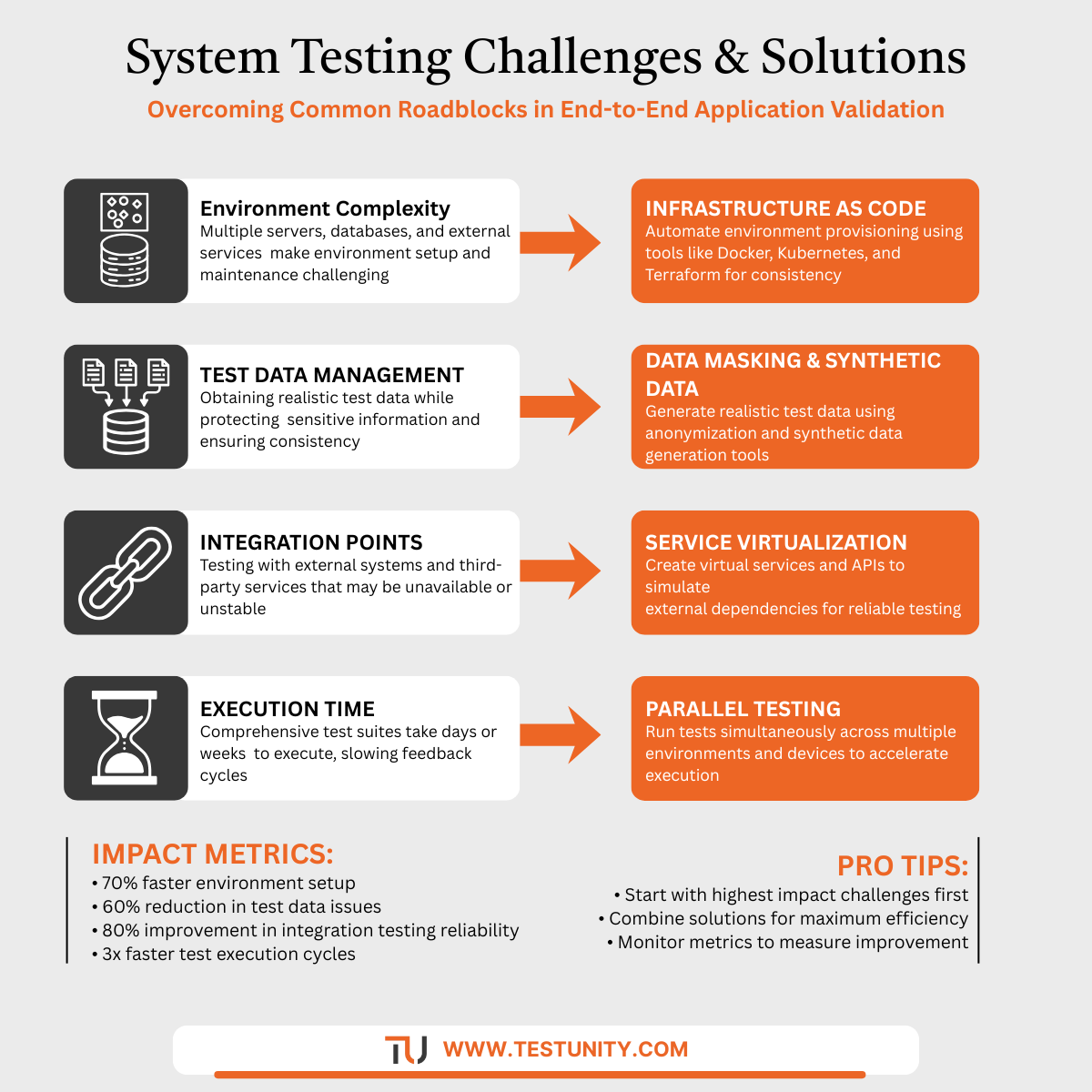
Common System Testing Challenges and Solutions
Challenge: Environment Configuration Complexity
Problem: Modern systems involve complex configurations across multiple servers, databases, and external services, making environment setup and maintenance challenging.
Solutions:
-
Implement infrastructure as code for consistent environment provisioning
-
Use containerization to package and deploy complex dependencies
-
Establish environment management protocols with clear ownership
-
Create environment health checks and monitoring
Challenge: Test Data Management
Problem: Obtaining and maintaining realistic test data while protecting sensitive information and ensuring data consistency.
Solutions:
-
Implement data masking and synthetic data generation
-
Establish data refresh and maintenance schedules
-
Create data subset strategies for efficient testing
-
Develop data governance policies for test data management
Challenge: Integration Point Testing
Problem: Testing interactions with external systems, third-party services, and legacy applications that may be unavailable or unstable during testing.
Solutions:
-
Implement service virtualization for unavailable dependencies
-
Create contract testing for API interactions
-
Establish sandbox environments for third-party services
-
Develop stubs and mocks for critical integration points
Challenge: Test Execution Time
Problem: Comprehensive system test suites can take days or weeks to execute completely, slowing feedback cycles.
Solutions:
-
Implement test parallelization across multiple environments
-
Use risk-based testing to prioritize critical test execution
-
Establish smoke test suites for rapid validation
-
Optimize test data and environment setup for faster execution
Integrating System Testing with Development Lifecycles
Agile and DevOps Integration
Adapting system testing for modern development approaches:
Continuous Testing Implementation: Integrating system testing into CI/CD pipelines for ongoing validation.
Shift-Left Practices: Involving system testing expertise early in development to prevent issues.
Test Environment as Code: Managing testing infrastructure through version-controlled configurations.
Quality Gate Establishment: Implementing automated quality checks that must pass before progression.
Our guide to shift-left testing provides strategies for integrating testing throughout development lifecycles.
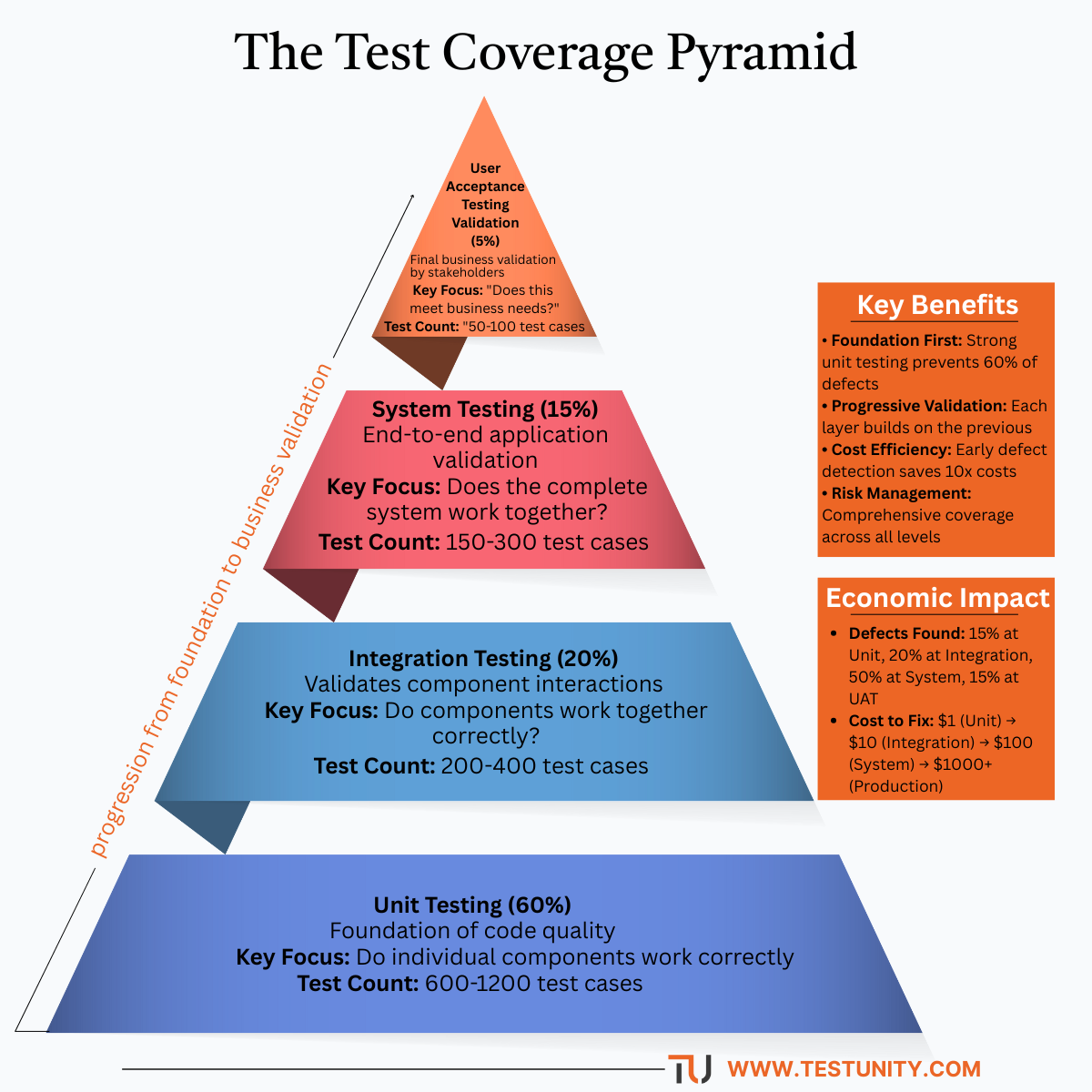
Test Pyramid Alignment
Positioning system testing appropriately within the testing strategy:
Unit Testing Foundation: Ensuring comprehensive unit testing catches component-level issues early.
Integration Testing Bridge: Validating component interactions before full system testing.
System Testing Comprehensive Validation: Testing complete system behavior from end-user perspective.
User Acceptance Business Validation: Confirming the system meets business needs before release.
Measuring System Testing Effectiveness
Quality Metrics
Tracking metrics that indicate testing effectiveness and system quality:
Requirements Coverage: Percentage of business requirements covered by test cases.
Test Case Effectiveness: Ratio of test cases that actually find defects.
Defect Detection Percentage: Proportion of defects found during system testing versus production.
Critical Defect Resolution Time: Average time to resolve high-severity defects.
Test Execution Progress: Rate of test case execution against planned schedules.
Process Metrics
Monitoring testing process efficiency and improvement:
Test Automation Coverage: Percentage of test cases automated versus manual.
Environment Stability: Uptime and reliability of testing environments.
Test Data Availability: Accessibility and quality of required test data.
Resource Utilization: Efficiency of testing resource allocation and usage.
Advanced System Testing Techniques
Model-Based Testing
Using system models to generate comprehensive test cases:
Behavioral Modeling: Creating models of expected system behavior to derive test cases.
State Transition Testing: Testing system behavior as it moves between different states.
Data Flow Testing: Tracing data through the system to identify testing scenarios.
Scenario Generation: Automatically generating test scenarios from system models.
Exploratory System Testing
Complementing scripted testing with exploratory approaches:
Session-Based Testing: Structured exploratory testing with defined charters and timeboxes.
Bug Hunting: Focused efforts to find specific types of defects or explore high-risk areas.
User Experience Exploration: Testing the system from different user perspectives and roles.
Business Process Validation: Exploring complete business processes to identify gaps or issues.
The Future of System Testing
AI-Enhanced System Testing
Emerging trends in intelligent testing approaches:
Predictive Test Selection: Using AI to identify the most relevant tests to run based on changes and risk.
Intelligent Test Data Generation: AI-powered creation of optimal test data for comprehensive coverage.
Automated Oracle Generation: Machine learning systems that can determine expected results.
Self-Healing Tests: Tests that automatically adapt to application changes.
Our exploration of AI in software testing examines how artificial intelligence transforms testing approaches.
Continuous System Testing
Evolution toward ongoing system validation:
Production Monitoring Integration: Using production data and monitoring to inform system testing.
Canary Testing Approaches: Gradually rolling out changes with continuous system validation.
Feature Flag Testing: Testing features in production with controlled exposure.
Real-User Monitoring: Incorporating actual user behavior into testing strategies.
Conclusion: Delivering Confidence Through Comprehensive Validation
System testing represents the crucial final validation that ensures all application components work together seamlessly to deliver business value. It’s the quality gateway where technical implementation meets business requirements, where individual excellence transforms into collective performance, and where development efforts culminate in deliverable value.
The comprehensive nature of system testing—encompassing functional validation, performance verification, security assurance, and user experience evaluation—makes it indispensable for delivering software that not only works technically but also delivers practical business value and satisfying user experiences.
As software systems grow increasingly complex, with more components, integrations, and dependencies, the importance of thorough system testing only increases. Organizations that master system testing practices gain significant competitive advantages through higher quality software, reduced production issues, and increased stakeholder confidence.
Effective system testing requires careful planning, appropriate resources, strategic automation, and continuous improvement. It demands both technical expertise and business understanding, both systematic approaches and creative problem-solving. Most importantly, it requires recognizing that system quality emerges from the interactions between components, not just from the quality of the components themselves.
At TestUnity, we understand that system testing is both an art and a science requiring specialized expertise, appropriate tools, and proven methodologies. Our experience spans diverse types of software testing, enabling us to implement system testing approaches that address both technical requirements and business objectives.
Ready to ensure your complete application delivers exceptional quality? Contact TestUnity for a comprehensive system testing assessment. Our testing experts can help you design and implement system testing strategies that validate your application from end-to-end, ensuring it meets quality standards, business requirements, and user expectations before release.

TestUnity is a leading software testing company dedicated to delivering exceptional quality assurance services to businesses worldwide. With a focus on innovation and excellence, we specialize in functional, automation, performance, and cybersecurity testing. Our expertise spans across industries, ensuring your applications are secure, reliable, and user-friendly. At TestUnity, we leverage the latest tools and methodologies, including AI-driven testing and accessibility compliance, to help you achieve seamless software delivery. Partner with us to stay ahead in the dynamic world of technology with tailored QA solutions.









The emphasis on system testing as a bridge between technical execution and business needs really stands out. It’s easy to focus on individual components, but making sure everything works together to meet stakeholder expectations is key to delivering true value.
I completely agree with you. System testing truly serves as a critical connection between the technical aspects and the overarching business objectives. While individual components are important, ensuring that they function cohesively to align with stakeholder expectations is what ultimately drives meaningful outcomes and delivers real value.