

Automation is no longer a luxury in software testing—it’s a necessity. Teams that fail to automate are simply too slow to compete. Yet, 68% of organizations struggle to scale their automation efforts effectively, wasting thousands on maintenance and flaky tests .
The difference between success and failure isn’t the tool you choose—it’s the test automation strategy you build. A well-defined strategy transforms automation from a chaotic collection of scripts into a disciplined, scalable engineering practice that delivers real business value.
This guide will walk you through exactly how to plan, execute, and scale a test automation strategy that works. You’ll learn the key components, how to choose the right framework, how to measure ROI, and how to avoid the common pitfalls that derail automation initiatives.
What is a Test Automation Strategy?
A test automation strategy is a high-level plan that defines how an organization will use automation to achieve its testing and business goals. It answers critical questions like:
-
What should we automate (and what should we leave manual)?
-
Why are we automating these specific tests?
-
How will we design, build, and maintain our automation suite?
-
When will automation run in our development pipeline?
-
Who is responsible for creating and owning automated tests?
Unlike a one-time project plan, a strategy is a living framework that guides decision-making as your application, team, and tools evolve. It ensures that every automation effort aligns with broader business objectives like faster releases, lower costs, or improved software quality.
Why You Need a Strategy Before Writing a Single Script
Many teams jump straight into coding automated tests, only to find themselves drowning in maintenance six months later. A strategy prevents this by providing:
-
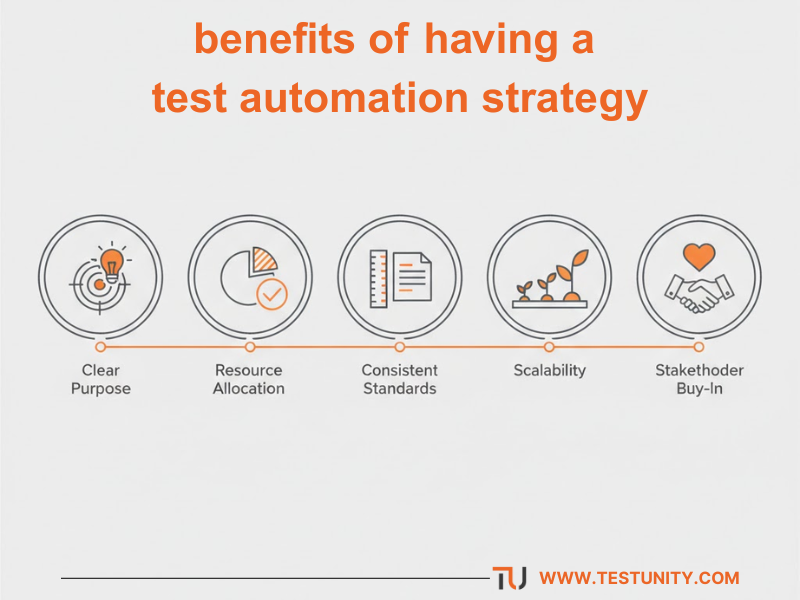
Clear Purpose: It prevents “automation for automation’s sake,” ensuring every script delivers measurable value.
-
Efficient Resource Allocation: It helps you decide where to invest time and budget for maximum impact.
-
Consistent Standards: It establishes coding standards, review processes, and maintenance workflows that keep your suite healthy.
-
Scalability: It creates a foundation that can grow with your application, preventing technical debt from accumulating.
-
Stakeholder Buy-In: It articulates the value of automation in business terms, securing ongoing support and funding.
The Core Components of an Effective Test Automation Strategy
A robust test automation strategy document should include the following key elements.
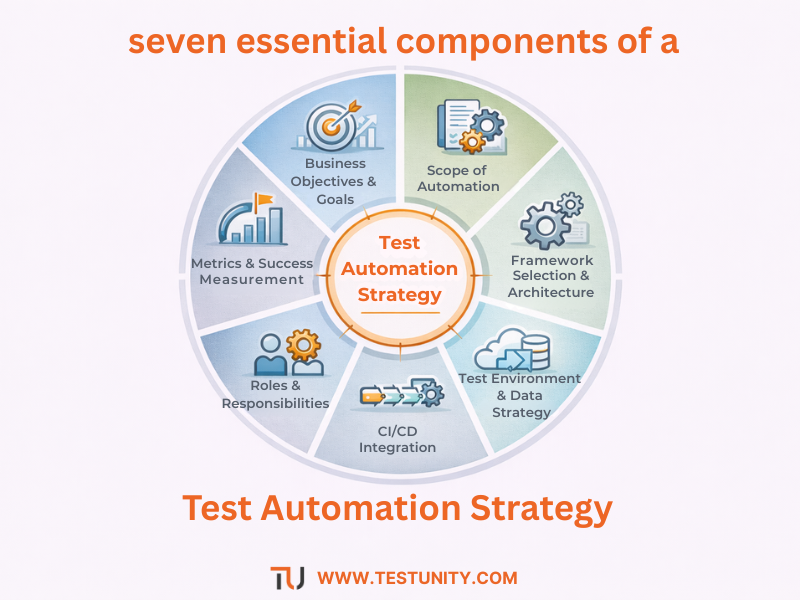
1. Business Objectives and Goals
Start with the “why.” What business problems are you trying to solve with automation? Common objectives include:
-
Reducing regression testing time from days to hours
-
Enabling more frequent releases (e.g., moving from monthly to weekly)
-
Freeing up manual testers for exploratory and complex testing
-
Improving test coverage in critical areas
-
Reducing defects that reach production
Define these goals in measurable terms. For example: “Reduce regression test execution time by 80% within six months” or “Achieve 90% automation coverage for all critical user journeys.”
2. Scope of Automation
Not every test should be automated. A clear scope defines:
-
In Scope: Which test types, features, or platforms will be automated (e.g., regression suite, API tests, cross-browser testing).
-
Out of Scope: What will remain manual (e.g., usability testing, ad-hoc exploratory testing, tests with frequently changing UI).
-
Priority Order: Which automations will be tackled first, based on business value and risk.
A good rule of thumb is to follow the Test Automation Pyramid , which we’ll explore in detail later.
3. Framework Selection and Architecture
This section defines the technical foundation of your automation effort:
-
Programming Language: Will you use Java, Python, JavaScript, C#? Consider team skills and application stack.
-
Testing Tools: Which tools will you use for UI automation (Selenium, Cypress, Playwright), API testing (Postman, RestAssured), and mobile testing (Appium)?
-
Framework Design: Will you use a linear, modular, data-driven, keyword-driven, or BDD framework? Each has trade-offs in maintainability and complexity.
-
Design Patterns: Will you implement the Page Object Model (POM) to reduce code duplication and improve maintainability?
For a deep dive into choosing the right tools, our guide on Selecting the Right Test Automation Framework (coming soon) provides a detailed comparative analysis.
4. Test Environment and Data Strategy
Automated tests are only as good as the environments they run on. Your strategy must address:
-
Environment Availability: Where will tests run (local, staging, production-like)? How will you ensure environment stability?
-
Test Data Management: How will you create, manage, and clean up test data? Will you use static datasets, dynamic data generation, or data masking for sensitive information?
-
Infrastructure: Will you run tests on local machines, on-premise servers, or cloud-based platforms (like Sauce Labs or BrowserStack)?
5. CI/CD Integration
Automation delivers maximum value when it’s integrated into your development pipeline. Define:
-
Trigger Points: When will tests run (on every commit, nightly, before release)?
-
Pipeline Stages: Which tests run at which stage (e.g., unit tests on commit, integration tests on merge, E2E tests before deployment)?
-
Failure Handling: What happens when a test fails? Does it block the pipeline, send alerts, or trigger automated retries?
For more on this topic, our guide on Integrating Testing into Your CI/CD Pipeline (coming soon) offers a step-by-step implementation plan.
6. Roles and Responsibilities
Clarity prevents chaos. Define who is responsible for:
-
Designing the automation framework (SDETs/automation architects)
-
Writing and reviewing test scripts (QA engineers, developers)
-
Maintaining tests and fixing failures (shared ownership model)
-
Managing test environments and data (DevOps/QA support)
-
Reporting and tracking automation metrics (QA lead/manager)
7. Metrics and Success Measurement
You can’t improve what you don’t measure. Define key performance indicators (KPIs) to track the health and value of your automation effort:
| Metric | What It Measures | Target |
|---|---|---|
| Automation Coverage % | Percentage of test cases automated vs. total possible | 70-80% for regression, lower for UI |
| Test Execution Time | How long it takes to run the full automated suite | Under 1 hour for critical path |
| Flakiness Rate | Percentage of tests that fail intermittently | < 5% |
| Defect Detection Rate | Number of bugs found by automation vs. manual testing | Trending upward |
| Maintenance Effort | Time spent fixing broken tests per sprint | < 20% of automation time |
| ROI of Automation | Time/cost saved vs. cost of creation/maintenance | Positive within 6-12 months |
The Test Automation Pyramid: Your Blueprint for Success
The Test Automation Pyramid , popularized by Mike Cohn, is a conceptual framework that guides you on what to automate and in what quantity. It’s the single most important concept in building a scalable, maintainable automation strategy.
          /\
         /  \
        / UI \
       / E2E  \
      /--------\
     /          \
    /  Service   \
   /  (API/Int.)  \
  /----------------\
 /                  \
/     Unit Tests     \
/______________________\
Level 1: Unit Tests (The Base)
-
What: Tests that verify individual functions, methods, or classes in isolation.
-
Who Writes: Developers.
-
Characteristics: Fast (milliseconds), reliable, cheap to run, high coverage.
-
Goal: Catch bugs at the source, before they propagate. Aim for thousands of these.
Read our blog on: Unit Testing: Complete Guide to Robust Software.
Level 2: Service/Integration Tests (The Middle)
-
What: Tests that verify interactions between modules, APIs, databases, and microservices.
-
Who Writes: Developers and SDETs.
-
Characteristics: Slower than unit tests (seconds), but still relatively fast. Test contracts and data flow.
-
Goal: Ensure components work together correctly. Aim for hundreds of these.
Read our blog on: Integration Testing Guide: Building Cohesive Software System.
Level 3: UI / End-to-End Tests (The Top)
-
What: Tests that simulate real user scenarios by interacting with the application’s user interface.
-
Who Writes: QA engineers and automation specialists.
-
Characteristics: Slowest (minutes), most brittle, expensive to maintain.
-
Goal: Validate critical user journeys. Aim for a handful of these (dozens, not hundreds).
Why the Pyramid Matters: If you build an inverted pyramid (lots of UI tests, few unit tests), your suite will be slow, flaky, and a nightmare to maintain. The pyramid ensures you have a solid foundation of fast, reliable tests, with a small number of high-value UI tests at the top.
How to Build Your Test Automation Strategy: A Step-by-Step Guide
Follow these practical steps to create a strategy that drives results.
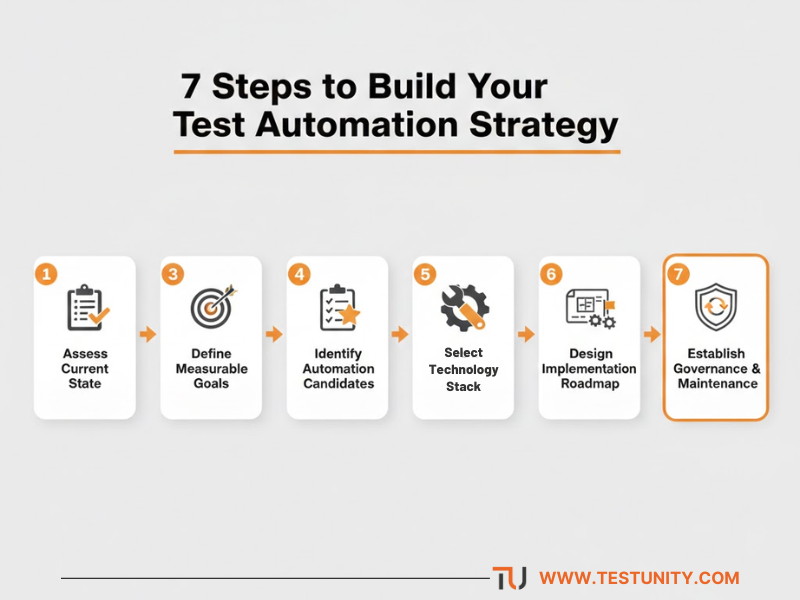
Step 1: Assess Your Current State
Before planning where you’re going, understand where you are. Conduct an audit of:
-
Existing manual and automated tests
-
Current tools and frameworks
-
Team skills and capacity
-
Pain points (e.g., long regression cycles, flaky tests, production defects)
Step 2: Define Clear, Measurable Goals
Work with stakeholders to define what success looks like. Use the SMART framework (Specific, Measurable, Achievable, Relevant, Time-bound). Examples:
-
“Automate 100% of critical path regression tests within 3 months.”
-
“Reduce release cycle from 4 weeks to 1 week within 6 months.”
Step 3: Identify Automation Candidates
Use a risk-based approach to prioritize what to automate first. Ask:
-
What tests are run most frequently (regression candidates)?
-
What areas have the highest business impact (critical user journeys)?
-
What tests are most time-consuming to run manually?
-
What areas have the highest defect rates?
Step 4: Select Your Technology Stack
Based on your assessment and goals, choose your tools. Consider:
-
Application technology (web, mobile, desktop, API)
-
Team expertise (leverage existing skills where possible)
-
Budget (open-source vs. commercial tools)
-
Integration with existing ecosystem (CI/CD, test management)
Step 5: Design the Framework Architecture
Sketch out how your framework will be structured. Define:
-
Folder structure and naming conventions
-
Coding standards and best practices
-
Helper libraries and utilities
-
Reporting and logging mechanisms
-
Design patterns to use (e.g., Page Object Model)
Step 6: Plan the Implementation Roadmap
Break the work into phases:
-
Phase 1 (Foundation): Set up the framework, create first proof-of-concept tests, establish CI/CD integration.
-
Phase 2 (Critical Path): Automate the most critical user journeys and high-value regression tests.
-
Phase 3 (Expand): Broaden coverage to secondary features and platforms.
-
Phase 4 (Optimize): Refine tests, reduce flakiness, improve execution speed.
Step 7: Establish Governance and Maintenance
Define how the automation suite will be managed long-term:
-
Regular code reviews for test scripts
-
Process for handling test failures (triage, fix, or decommission)
-
Scheduled maintenance sprints
-
Metrics review cadence
Calculating the ROI of Test Automation
Getting budget approval for automation requires proving its value. Here’s a simple way to calculate ROI.
The Formula
ROI = (Savings – Investment) / Investment
1. Calculate Your Investment (Costs)
-
Tool Costs: Licenses for commercial tools or cloud platforms.
-
Infrastructure: Servers, cloud testing grids.
-
People Time: Hours spent on framework design, script creation, and ongoing maintenance.
2. Calculate Your Savings (Benefits)
-
Manual Testing Time Saved: (Manual execution time per cycle × number of cycles per year) – (Automated execution time × cycles per year)
-
Defect Detection Savings: Cost of finding a bug in production vs. finding it earlier in the cycle.
-
Faster Time-to-Market: Revenue impact of releasing features faster.
Example Calculation
-
Manual Regression: 40 hours per cycle × 12 cycles/year = 480 hours/year.
-
Automated Regression: 2 hours to run + 5 hours maintenance/cycle = 84 hours/year.
-
Time Saved: 480 – 84 = 396 hours/year.
-
Cost Saved: 396 hours × $50/hour burdened rate = $19,800 saved annually.
-
Investment: $10,000 (tool licenses + 200 setup hours × $50 = $10,000) = $20,000 total first-year cost.
-
Year 1 ROI: ($19,800 – $20,000) / $20,000 = -1% (break-even).
-
Year 2 ROI: ($19,800 – $5,000 maintenance) / $5,000 = 296% .
This shows that while automation requires upfront investment, the long-term returns are substantial.
Common Pitfalls and How to Avoid Them
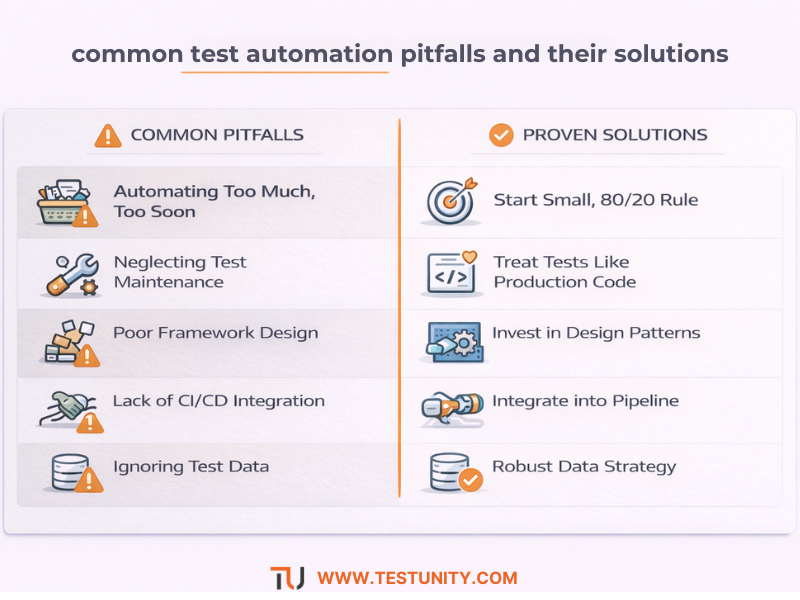
Pitfall 1: Automating Too Much, Too Soon
Problem: Trying to automate everything at once leads to burnout and technical debt.
Solution: Start small. Follow the 80/20 rule: automate the 20% of tests that cover 80% of your critical functionality.
Pitfall 2: Neglecting Test Maintenance
Problem: Tests become flaky or broken, eroding trust in automation.
Solution: Treat test code like production code. Review it, refactor it, and allocate time for regular maintenance in every sprint.
Pitfall 3: Poor Framework Design
Problem: Tests are hard to read, brittle, and break with every UI change.
Solution: Invest time in framework design upfront. Use design patterns like Page Object Model to isolate UI changes.
Pitfall 4: Lack of CI/CD Integration
Problem: Tests are run manually or infrequently, defeating the purpose of automation.
Solution: Integrate tests into your CI/CD pipeline so they run automatically on every code change. For more on this, see our guide on Continuous Testing: The Backbone of Modern DevOps .
Pitfall 5: Ignoring Test Data
Problem: Tests fail due to missing or inconsistent data, not actual bugs.
Solution: Develop a robust test data management strategy. Use APIs to create test data on demand, or maintain a consistent, version-controlled dataset.
Scaling Your Automation: From Team to Enterprise
Once you’ve mastered automation for a single team, the next challenge is scaling across the organization.
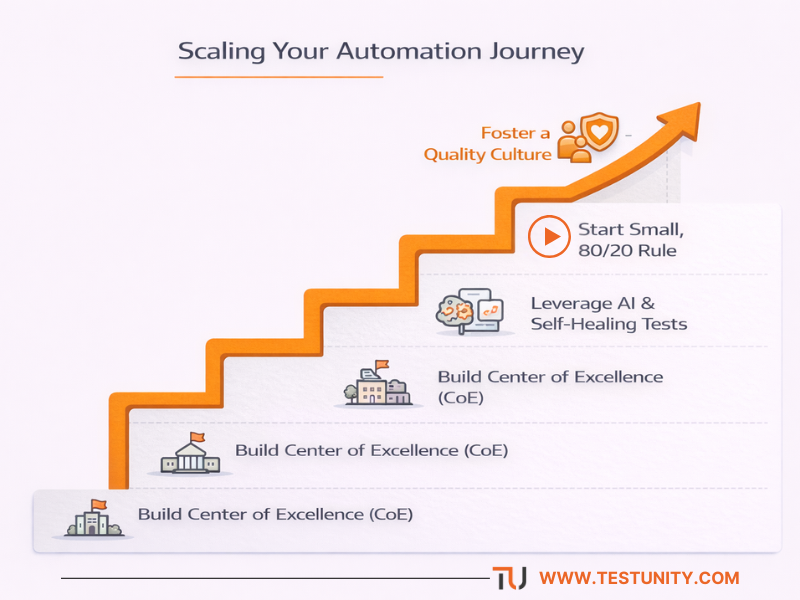
Build a Center of Excellence (CoE)
A CoE is a central team of automation experts that:
-
Defines standards and best practices
-
Evaluates and recommends tools
-
Provides training and mentoring
-
Shares reusable components and libraries
Implement Shift-Left Testing
Empower developers to write and run automated tests earlier in the cycle. Provide them with the tools and training to contribute to the automation suite. This reduces the burden on QA and catches issues faster.
Leverage AI and Self-Healing Tests
Emerging tools use artificial intelligence to automatically detect and fix broken locators when the UI changes, dramatically reducing maintenance effort. While not a silver bullet, these tools can help scale automation in dynamic environments.
Foster a Quality Culture
Ultimately, successful automation requires a culture where everyone owns quality. Encourage collaboration between dev and QA, celebrate automation wins, and continuously learn from failures.
Conclusion: Your Automation Journey Starts Here
A well-crafted test automation strategy is the foundation of modern software delivery. It transforms testing from a bottleneck into a competitive advantage, enabling faster releases, higher quality, and more confident deployments.
But a strategy on paper is just the beginning. The real work lies in execution—choosing the right tools, building a maintainable framework, integrating with CI/CD, and fostering a culture of quality.
At TestUnity, we’ve helped dozens of organizations navigate this journey. From strategy development to framework implementation and scaling, our Test Automation Services provide the expertise and execution power you need to succeed.
Ready to build an automation strategy that delivers real results? Contact TestUnity today to speak with one of our automation experts and discover how we can help you plan, execute, and scale your test automation efforts.

TestUnity is a leading software testing company dedicated to delivering exceptional quality assurance services to businesses worldwide. With a focus on innovation and excellence, we specialize in functional, automation, performance, and cybersecurity testing. Our expertise spans across industries, ensuring your applications are secure, reliable, and user-friendly. At TestUnity, we leverage the latest tools and methodologies, including AI-driven testing and accessibility compliance, to help you achieve seamless software delivery. Partner with us to stay ahead in the dynamic world of technology with tailored QA solutions.









Leave a Reply