

Securing a role in test automation requires demonstrating a deep, practical understanding of Selenium WebDriver. While technical proficiency is key, top candidates distinguish themselves by explaining core concepts, making smart architectural decisions, and aligning automation with modern development practices.
This guide details the top 10 Selenium interview questions that form the backbone of any technical screening. For each, we provide a clear answer, relevant code, and—most importantly—the deeper context and strategic thinking that interviewers actively seek in senior-level candidates.
1. What Core Testing Types Can Selenium Automate, and How Does It Integrate into a DevOps Workflow?
A basic answer will list functional and regression testing. A standout answer connects Selenium to continuous delivery.
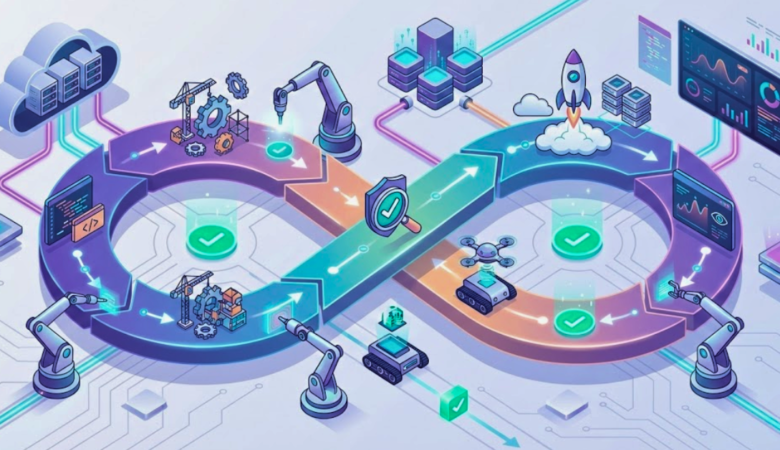
Strategic Answer: Selenium WebDriver is the cornerstone for automating functional UI tests for web applications. Its primary use is validating user workflows and ensuring regression test stability after new code commits. Its real power is unlocked within a CI/CD pipeline.
Discuss how Selenium scripts are executed by tools like Jenkins or GitHub Actions as a quality gate. Emphasize that in a mature DevOps culture, Selenium is one component of a broader testing strategy, which includes faster, more isolated API automation testing services and performance testing services for a holistic quality assessment. This shows you understand Selenium’s role in the bigger picture of shipping quality software rapidly.
2. Demonstrate Element Interaction Using sendKeys() and click(). How Do You Handle Complex UI Gestures?
This tests hands-on scripting ability and knowledge of advanced features.
Direct Demonstration:
java
// Entering text into a login field
WebElement username = driver.findElement(By.id("username"));
username.sendKeys("testUser");

// Clicking the login button
WebElement loginBtn = driver.findElement(By.cssSelector("[data-test='login-submit']"));
loginBtn.click();
Advanced Application: To truly impress, describe the Actions class for complex interactions. Mention that while basic clicks are common, modern web apps often require hover menus, drag-and-drop, or multi-key shortcuts.
java
// Example: Performing a right-click (context click) action
Actions actions = new Actions(driver);
WebElement targetElement = driver.findElement(By.id("canvas"));
actions.contextClick(targetElement).perform();
This demonstrates practical experience beyond textbook examples.
3. What Are Assertions in Selenium, and Why is the Distinction Between “Hard” and “Soft” Assertions Critical for Test Design?
Assertions are validation points, but your grasp of their implementation defines test suite robustness.
Core Explanation: Assertions compare the application’s actual state against an expected value. A failure typically results in a test being marked as failed.
Differentiator (Soft vs. Hard):
- Hard Assertions: Methods like
Assert.assertEquals()orassertTrue(). Upon failure, they throw an exception immediately, terminating the test. Use these for critical, show-stopper validations (e.g., “Is the user logged in?”). - Soft Assertions: Implemented via classes like
SoftAssertin TestNG. They collect failures throughout a test method. All validations are executed, and a final report is generated withassertAll(). This is ideal for validating a form page where you want a complete list of all field errors, not just the first one.
Explaining this trade-off shows you design tests for both accuracy and efficient debugging.
4. How Do You Locate a Hyperlink, and When is partialLinkText() a More Robust Choice Than linkText()?
Your locator strategy choice reveals your experience with dynamic content.
Standard Method: Use By.linkText() for an exact text match and By.partialLinkText() for a substring match.
java
// Exact match - precise but brittle if text changes
driver.findElement(By.linkText("Customer Support Portal")).click();

// Partial match - more flexible for dynamic content
driver.findElement(By.partialLinkText("Support")).click();
Professional Context: Explain that partialLinkText() is valuable when link text is dynamically generated (e.g., “Welcome, [Username]”). However, advocate for the best practice: collaborating with developers to implement unique, static attributes like data-test-id for the most resilient and readable locators, a hallmark of good automation framework development.
5. Explain the Standard and Modern Best Practices for Initializing Different Browser Drivers.
This evaluates your knowledge of test environment setup.
Traditional Approach: Historically, you had to manage driver executables (chromedriver, geckodriver) manually, setting system paths.
java
System.setProperty("webdriver.chrome.driver", "/projects/drivers/chromedriver");
WebDriver driver = new ChromeDriver();
Modern, Efficient Practice: State that managing binaries manually is outdated. Highlight the use of WebDriverManager, an open-source library that automates driver management. It detects the installed browser version and downloads the compatible driver, vastly simplifying setup and maintenance—a must for scalable test automation.
java
// Modern setup with WebDriverManager
import io.github.bonigarcia.wdm.WebDriverManager;
WebDriverManager.chromedriver().setup();
WebDriver driver = new ChromeDriver();
6. Define XPath. Compare Absolute and Relative XPath, and Discuss the Pros and Cons of XPath Versus CSS Selectors.
A nuanced answer here separates juniors from seniors.
Definition: XPath (XML Path Language) is a query language for selecting nodes in HTML/XML documents.
Absolute vs. Relative:
- Absolute XPath: Begins at the root (
/html/body/div...). It is highly fragile; any DOM change breaks it. Its use is strongly discouraged. - Relative XPath: Starts from anywhere (
//). It’s flexible, using attributes, text, or hierarchy (e.g.,//input[@name='q']or//li[contains(@class, 'active')]).
Expert Insight: Acknowledge that while XPath is powerful (it can traverse up the DOM, use functions like contains() or starts-with()), CSS Selectors are generally faster and offer simpler syntax for basic attribute and ID-based location. The choice depends on the specific need: CSS for simplicity and speed, XPath for complex traversal or text-based location. This balanced view shows deep practical knowledge.
7. How Do You Retrieve Text from a Web Element? Provide a Concrete Example of Its Use in Test Validation.
This checks knowledge of a fundamental command and its application.
Syntax:
java
String pageHeader = driver.findElement(By.tagName("h1")).getText();
Real-World Validation Scenario: Don’t just recite the method. Describe a use case: after adding an item to a shopping cart, a confirmation message appears. You would use getText() to capture that message and then use a hard assertion to verify it contains “added to your cart” or the specific product name. This demonstrates how you translate user-facing functionality into an automated check, a core functional testing skill.
8. Explain Implicit, Explicit, and Fluent Waits. Why are Explicit Waits Considered a Best Practice, and How Do They Combat Flaky Tests?
Synchronization is critical. A comprehensive answer proves you can build reliable automation.
- Implicit Wait: A global setting that makes Selenium poll the DOM for a set time when trying to find an element. Its major flaw is that it adds overhead to every find command and doesn’t wait for specific element states (clickable, visible).
- Explicit Wait: The professional standard. It instructs Selenium to wait for a specific condition on a specific element. It’s precise and efficient.javaWebDriverWait wait = new WebDriverWait(driver, Duration.ofSeconds(10)); WebElement element = wait.until(ExpectedConditions.presenceOfElementLocated(By.id(“results”)));
- Fluent Wait: A more configurable Explicit Wait, allowing you to set polling frequency and ignore specific exceptions during the wait period.
Clear Recommendation: Always advocate for Explicit Waits. Explain that Implicit Waits can lead to unpredictable, slow test execution and their interaction with Explicit Waits can cause unexpected timeouts. Explicit waits make tests more robust and faster by waiting the minimum necessary time for a defined condition, which is essential for CI/CD integration services.
9. Describe Selenium’s Navigation Commands. Is There a Functional Difference Between driver.get() and driver.navigate().to()?
This tests your attention to API details.
The Commands: navigate().to(url), navigate().back(), navigate().forward(), navigate().refresh().
The Subtle Difference: driver.get(url) and driver.navigate().to(url) perform the same primary function: loading a page. The key distinction is that navigate() provides a Navigation interface, allowing you to work with the browser’s history. This detail, while small, demonstrates a meticulous understanding of the WebDriver API.
10. How Do You Check an Element’s State with isDisplayed(), isEnabled(), and isSelected()? Why are These Checks Vital for Writing Defensive Test Scripts?
These boolean methods are essential for creating intelligent, user-like test flows.
The Methods:
isDisplayed(): Checks if an element is visible on the page (not hidden by CSS).isEnabled(): Checks if an element is interactive (e.g., a button is not disabled).isSelected(): Checks the state of checkboxes, radio buttons, or toggle switches.
Strategic Importance: Explain that these are used for pre-condition validation. Before attempting to click a “Save” button, a robust test would verify it is both displayed and enabled. Before testing a checkbox, you might check its initial state. This approach prevents illogical test actions and errors, making your automation more reliable and closely aligned with real user behavior.
Conclusion: Building Expertise Beyond the Interview
Mastering these Selenium interview questions establishes a strong technical foundation. The journey from a competent candidate to a valued automation engineer involves leveraging these fundamentals to solve broader challenges: architecting scalable test automation frameworks, integrating suites into CI/CD for rapid feedback, and understanding how Selenium fits within a strategy that includes AI-powered test generation and comprehensive security testing.
At TestUnity, we apply these principles daily to build intelligent, maintainable, and high-value automation solutions for our clients. Our expertise in automation framework development and end-to-end testing services helps teams transform automation from a cost center into a strategic asset for quality and speed.
Ready to build professional, future-proof test automation? Explore our proven web automation testing services or speak directly with a TestUnity expert to discuss your specific quality engineering goals.

TestUnity is a leading software testing company dedicated to delivering exceptional quality assurance services to businesses worldwide. With a focus on innovation and excellence, we specialize in functional, automation, performance, and cybersecurity testing. Our expertise spans across industries, ensuring your applications are secure, reliable, and user-friendly. At TestUnity, we leverage the latest tools and methodologies, including AI-driven testing and accessibility compliance, to help you achieve seamless software delivery. Partner with us to stay ahead in the dynamic world of technology with tailored QA solutions.








bookmarked!!, I rwally like your blog! http://boyarka-inform.com/
Hi! I’m at work surfing around your blog frm my new iphone 3gs!
Just wanted to say I love reading your blog and look forward to all your posts!
Carry on the superb work! http://boyarka-inform.com/