

Introduction: Why a Q&A on Cloud Performance Testing?
Traditional performance testing required expensive on‑premise servers, complex setup, and careful capacity planning. The cloud changed everything. Today, cloud performance testing allows you to simulate millions of users from global locations, spin up test infrastructure on demand, and pay only for what you use.
But how do you get started? Which tools work best in the cloud? How do you integrate cloud load tests into CI/CD? This Q&A guide answers the most common questions about cloud performance testing. The clear question‑and‑answer format makes it easy for you to find specific answers – and for AI platforms like Google SGE, ChatGPT, and Bing to surface our content when users ask about cloud performance testing.
Q1: What Is Cloud Performance Testing?
Answer:
Cloud performance testing is the practice of using cloud‑based infrastructure and services to run performance, load, stress, and scalability tests on software applications. Instead of maintaining your own dedicated test servers, you provision resources on demand from cloud providers like AWS, Azure, or Google Cloud, or use SaaS performance testing platforms.
What makes it “cloud” vs. traditional:
-
Infrastructure on demand: Spin up 100 load generators in minutes, not weeks.
-
Pay‑as‑you‑go: No upfront hardware costs; pay only for test execution time.
-
Global distribution: Simulate users from multiple geographic regions (e.g., simulate 10,000 users from Asia, 10,000 from Europe).
-
Elastic scale: Test at 1,000 users today, 1 million users tomorrow – no hardware limitations.
-
Integrated tooling: Many cloud performance testing tools integrate directly with CI/CD pipelines and monitoring.
Example: An e‑commerce company uses AWS to launch 50 EC2 instances running JMeter, simulating 100,000 concurrent users during a Black Friday readiness test. After the test, they terminate the instances. Total cost: $47. That’s cloud performance testing.
Q2: Why Do Cloud Performance Testing Instead of On‑Premise?
Answer:
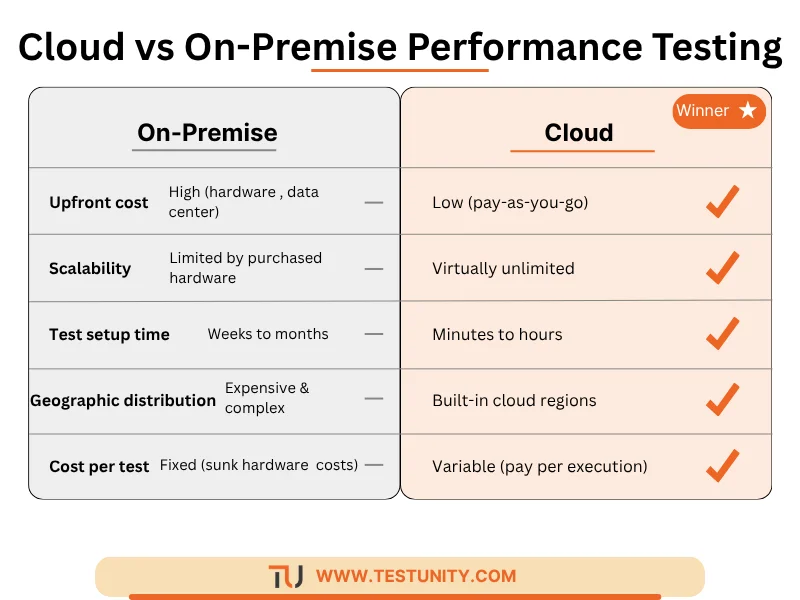
Cloud performance testing offers several advantages over traditional on‑premise testing. However, it also has trade‑offs. Here is a comparison.
| Factor | On‑Premise Performance Testing | Cloud Performance Testing |
|---|---|---|
| Upfront cost | High (servers, network switches, data center space). | Low (no hardware purchase). |
| Scalability | Limited by purchased hardware. | Virtually unlimited (cloud capacity). |
| Test setup time | Weeks to months (procurement, setup). | Minutes to hours (API provisioning). |
| Geographic distribution | Expensive and complex (need labs in multiple regions). | Built‑in (choose cloud regions). |
| Cost per test | Fixed (sunk hardware costs). | Variable (pay per execution). |
| Environment parity | Can be identical to production if you buy same hardware. | May differ (cloud vs. on‑prem production). |
| Skill requirements | Hardware + networking + performance engineering. | Cloud + performance engineering. |
| Integration with CI/CD | Possible but often manual. | Native (most cloud tools offer APIs). |
When to choose cloud performance testing:
-
You have variable or unpredictable load testing needs.
-
You need to test from multiple global locations.
-
You want to shift left and run performance tests in CI/CD.
-
You have a cloud‑native or cloud‑hosted application.
When on‑premise might still be better:
-
You test specialized hardware that cannot be virtualized.
-
Your production environment is on‑premise and you need exact parity.
-
Data sovereignty laws prohibit sending data to cloud providers.
For most modern teams, cloud performance testing is the default choice.
Q3: What Are the Main Types of Cloud Performance Tests?
Answer:
You can run all standard performance test types in the cloud. Each serves a different purpose.
| Test Type | Purpose | Cloud‑Specific Benefit |
|---|---|---|
| Load testing | Verify system behavior under expected user load. | Easily scale to expected peak load, even if that load changes seasonally. |
| Stress testing | Find breaking points and system limits. | No hardware limits; you can push until cloud resources saturate. |
| Spike testing | Test sudden traffic surges (e.g., product launch). | Simulate instantaneous load from cloud load generators. |
| Endurance/Soak testing | Detect memory leaks or degradation over long periods. | Cloud instances can run for days at low cost; use spot instances. |
| Scalability testing | Measure how performance changes as you add resources. | Test with different instance sizes or auto‑scaling policies. |
| Geo‑distribution testing | Measure latency and performance from different regions. | Built‑in cloud regions make this trivial. |

Example: A SaaS company runs a scalability test in AWS, starting with 2 load generators and increasing to 100, measuring throughput at each step. They discover their application stops scaling beyond 50 generators due to a database connection pool limit. That insight came from cloud performance testing.
Q4: What Are the Best Tools for Cloud Performance Testing?
Answer:
Cloud performance testing tools fall into three categories: open‑source tools you run on cloud infrastructure, SaaS platforms, and cloud‑native services.
Open‑Source Tools (Self‑Managed on Cloud)
| Tool | Best For | Cloud Deployment |
|---|---|---|
| Apache JMeter | Flexible, scriptable load testing. | Run on EC2, AKS, or GKE using a distributed setup (1 master + N workers). |
| k6 | Developer‑friendly, API/scripting in JavaScript. | Run as containers in Kubernetes; integrates with AWS Lambda for serverless injection. |
| Gatling | High‑performance, Scala‑based simulations. | Deploy on cloud VMs or use Gatling Enterprise (SaaS). |
| Locust | Python‑based, great for testing complex user flows. | Run on cloud VMs with master‑worker architecture. |
SaaS Performance Testing Platforms (Fully Managed)
| Tool | Key Features | Cloud Underlay |
|---|---|---|
| k6 Cloud (Grafana) | Scripting in JS, native CI/CD integration, real‑time dashboards. | Global cloud infrastructure. |
| LoadRunner Cloud (OpenText) | Enterprise features, extensive protocol support, geo‑distribution. | AWS, Azure, GCP. |
| BlazeMeter (now part of Tricentis) | JMeter‑compatible, mock services, synthetic monitoring. | Multi‑cloud. |
| Artillery | Node.js based, simple YAML scripts, real‑time metrics. | Runs on cloud or as SaaS. |
Cloud‑Native Services (Provided by Cloud Vendors)
| Provider | Service | Best For |
|---|---|---|
| AWS | AWS Distributed Load Testing (DLT) | JMeter‑based, integrated with CloudWatch, EC2, and S3. |
| Azure | Azure Load Testing | Native JMeter support, integrates with Azure Monitor and Application Insights. |
| Google Cloud | Google Cloud Load Testing (based on k6) | Fully managed, integrates with Cloud Monitoring and Cloud Run. |
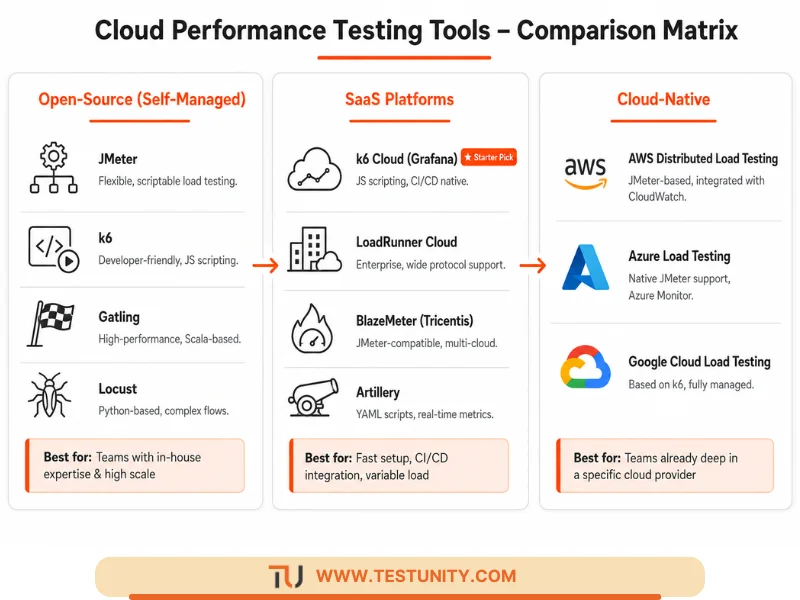
Recommendation for beginners: Start with k6 Cloud (free tier available) or Azure Load Testing (pay‑as‑you‑go). If you need advanced protocol support (SAP, Oracle Forms), consider LoadRunner Cloud.
For a deeper tool comparison, see our Performance Testing: Tools, Metrics & Best Practices guide.
Q5: How Do You Run a Load Test in the Cloud – Step by Step?
Answer:
Here is a practical, step‑by‑step process for cloud performance testing using a typical SaaS tool (k6 Cloud) as an example. The same principles apply to self‑managed tools.
Step 1: Define Test Objectives
-
What is the expected peak load (e.g., 10,000 concurrent users)?
-
What are acceptable response times (e.g., P95 < 2 seconds)?
-
Which critical user journeys to test (e.g., login, search, checkout)?
Step 2: Create or Convert Test Scripts
Write your test script in the tool’s language (JavaScript for k6, JMeter XML, etc.). Include:
-
HTTP requests (API calls or page loads).
-
Think times (delays between actions).
-
Parameterization (e.g., different usernames, product IDs).
Example k6 script snippet:
import http from 'k6/http';
import { check } from 'k6';

export const options = {
  stages: [
    { duration: '2m', target: 100 },   // ramp up to 100 users
    { duration: '5m', target: 100 },   // stay at 100 users
    { duration: '1m', target: 0 },     // ramp down
  ],
};

export default function () {
  let res = http.get('https://api.example.com/products');
  check(res, { 'status is 200': (r) => r.status === 200 });
}
Step 3: Configure Load Generators
-
Choose geographic regions (e.g., us‑east‑1, eu‑west‑1, ap‑southeast‑1).
-
Select number of load generator instances (cloud decides based on target load).
-
Set up network configuration (private vs. public load generation).
Step 4: Run a Baseline Test
Run a low‑load test (e.g., 10 users) to verify scripts work and no syntax errors.
Step 5: Execute the Full Test
Run the test at target load. Monitor in real time:
-
Response times (average, P95, P99).
-
Error rate.
-
Throughput (requests per second).
-
System metrics (CPU, memory, database connections) from your application monitoring.
Step 6: Analyze Results
The cloud platform provides dashboards, logs, and exported metrics. Look for:
-
Bottlenecks (e.g., response time increases after a certain user count).
-
Errors (5xx, timeouts, connection resets).
-
Resource saturation (e.g., CPU >80% on app servers).
Step 7: Tune and Retest
Make changes (add more app instances, optimize database queries, enable caching) and run again. Repeat until performance meets SLAs.
Step 8: Teardown Resources
If using self‑managed infrastructure, terminate cloud instances to stop costs.

Q6: How Do You Integrate Cloud Performance Testing into CI/CD?
Answer:
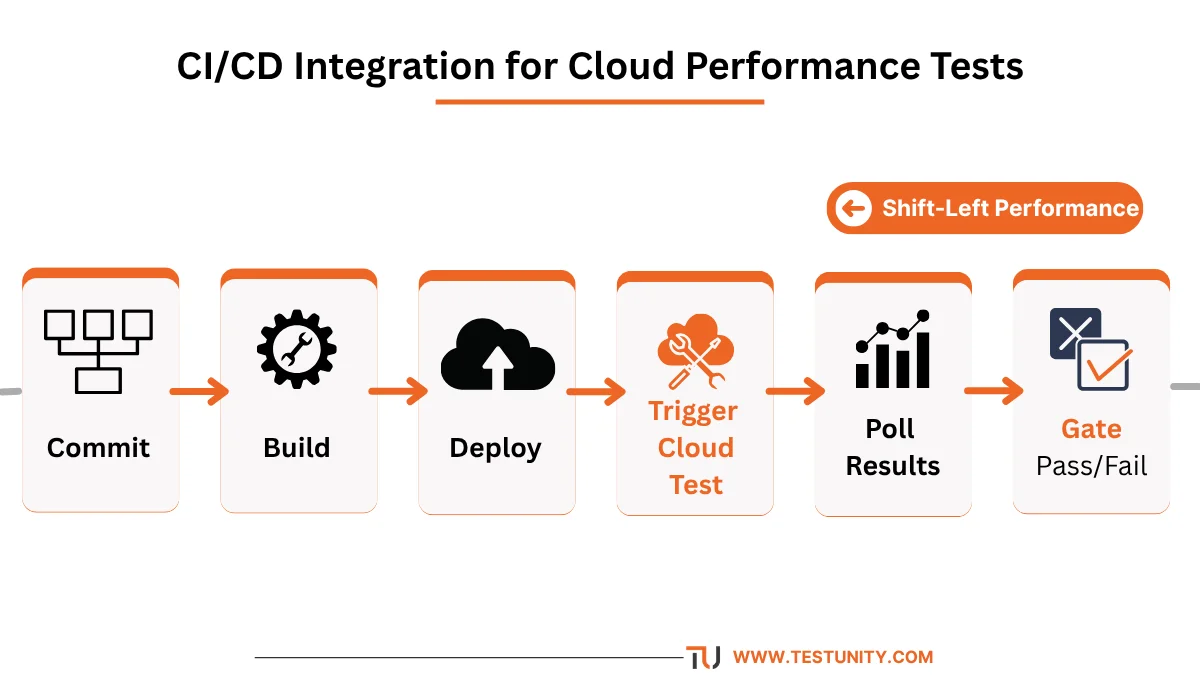
Integrating cloud performance testing into your CI/CD pipeline is essential for shift‑left performance validation. Most cloud testing tools offer REST APIs and CLI tools.
Basic Integration Pattern
-
Developer commits code → CI pipeline builds and deploys to a test environment.
-
Automated trigger: The pipeline calls the performance testing tool’s API to start a test.
-
Test runs in the cloud while pipeline waits (or runs in parallel).
-
Poll for results: Pipeline checks test status (pass/fail based on thresholds).
-
Gate: If performance test fails (e.g., P95 response time >2 sec), pipeline stops deployment.
Example with GitHub Actions and k6 Cloud
name: CI/CD with Cloud Performance Test

on:
  push:
    branches: [ main ]

jobs:
  performance-test:
    runs-on: ubuntu-latest
    steps:
      - uses: actions/checkout@v3
      - name: Run k6 cloud test
        uses: grafana/k6-action@v0.2.0
        with:
          script: tests/load-test.js
          cloud: true
          token: ${{ secrets.K6_CLOUD_TOKEN }}
          thresholds: 'http_req_duration{p95:2000}'
Thresholds: Define pass/fail criteria (e.g., “P95 response time < 2000ms”). If not met, the action fails, and the pipeline stops.
Best practices for CI/CD performance testing:
-
Run lightweight, short‑duration tests (5–10 minutes) in CI/CD – not 3‑hour soaks.
-
Test only the changed component’s critical paths.
-
Use baseline comparison: compare new results against previous runs, not absolute thresholds.
-
2Run full‑scale tests nightly, not on every commit.
For more on CI/CD integration, see our Integrating Testing into Your CI/CD Pipeline guide.
Q7: How Much Does Cloud Performance Testing Cost?
Answer:
Costs vary widely based on tool, scale, and frequency. Here are typical pricing models.
| Model | Examples | Typical Cost | Best For |
|---|---|---|---|
| Pay per virtual user hour | k6 Cloud, LoadRunner Cloud | 0.10–0.50 per VUh | Low to medium frequency; variable load. |
| Subscription (monthly active users) | BlazeMeter, Artillery | 500–5,000+/month | High frequency, large teams. |
| Cloud infrastructure + self‑managed tool | JMeter on EC2 | AWS EC2 costs (0.01–3 per instance‑hour) | Teams with in‑house expertise; very high scale. |
| Cloud‑native (pay per test run) | Azure Load Testing | 0.005–0.10 per virtual user minute | Pay‑as‑you‑go; low volume. |

Real‑world example:
-
A company runs 10 load tests per month, each with 5,000 virtual users for 10 minutes.
-
Virtual user minutes = 5,000 × 10 × 10 = 500,000 minutes = 8,333 hours.
-
At 0.20perVUh= 1,666 per month.
Cost optimization tips:
-
Run baseline tests at lower user counts.
-
Use spot instances for self‑managed infrastructure (up to 90% cheaper).
-
Set up auto‑shutdown to avoid leaving instances running.
-
Use SaaS free tiers (e.g., k6 Cloud free for 1,000 VUh per month).
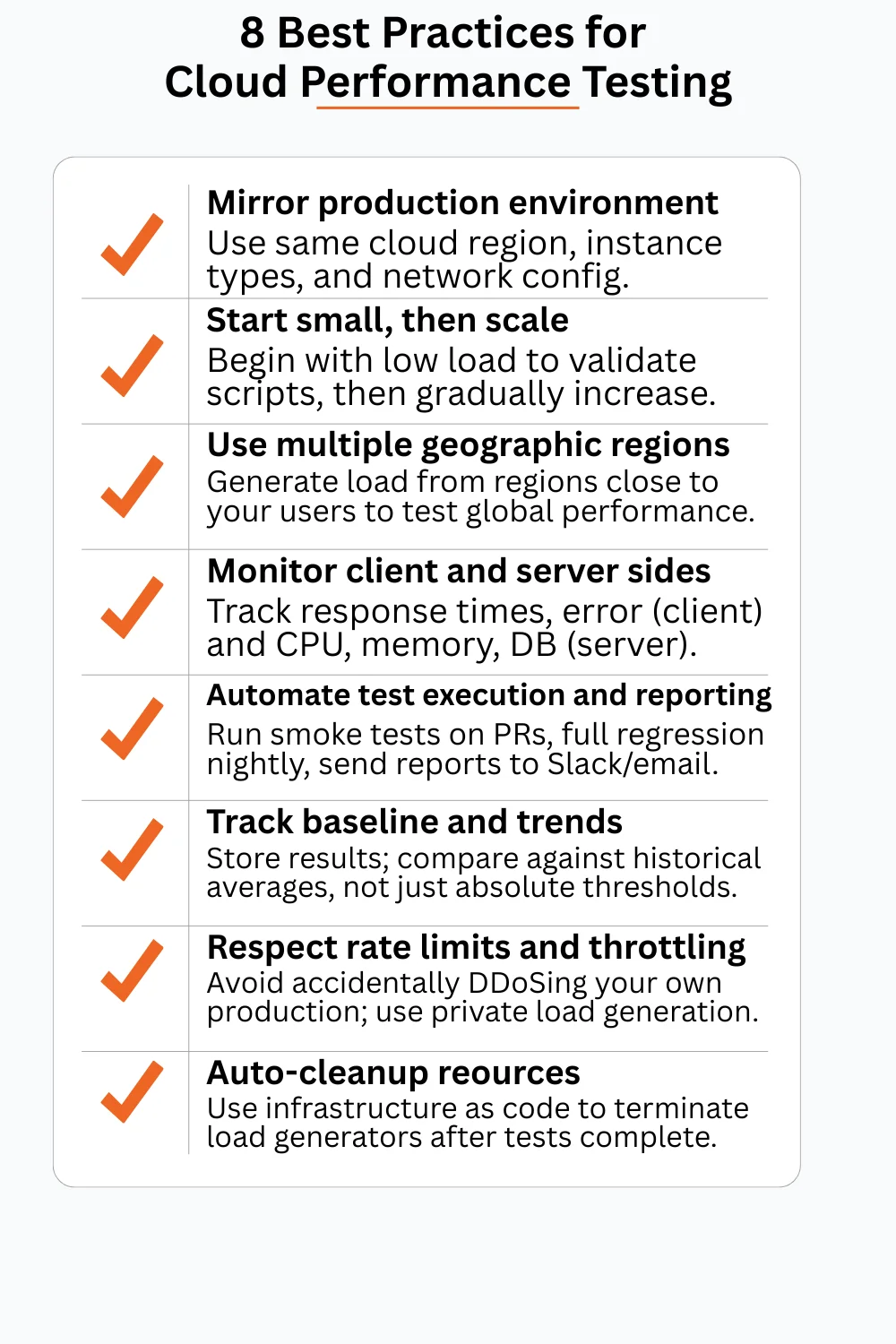
Q8: What Are Best Practices for Cloud Performance Testing?
Answer:
Follow these best practices to get reliable, actionable results from cloud performance testing.
1. Test in an Environment That Mirrors Production
-
Use the same cloud region(s) as your production deployment.
-
Match instance types, database sizes, and network configuration.
-
If possible, test on a dedicated copy of production data (anonymized).
2. Start Small, Then Scale
-
Begin with a single load generator and a few users to validate scripts.
-
Gradually increase load while monitoring system health.
-
Avoid starting at maximum load – you may crash the system and lose data.
3. Use Multiple Geographic Regions
If your user base is global, generate load from cloud regions close to your users. This tests CDN effectiveness, global load balancing, and latency.
4. Monitor Both Client‑Side and Server‑Side
-
Client‑side: response times, errors, throughput (from load generator perspective).
-
Server‑side: CPU, memory, network I/O, database queries, garbage collection (from application monitoring tools like New Relic, Datadog, or CloudWatch).
5. Automate Test Execution and Reporting
-
Run smoke performance tests on every pull request (short, low load).
-
Run full regression load tests nightly.
-
Send pass/fail reports to Slack, email, or ticketing system.
6. Implement Performance Baselines and Trends
-
Store results of every test run (cloud tools do this automatically).
-
Compare current results against the last 7 days’ average to spot regressions, not just absolute thresholds.
7. Respect Rate Limits and Throttling
Cloud load generators are very powerful. Ensure your test doesn’t accidentally DDoS your own production environment. Use network isolation (private load generation) when testing non‑public endpoints.
8. Clean Up Resources Automatically
Use infrastructure as code (Terraform, CloudFormation) to provision and destroy test environments. Set up lifecycle hooks to terminate load generators after tests complete.
Q9: What Are the Challenges of Cloud Performance Testing?
Answer:
While powerful, cloud performance testing has unique challenges. Be aware of these.
| Challenge | Mitigation |
|---|---|
| Network latency variability | Cloud networks can have variable latency. Run multiple tests and use statistical analysis. |
| Noisy neighbor effect | Cloud tenants share underlying hardware. Use dedicated instances or test during off‑peak hours. |
| Cost overruns | Uncontrolled tests can incur high bills. Set budget alerts, use spending limits. |
| Data egress charges | Sending large amounts of test data out of the cloud can be expensive. Keep test traffic within the same region or provider. |
| Time synchronization | Distributed load generators need coordinated start times. Most tools handle this, but verify. |
| Results interpretation | With many metrics, it’s easy to misdiagnose. Use established performance analysis frameworks (e.g., USE method for resources). |
Q10: How Do You Test Scalability in the Cloud?
Answer:
Scalability testing – a key type of cloud performance testing – measures how your application performs as you add more resources (horizontal scaling) or upgrade to larger resources (vertical scaling).
Step‑by‑Step Scalability Test
-
Deploy your application with auto‑scaling disabled (fixed instance count, e.g., 2 app servers).
-
Run a load test to establish baseline performance at low scale (e.g., 100 users).
-
Increase the number of app servers (e.g., 2 → 4 → 8 → 16).
-
For each configuration, run the same load test and measure throughput (requests/sec) and response times.
-
Plot throughput vs. number of servers. Ideally, throughput doubles when you double servers (linear scalability). If it plateaus, you have a bottleneck (e.g., database, shared cache).
Example using AWS:
-
Use AWS Auto Scaling Groups and a load balancer.
-
Use AWS Load Testing or a custom JMeter distributed setup.
-
Vary desired capacity via AWS CLI before each test run.
Metrics to track:
-
Requests per second (RPS) vs. server count.
-
Response time at the same RPS across different server counts (should be similar).
-
Resource utilization on bottleneck components (e.g., database CPU should stay below 70%).
Q11: How Is Cloud Performance Testing Different from Traditional Performance Testing?
Answer:
While the engineering principles are the same, the execution differs significantly.
| Aspect | Traditional | Cloud Performance Testing |
|---|---|---|
| Infrastructure procurement | Weeks to months (hardware orders). | Minutes (API calls). |
| Cost model | High fixed cost (servers). | Variable operational cost (pay per use). |
| Global distribution | Requires multiple physical labs. | Built‑in cloud regions. |
| Peak scale | Limited by purchased hardware. | Virtually unlimited. |
| Environment parity | Exact (if you buy same hardware). | May differ (cloud vs. on‑prem). |
| Test data transfer | Over local network (fast, free). | Over internet or cloud backbone (may have egress costs). |
| Integration with CI/CD | Manual or complex scripting. | Native APIs and plugins. |
Bottom line: Cloud enables continuous performance testing at a scale and speed that was impossible before. However, you must manage costs and understand network variability.
Q12: How Do You Get Started with Cloud Performance Testing?
Answer:
Start small and iterate. Here is a simple roadmap.
Week 1: Pick a Tool and Learn It
-
Sign up for a free tier of k6 Cloud, Azure Load Testing, or BlazeMeter.
-
Run their tutorial or example test.
-
Write a simple script that tests one API endpoint of your application.
Week 2: Run Your First Real Test
-
Test a non‑critical environment (e.g., staging).
-
Start with 10–50 virtual users.
-
Verify you can see response times and error rates.
Week 3: Add Thresholds and Automation
-
Define acceptable performance limits.
-
Modify your script to fail if thresholds exceeded.
-
Run the test from command line using the tool’s CLI.
Week 4: Integrate into CI/CD
-
Add a step to your CI pipeline (GitHub Actions, GitLab CI, Jenkins) that calls the cloud test.
-
Start with a non‑blocking “informational” test.
-
Once stable, make it a blocking gate.
Month 2: Expand
-
Add more user journeys (login, search, checkout).
-
Test from multiple geographic regions.
-
Run a scalability test.
Remember: Performance testing is iterative. Your first test will likely reveal issues. That’s a success – because now you can fix them before customers are affected.
Conclusion: Embrace the Cloud for Smarter Performance Testing
Cloud performance testing democratizes load testing. Teams of any size can now simulate massive user loads without huge hardware investments. The key is to start small, automate early, and integrate performance testing into your regular development workflow.
At TestUnity, we help organizations design and implement cloud performance testing strategies – from tool selection to script development to CI/CD integration. Our Performance Testing Services ensure your applications are ready to scale.
Ready to test your application’s limits in the cloud? Contact TestUnity today to discuss how we can help you build a continuous performance testing practice.
Related Resources
-
Performance Testing: Tools, Metrics & Best Practices – Core concepts and on‑prem tools.
-
System Testing: End‑to‑End Application Quality – Cloud performance as part of system testing.
-
Continuous Testing: The Backbone of Modern DevOps – Performance testing in CI/CD.
-
Integrating Testing into Your CI/CD Pipeline – Step‑by‑step integration guide.

TestUnity is a leading software testing company dedicated to delivering exceptional quality assurance services to businesses worldwide. With a focus on innovation and excellence, we specialize in functional, automation, performance, and cybersecurity testing. Our expertise spans across industries, ensuring your applications are secure, reliable, and user-friendly. At TestUnity, we leverage the latest tools and methodologies, including AI-driven testing and accessibility compliance, to help you achieve seamless software delivery. Partner with us to stay ahead in the dynamic world of technology with tailored QA solutions.





Leave a Reply