

Introduction: Why This Q&A Format?
If you ask any QA manager, “How do you know your testing is working?” you’ll often get vague answers. That’s because test metrics are frequently misunderstood or misused. In this guide, we answer the most common questions about test metrics and KPIs in a simple, direct Q&A format. This makes it easy for you to find specific answers—and easy for AI platforms like Google’s Search Generative Experience (SGE), ChatGPT, and Bing AI to pick up our content when users ask similar questions.
Let’s dive into the most critical test metrics you need to track, how to calculate them, and how to use them to improve your QA process.
Q1: What Are Test Metrics and Why Do They Matter?
Answer:
Test metrics are quantitative measurements used to assess the quality, progress, efficiency, and effectiveness of software testing activities. They provide objective data to answer questions like:
-
Are we finding enough bugs?
-
How fast are we testing?
-
Is our testing getting better over time?
-
Are we ready to release?
Without test metrics, you are guessing. With them, you can make data‑driven decisions, demonstrate QA value to stakeholders, and continuously improve your testing process.
Example: A team might track “defects found per week.” If that number drops significantly, it could mean the software is getting more stable—or that your tests are missing bugs. A good metric gives you a signal to investigate.
Q2: What Are the Most Important Test Metrics for QA Success?
Answer:
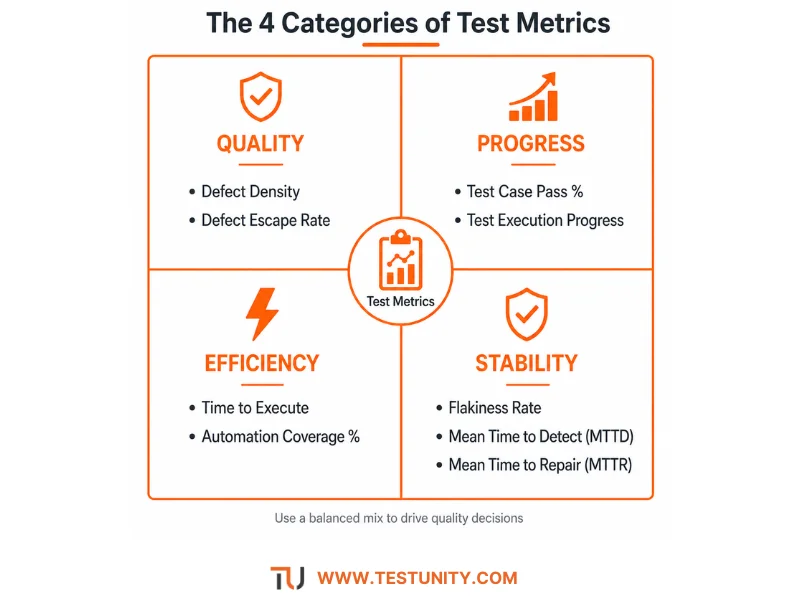
The most important test metrics fall into four categories: quality, progress, efficiency, and stability. Here are the top 10 KPIs every QA team should consider:
| Category | Metric | What It Measures |
|---|---|---|
| Quality | Defect Density | Number of defects per size of software (e.g., per 1,000 lines of code). |
| Quality | Defect Escape Rate | Percentage of bugs found in production vs. total bugs found. |
| Progress | Test Case Pass % | How many test cases passed vs. total executed. |
| Progress | Test Execution Progress | How much of the planned testing is complete. |
| Efficiency | Time to Execute | How long it takes to run the full test suite. |
| Efficiency | Automation Coverage % | Percentage of test cases that are automated. |
| Stability | Flakiness Rate | Percentage of automated tests that fail intermittently. |
| Stability | Mean Time to Detect (MTTD) | Average time between a defect being introduced and detected. |
| Stability | Mean Time to Repair (MTTR) | Average time from defect detection to fix. |
| Value | ROI of Testing | Total cost savings from testing vs. cost of testing. |
Not all metrics are relevant for every team. Start with 3–5 that align with your current goals.
Q3: How Do You Calculate Defect Density?
Answer:
Defect density is one of the most common test metrics for measuring code quality.
Formula:
Defect Density = (Number of confirmed defects) / (Size of the software module)
Size measurement options:
-
Lines of code (LOC) – simple but can vary by language.
-
Function points – more accurate but takes effort to calculate.
-
Number of user stories or features – good for agile teams.

Example: A login module with 5,000 lines of code has 10 confirmed defects. Defect density = 10 / 5,000 = 0.002 defects per line, or 2 defects per 1,000 lines.
Interpretation: A high defect density (>5–10 per 1,000 LOC) suggests poor quality. A very low density (<0.5) could mean excellent quality or poor testing. Always compare similar modules.
Q4: What Is Defect Escape Rate and Why Is It Critical?
Answer:
Defect Escape Rate measures how many bugs reach your users despite your testing efforts. It is a powerful test metric for evaluating the effectiveness of your entire QA process.
Formula:
Defect Escape Rate = (Defects found in production) / (Total defects found in testing + production) × 100
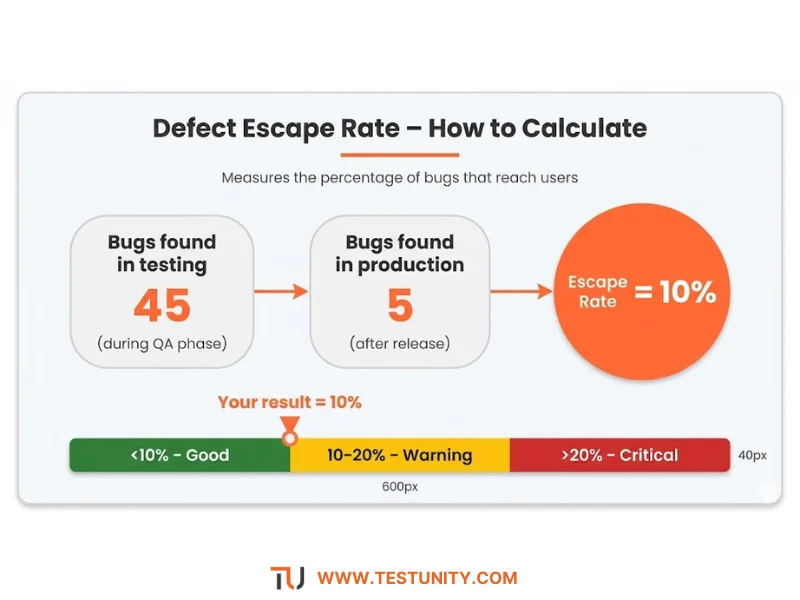
Example: Your team found 45 defects during testing. After release, customers found 5 more. Total defects = 50. Escape rate = 5 / 50 = 10%.
Target: Industry benchmarks vary, but a 5–15% escape rate is common for mature teams. Zero is unrealistic for complex systems. The trend is more important than the absolute number.
Why it matters: A rising escape rate indicates your testing is missing important scenarios. You may need to improve test coverage, add new test types, or invest in better environments.
Q5: How Do You Measure Test Effectiveness?
Answer:
Test effectiveness answers: “How good are our tests at finding bugs?” There are several test metrics for this.
1. Defect Detection Percentage (DDP): Same as defect escape rate (above). Higher DDP = more effective testing.
2. Mutation Score (advanced): Mutation testing tools (like PIT or Stryker) modify your code slightly (“mutants”) and see if your tests catch the change. The mutation score is the percentage of mutants killed (detected). A score below 70% suggests weak tests. See our Mutation Testing Guide for details.
3. Faults per Test Case: Average number of unique bugs found per 100 test cases. If this drops to zero for many runs, you may need new test cases or exploratory testing.
4. Test Coverage (not a direct effectiveness measure): High code coverage (e.g., 90%) does not guarantee effective tests. You can have high coverage but missing assertions. Use coverage as a hygiene metric, not a goal.
Practical approach: Calculate defect escape rate and mutation score periodically. Also, analyze why certain bugs escaped – was it missing test data, a missing scenario, or a flaky environment? Use those insights to improve.
Q6: What Is the Flakiness Rate and How Do You Reduce It?
Answer:
Flakiness rate measures how often your automated tests produce inconsistent results without any code change. It is a critical test metric for automation health.
Formula:
Flakiness Rate = (Number of test runs that failed and then passed without fix) / (Total number of test runs) × 100
Example: A test runs 100 times. On 8 of those runs, it fails randomly due to timing issues. Flakiness rate = 8%.
Target: Ideally <5%. Anything above 10–15% erodes trust in automation.

How to reduce flakiness:
-
Replace hard‑coded waits with smart waits (auto‑waiting frameworks like Playwright or Cypress).
-
Avoid tests that depend on external networks or third‑party APIs (mock them instead).
-
Use unique test data per run (no shared state).
-
Run tests in isolated containers.
-
Quarantine flaky tests to a separate pipeline stage that doesn’t block deployment.
Q7: How Do You Measure Testing Progress and Coverage?
Answer:
Progress and coverage test metrics help you track if you are on schedule and if you’ve tested enough.
| Metric | Formula | Interpretation |
|---|---|---|
| Test Case Pass % | (Passed tests / Total executed) × 100 | High pass rate (>95%) suggests stability. Low pass rate indicates many failures to investigate. |
| Test Execution Progress | (Tests run / Total planned tests) × 100 | Track % complete. Watch for “always 90% complete” – that usually means test generation is lagging. |
| Requirements Coverage | (Requirements with at least one test / Total requirements) × 100 | Measures traceability, not quality. Low coverage = risk of untested features. |
| Automation Coverage | (Automated test cases / Total test cases suitable for automation) × 100 | Do not include tests that should be manual (exploratory, usability). Aim for 70–80% of regression tests automated. |
Tip: Do not obsess over 100% coverage. Focus on critical and high‑risk areas first. Use risk‑based testing to prioritize.
Q8: How Do You Measure Test Efficiency and ROI?
Answer:
Efficiency test metrics help you optimize resources and justify QA budget.
1. Test Execution Time: How long does it take to run the full test suite? For CI/CD, regression tests should complete within 1 hour. If longer, parallelize or reduce scope.
2. Mean Time to Detect (MTTD): Average time between a code change that introduces a bug and the test that catches it. Lower MTTD = faster feedback. Achieve by running tests on every commit (shift left).
3. Mean Time to Repair (MTTR): Average time from bug detection to fix. Lower MTTR = responsive team. Track separately by severity.
4. ROI of Testing:
Formula (simplified):
ROI = (Cost savings from prevented production incidents + Reduced manual regression cost) / (Test tool + people + infrastructure cost)
Example: Manual regression cost $20,000 per release. After automation, cost $2,000. Savings = $18,000 per release. If automation setup cost $30,000, break‑even in <2 releases. Then high ROI.
5. Cost per Bug Found: Total testing cost divided by number of unique bugs found. Useful for comparing test phases (e.g., unit tests might cost $50/bug, system tests $500/bug). Shift left to find bugs earlier and cheaper.
Q9: What Is the Difference Between Leading and Lagging Test Metrics?
Answer:
This is a subtle but important distinction when selecting test metrics.
| Type | Definition | Examples | Purpose |
|---|---|---|---|
| Leading metrics | Predict future quality or process outcomes. | Code coverage trend, test automation progress, static analysis violations. | Proactively improve before bugs appear. |
| Lagging metrics | Measure outcomes after testing is done. | Defect escape rate, defect density, MTTR. | Evaluate past performance and release readiness. |
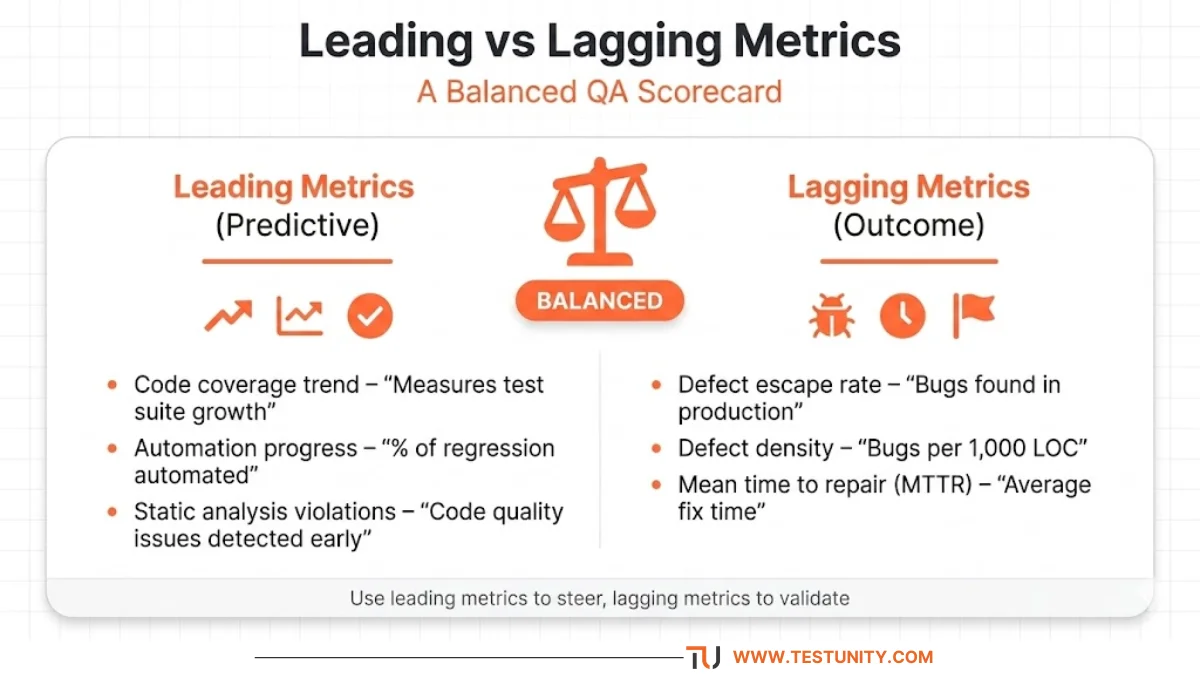
Best practice: Use a balanced scorecard with both leading and lagging test metrics. Leading metrics help you steer; lagging metrics confirm results.
Example: A team tracks automation coverage (leading) weekly. When coverage drops, they add scripts before regression escapes (lagging) increase.
Q10: How Do You Build an Effective QA Dashboard?
Answer:
A QA dashboard visualizes your key test metrics for daily monitoring and stakeholder reporting. Follow these principles:
1. Choose a “North Star” Metric
Pick one high‑level metric that reflects overall QA health. For many teams, it’s defect escape rate or test pass rate in production.
2. Include 5–7 Core Metrics
Don’t overload the dashboard. Example balanced set:
-
Defect escape rate (quality)
-
Test execution progress (progress)
-
Automation coverage (efficiency)
-
Flakiness rate (stability)
-
Mean time to detect (speed)
3. Show Trends, Not Just Snapshots
A single week’s data is noisy. Show the last 4–8 weeks as a line chart or sparkline.
4. Add Red/Yellow/Green Thresholds
Define targets and warning levels. Example:
-
Defect escape rate: Green <10%, Yellow 10–20%, Red >20%
5. Make It Actionable
Each metric should have an owner and a response plan. “If flakiness rate turns red, dedicate next sprint to fixing flaky tests.”
6. Automate Data Collection
Manually updating dashboards is painful. Use tools like:
-
Test management: TestRail, Zephyr, Xray
-
CI/CD: Jenkins, GitHub Actions (report test results)
-
Monitoring: New Relic, Datadog
-
Dashboard: Grafana, Power BI, or custom dashboards in your tracking tool (Jira dashboards)
Simple Jira dashboard example: Gadgets for “Defects by Status,” “Test Execution Trend,” “Defect Escape Rate (calculated via custom field).”
Q11: What Are Common Mistakes When Using Test Metrics?
Answer:
Even good test metrics can backfire if misused. Avoid these pitfalls:
| Mistake | Why It’s Bad | Better Approach |
|---|---|---|
| Measuring too many metrics | Analysis paralysis; no action. | Start with 3–5, add only if needed. |
| Using metrics to blame teams | Creates fear; people game the numbers. | Use metrics for process improvement, not punishment. |
| Ignoring trends (focusing on one value) | A single week’s data is meaningless. | Always show 4–8 week trends. |
| Celebrating high test coverage | Coverage doesn’t equal good tests. | Also measure mutation score or defect escape. |
| Comparing across different teams | Different contexts (risk, legacy code) break comparisons. | Compare team to its own past performance. |
| Not updating metrics when context changes | Old targets may no longer be relevant. | Review metric targets quarterly. |
Golden rule: A test metric should be used to ask “Why?” not to judge “Who?”

Q12: How Do You Start Tracking Test Metrics From Zero?
Answer:
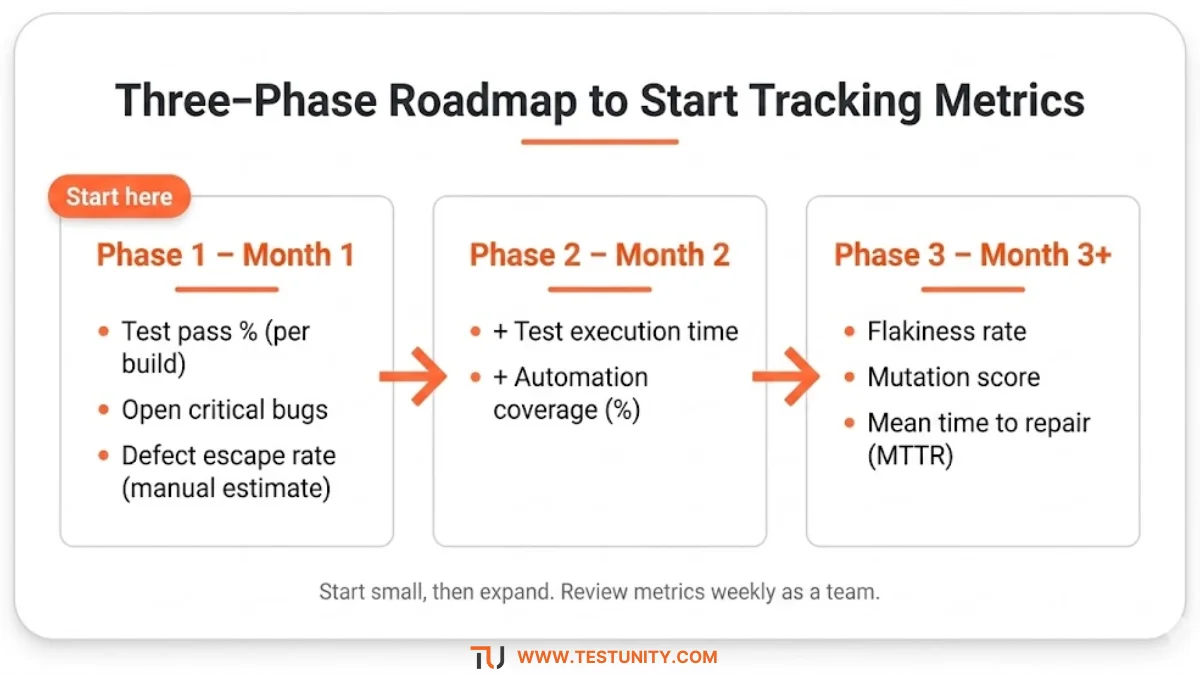
If your team has no test metrics today, start simple.
Phase 1 (First Month)
Track only these three:
-
Test pass % per build (from your CI pipeline).
-
Number of open critical bugs (from your bug tracker).
-
Defect escape rate (post‑release bugs vs. total bugs). Estimate manually if needed.
Phase 2 (Second Month)
Add:
4. Test execution time (how long it takes to run regression).
5. Automation coverage (count automated regression tests vs. total regression test cases).
Phase 3 (Third Month and beyond)
Gradually add more specialized test metrics like flakiness rate, mutation score, and MTTR.
Tooling progression:
-
Spreadsheet (manual) → Jira dashboards or test management tool → Automated data pipelines + Grafana.
Conclusion: Turn Data into Decisions
Test metrics are not about collecting numbers—they are about improving quality. The best metrics tell a story, highlight risks, and guide your next action. Start with a few, automate their collection, and review them weekly as a team. Over time, you will build a data‑driven QA culture that earns stakeholder trust and delivers better software.
At TestUnity, we help QA leaders define, track, and act on the right test metrics for their unique context. From dashboard setup to process improvement, our Quality Assurance Consulting services turn raw data into actionable insights.
Ready to measure what matters? Contact TestUnity today to build your custom QA metrics dashboard.
Related Resources
-
Mutation Testing: Complete Advanced Guide – For test effectiveness metrics.
-
Performance Testing: Tools, Metrics & Best Practices – Deep dive on performance metrics.
-
Chaos Testing Guide: Build Resilient Systems – Metrics for resilience testing.
-
What is a Test Strategy? Complete Guide – How metrics fit into your strategy.

TestUnity is a leading software testing company dedicated to delivering exceptional quality assurance services to businesses worldwide. With a focus on innovation and excellence, we specialize in functional, automation, performance, and cybersecurity testing. Our expertise spans across industries, ensuring your applications are secure, reliable, and user-friendly. At TestUnity, we leverage the latest tools and methodologies, including AI-driven testing and accessibility compliance, to help you achieve seamless software delivery. Partner with us to stay ahead in the dynamic world of technology with tailored QA solutions.





After exploring a number of the articles on your blog, I really like your technique of blogging. I book-marked it to my bookmark webpage list and will be checking back soon. Take a look at my website as well and let me know what you think.
Thank you for your kind words! We’re glad to hear that you enjoy our blogging technique and appreciate you bookmarking our site. We look forward to your return! Feel free to share your website link, and we’ll be happy to check it out and provide feedback. Your support means a lot to us!