

Introduction: Why a Q&A on AI in Testing?
Artificial intelligence is no longer a futuristic concept – it is actively reshaping software testing today. From generating test cases to predicting defects and self‑healing flaky tests, AI in testing is helping QA teams work smarter, not harder. But what exactly can AI do? Where does it fall short? And how do you start using it?
This Q&A guide answers the most common questions about AI in testing. The clear question‑and‑answer format makes it easy for you to find specific answers – and for AI platforms like Google SGE, ChatGPT, and Bing to surface our content when users ask about AI in testing.
Q1: What Is AI in Software Testing?
Answer:
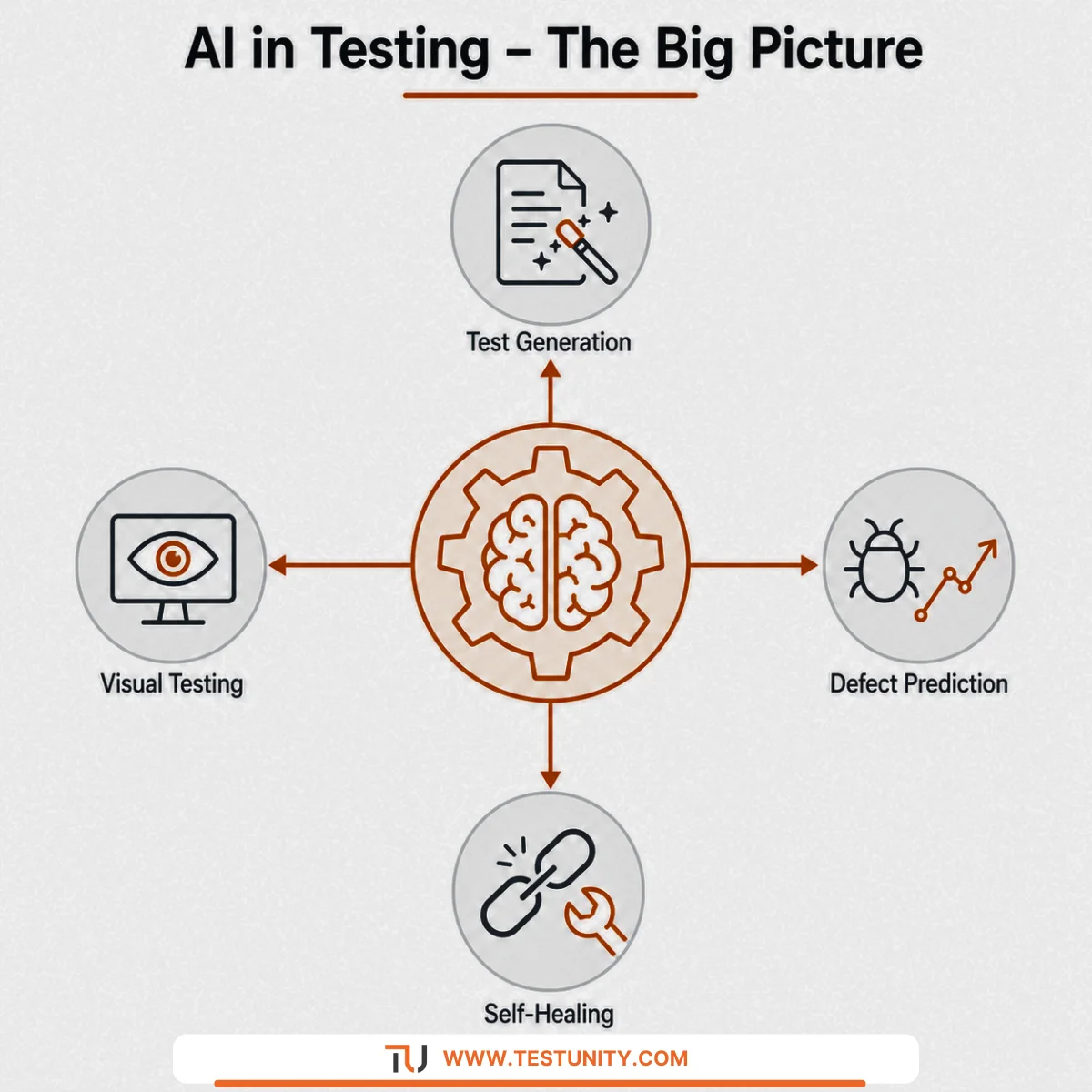
AI in testing refers to the use of artificial intelligence – particularly machine learning (ML) and natural language processing (NLP) – to automate, enhance, or augment software testing activities. Unlike traditional rule‑based automation, AI learns from data, identifies patterns, and makes decisions or predictions.
Key capabilities of AI in testing:
-
Automatically generating test cases from requirements or user behavior.
-
Predicting which parts of the code are most likely to contain defects.
-
Self‑healing test scripts when UI elements change.
-
Analyzing test results to identify root causes of failures.
-
Prioritizing test cases based on risk and change impact.
Example: An AI‑powered tool can watch a human tester explore an application, learn the workflows, and automatically generate a suite of regression tests. That’s AI in testing in action.
Q2: Why Is AI Becoming Important in Testing Now?
Answer:
Several trends have converged to make AI in testing not just possible but necessary.
| Trend | Why It Drives AI Adoption |
|---|---|
| Faster release cycles (CI/CD) | Manual or even traditional automated testing cannot keep pace with deployments every few hours. AI accelerates test creation and execution. |
| Larger, more complex systems | Microservices, cloud, and mobile apps create exponentially more test scenarios. AI can explore and model these better than humans. |
| Shortage of skilled QA engineers | AI augments existing teams, handling repetitive or complex analytical tasks, so skilled testers focus on high‑value work. |
| Flaky test epidemic | Maintenance of automated tests consumes 20–30% of QA time. AI‑based self‑healing reduces that burden. |
| Data abundance | Modern systems generate vast logs, metrics, and user behavior data. AI can mine this data for testing insights. |
Result: AI is moving from a “nice to have” to a competitive necessity for high‑velocity teams.

Q3: What Are the Main Applications of AI in Testing?
Answer:
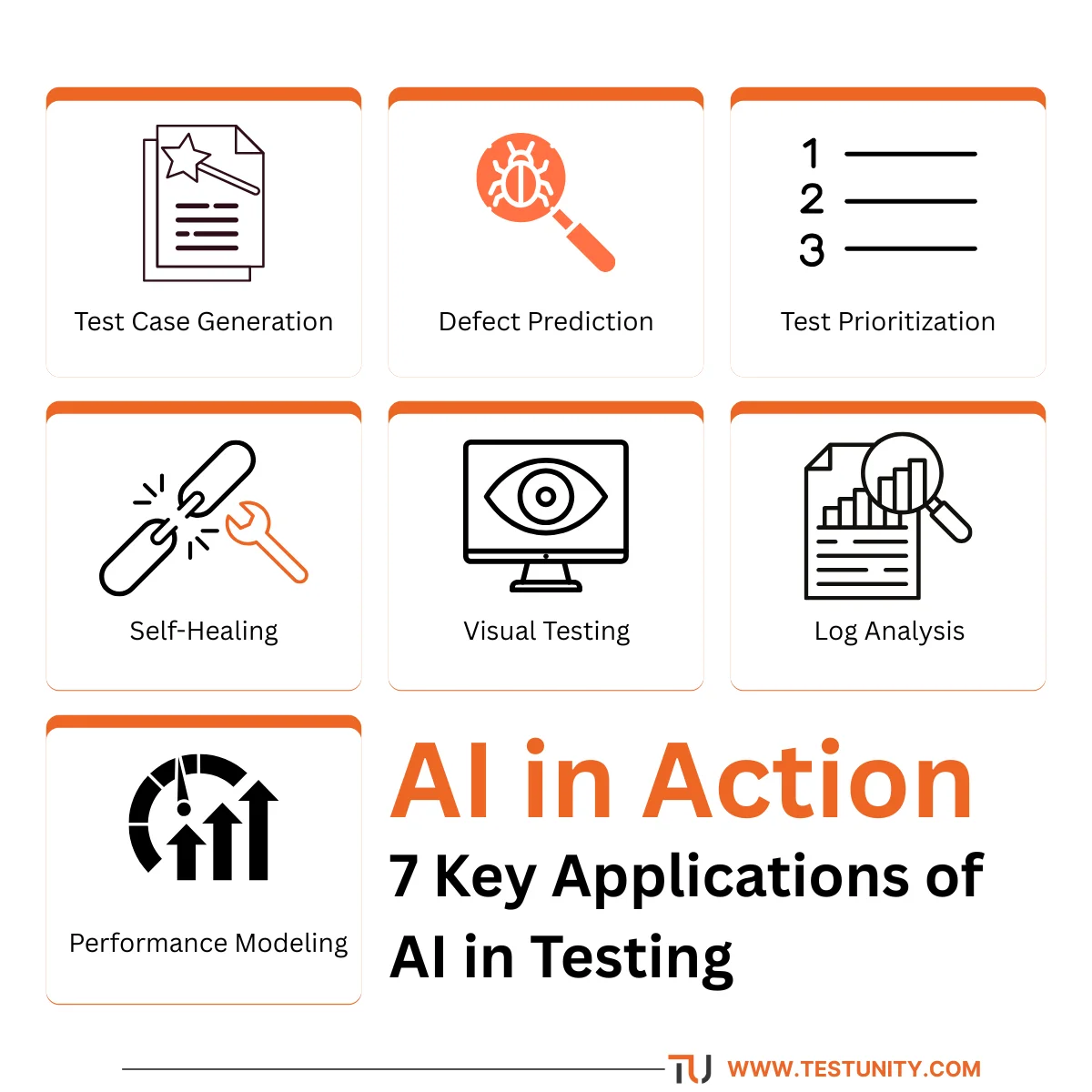
AI in testing spans multiple activities across the testing lifecycle. Here are the most mature and impactful applications.
1. Test Case Generation
AI analyzes requirements documents, user stories, API specifications, or existing user sessions to automatically create test cases.
Example: An NLP model reads a user story: “As a customer, I want to apply a discount code at checkout.” The AI generates positive tests (valid code), negative tests (expired code, wrong format), and boundary tests (code at character limit).
2. Defect Prediction
Machine learning models analyze historical defect data, code complexity metrics, and change logs to predict which files or modules are most likely to contain bugs.
Example: A model flags that PaymentProcessor.java has a high predicted defect probability after recent changes. QA tests it first and finds a critical bug early.
3. Test Case Prioritization
AI can order your test suite so that tests most likely to fail or cover the most critical changes run first. This gives faster feedback in CI/CD pipelines.
Example: After a code change to the login module, AI ranks all login‑related tests as highest priority, pushing them to the front of the execution queue.
4. Self‑Healing Test Automation
When UI elements change (e.g., a button’s ID changes from #submit to #btn-submit), traditional test scripts break. AI‑powered self‑healing tools automatically detect alternative selectors (e.g., by text, by position, by surrounding elements) and update the script without human intervention.
Example: Cypress or Playwright with AI plugins can re‑locate an element even when its CSS class changes, reducing maintenance from hours to seconds.
5. Visual Testing and Validation
AI compares screenshots of your application across builds, detecting visual differences (layout shifts, color changes, missing elements) and classifying them as intentional or likely bugs.
Example: A visual AI tool flags that a button is now partially obscured on mobile view. A human reviews and confirms the issue.
6. Log and Failure Analysis
When a test fails, AI can analyze logs, screenshots, and network traces to suggest the root cause (e.g., “API timeout – likely due to slow database query”) or even automatically file a bug with relevant details.
Example: An AI agent correlates a UI test failure with a backend error log and creates a Jira ticket, saving hours of debugging.
7. Performance Test Modeling
AI can learn normal system behavior from production monitoring data and automatically generate realistic load test scenarios (user journeys, think times, data distributions) instead of manually scripting them.
Example: An AI tool ingests production traffic logs and produces a load test that mirrors real user patterns, catching performance regressions more accurately.
Q4: How Does AI Test Generation Work?
Answer:
There are several technical approaches to AI test generation. The most common in AI in testing tools today include:
1. Model‑Based Testing + Reinforcement Learning
The AI explores the application like a game, learning which actions lead to different states. It uses reinforcement learning to discover paths that maximize coverage or find failures.
2. Natural Language Processing (NLP)
Given plain‑language acceptance criteria (e.g., “Given I am logged in, when I add an item to cart, then the cart count increments”), NLP models generate executable test steps.
3. Generative AI (LLMs)
Large language models (like GPT‑4) trained on code and testing examples can write test scripts from scratch. For example, “Write a Playwright test that logs in with user X, searches for product Y, and verifies the price.” The AI outputs a complete test.
4. Differential Testing
AI runs two versions of an application (or an application vs. a specification) with the same inputs and flags any behavioral differences. This is powerful for regression detection.
Practical example: A team feeds their API OpenAPI specification into an LLM. The LLM generates a suite of API tests covering all endpoints, positive and negative cases, within minutes – a task that would normally take days.
Q5: Can AI Replace Human Testers?
Answer:
No. This is the most common misconception about AI in testing. AI augments, but does not replace, human testers.
| Task | AI Capability | Human Still Needed |
|---|---|---|
| Test case generation | Good for repetitive, rule‑based, or combinatorial tests. | Humans provide business context, edge cases, and exploratory creativity. |
| Defect prediction | Good at statistical risk analysis. | Humans decide which predictions to act on and why. |
| Self‑healing | Good for simple selectors. | Complex UI changes still need human review. |
| Visual validation | Good at pixel‑level comparisons. | Humans judge subjective aesthetics and usability. |
| Root cause analysis | Good at correlating logs. | Humans make final diagnosis and fix decisions. |
| Exploratory testing | Poor; AI cannot be truly curious or intuitive. | Humans excel at learning and discovering unexpected bugs. |
| Usability testing | None; AI cannot feel frustration or delight. | Humans are essential. |
Conclusion: The future of AI in testing is co‑pilot – AI handles the repetitive, data‑intensive, and predictive tasks, freeing human testers to focus on exploration, strategy, and user empathy.

Q6: What Are the Limitations of AI in Testing Today?
Answer:
Despite rapid progress, AI in testing has several limitations you should be aware of.
| Limitation | Explanation |
|---|---|
| Requires high‑quality training data | AI models need clean, labeled, and sufficient data to learn. Many organizations don’t have this. |
| Can produce false positives/negatives | AI predictions are probabilistic, not guarantees. A model might flag a safe change as high risk or miss a real defect. |
| Black box problem | Many AI models do not explain why they made a prediction, making it hard to trust or debug. |
| High initial setup cost | Training or configuring AI tools requires skills (data science, ML) that most QA teams lack. |
| Limited to what it has seen | AI cannot predict novel failures that are unlike anything in its training data. |
| Context blindness | AI lacks understanding of business priorities, regulatory nuances, or user intent. |
| Integration complexity | Existing test frameworks and CI/CD pipelines may not easily accommodate AI components. |

Realistic view: Use AI for high‑volume, pattern‑based tasks, but always have human oversight, especially for critical systems.
Q7: How Do You Choose an AI Testing Tool?
Answer:
The market for AI in testing tools is growing rapidly. Use this framework to evaluate options.
Step 1: Identify Your Pain Point
-
Test maintenance costs too high? → Look for self‑healing tools (e.g., Mabl, Testim, Applitools).
-
Not enough test coverage? → AI test generation (e.g., Functionize, Sauce Labs AI).
-
Flaky tests wasting time? → AI flakiness detection (e.g., Launchable, TestCraft).
-
Too many production escapes? → Defect prediction (e.g., CodeClimate, DeepSource).
Step 2: Check Integration
Does the tool work with your existing:
-
Test framework (Selenium, Cypress, Playwright, JUnit, pytest)?
-
CI/CD platform (Jenkins, GitHub Actions, GitLab CI)?
-
Bug tracker (Jira, Linear, Asana)?
Step 3: Evaluate Ease of Use
-
Is it “no‑code” or code‑friendly? (Your team’s skills matter.)
-
How long is the learning curve?
-
Does it provide clear explanations of its AI decisions?
Step 4: Test with Your Application
Run a proof of concept (2–4 weeks) on a small but representative part of your system. Measure:
-
Time saved in test creation or maintenance.
-
Defects found that manual or traditional automation missed.
-
False positive rate.
Step 5: Consider Total Cost of Ownership
-
License fees (often per user or per execution).
-
Training and onboarding time.
-
Infrastructure (some AI tools require additional compute).

Recommendation: Start with a purpose‑built AI tool for your most painful area (e.g., self‑healing for UI tests). Avoid “all‑in‑one” suites until you have experience.
Q8: How Does AI Improve Test Automation Maintenance?
Answer:
Maintenance is the #1 hidden cost of test automation. AI in testing directly addresses this.
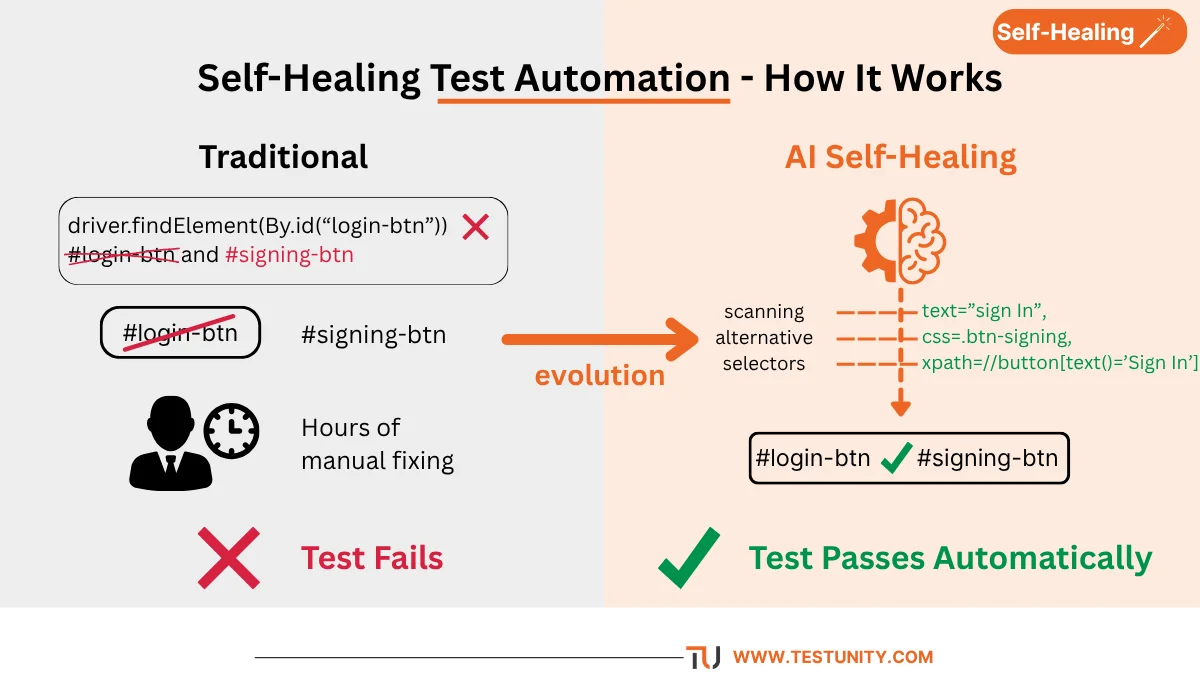
Traditional maintenance problem:
-
Developer changes a button’s ID from
#login-btnto#signin-btn. -
All tests using that ID fail.
-
QA engineer manually finds and updates each occurrence (hours of work).
AI self‑healing solution:
-
The AI detects the test failure.
-
It scans the page and finds the button by alternative attributes (text “Sign In”, CSS class, position relative to known elements).
-
It updates the internal locator automatically.
-
The test passes on next run, with an alert to the QA team that a change occurred.
Additional AI maintenance features:
-
Flaky test detection: AI identifies tests that pass/fail inconsistently and suggests root causes (timing, data race, environment).
-
Dead test removal: AI notices when a test has not failed or provided value for many runs and recommends deletion.
-
Test refactoring: AI suggests merging duplicate test steps or splitting overly long tests.
Result: Maintenance time can drop from 20–30% of QA effort to under 10%.
Q9: What Skills Do QA Engineers Need for AI‑Augmented Testing?
Answer:
You do not need to become a data scientist to benefit from AI in testing. However, the role of QA is evolving.
| Traditional QA Skill | New/Augmented Skill |
|---|---|
| Manual test case design. | Understanding AI‑generated tests – knowing when to trust, when to edit. |
| Writing automation scripts. | Configuring and supervising AI test tools. |
| Bug reporting. | Interpreting AI failure predictions and root cause suggestions. |
| Basic SQL and log reading. | Basic understanding of ML concepts (training data, overfitting, confidence scores). |
| Regression test selection. | Using AI prioritization outputs to guide test execution. |
Practical advice: Spend 10% of your learning time on AI fundamentals – what models can and cannot do, how to evaluate them, and prompt engineering for LLMs. The rest of your time should remain on domain expertise and testing craft.
Q10: How Do You Start Implementing AI in Testing?
Answer:
A pragmatic, phased approach works best. Do not try to “AI‑ify” everything at once.
Phase 1: Foundation (Weeks 1–4)
-
Identify one painful, repetitive area (e.g., flaky UI tests, under‑tested API).
-
Research and select a single AI‑powered tool for that area.
-
Run a small proof of concept on 5–10 test cases.
Phase 2: Pilot (Months 2–3)
-
Expand to a full feature or service.
-
Train your team on the tool and new workflows.
-
Measure time saved, defects found, and false positive rate.
Phase 3: Integration (Months 4–6)
-
Integrate the AI tool into your CI/CD pipeline.
-
Automate data collection for retraining (if needed).
-
Set up dashboards to monitor AI performance.
Phase 4: Scale (Month 6+)
-
Add additional AI capabilities (e.g., defect prediction on top of test generation).
-
Share learnings across teams.
-
Reassess ROI and tool fit quarterly.
Low‑risk starting points:
-
Self‑healing locators for Selenium/Cypress (add‑on plugins).
-
Visual testing with an AI tool like Applitools (quick win).
-
Test generation from OpenAPI (free or low‑cost with LLMs).
Q11: What Is the Future of AI in Testing?
Answer:
The next 3–5 years will bring significant advances in AI in testing. Here is what to expect.
| Near‑term (1–2 years) | Medium‑term (3–5 years) |
|---|---|
| Self‑healing becomes standard in all major automation frameworks. | AI agents that orchestrate entire test campaigns, from generation to reporting. |
| LLM‑based test generation from plain English acceptance criteria. | Predictive quality models that forecast release readiness with high accuracy. |
| AI flakiness detection built into CI/CD (automatically quarantine or fix). | Automated root cause analysis that not only detects but also suggests code fixes. |
| Visual AI for responsive/mobile testing widely adopted. | AI that learns from production data to adjust test priorities in real time. |
| Defect prediction integrated into code review tools. | Conversational QA – ask an AI “What should I test after this change?” |
Long‑term (5+ years): Fully autonomous testing agents that explore applications, file bugs, and even roll back bad deployments – always working alongside human testers as collaborators, not replacements.
Q12: How Does AI in Testing Relate to Other QA Trends?
Answer:
AI in testing amplifies and enables other modern testing practices.
| Trend | How AI Helps |
|---|---|
| Shift left | AI predicts defects early from code changes, before testing even begins. |
| Continuous testing | AI prioritizes tests for fast CI/CD feedback, making pipelines more efficient. |
| Test automation | Self‑healing reduces maintenance, the biggest automation barrier. |
| Risk‑based testing | AI risk models are more accurate and dynamic than static risk matrices. |
| Chaos engineering | AI can generate chaos experiments by analyzing system dependencies and predicting weak points. |
| Performance testing | AI models realistic user behavior from production data, creating better load tests. |
| Accessibility testing | AI can automatically detect WCAG violations (e.g., contrast ratios, missing alt text) at scale. See our Accessibility Testing Guide. |
Takeaway: AI is not a separate silo – it is an enabler across all quality activities.
Conclusion: Embrace AI as Your Testing Co‑Pilot
AI in testing is not a magic wand, but it is a powerful accelerator. It reduces drudgery, predicts problems before they happen, and helps QA teams focus on what humans do best: exploring, empathizing with users, and making strategic quality decisions.
Start small. Pick one pain point. Run a pilot. Measure results. Then expand. The teams that learn to work alongside AI will lead the next generation of software quality.
At TestUnity, we help organizations navigate the adoption of AI in testing – from tool selection and proof of concept to full integration into your QA pipeline. Our Test Automation Services incorporate AI where it delivers the most value.
Ready to make AI work for your testing team? Contact TestUnity today to explore how we can help you implement AI‑augmented QA.
Related Resources
-
Mutation Testing: Complete Advanced Guide – AI can enhance mutation analysis.
-
Chaos Testing Guide: Build Resilient Systems – AI for predicting failure modes.
-
Accessibility Testing Guide – AI for automated accessibility checks.
-
Test Automation Strategy: How to Plan, Execute, and Scale – AI as part of your automation roadmap.

TestUnity is a leading software testing company dedicated to delivering exceptional quality assurance services to businesses worldwide. With a focus on innovation and excellence, we specialize in functional, automation, performance, and cybersecurity testing. Our expertise spans across industries, ensuring your applications are secure, reliable, and user-friendly. At TestUnity, we leverage the latest tools and methodologies, including AI-driven testing and accessibility compliance, to help you achieve seamless software delivery. Partner with us to stay ahead in the dynamic world of technology with tailored QA solutions.





Do you have any video of that? I’d love to find out more details.
Thank you for your interest in our blog, Currently, we do not have any video content available on this topic. However, we aim to provide comprehensive written insights and are always looking for ways to enhance our content. If you have specific questions or areas you’d like to know more about, please feel free to ask! We’re here to help and would love to provide more details.
Hi there terrific website! Does running a blog such as this require a massive
amount work? I have very little knowledge of programming but I had been hoping to start my own blog soon. Anyways, if you have any suggestions or techniques
for new blog owners please share. I understand this is off
topic however I just had to ask. Cheers!
Thank you for your kind words! Running a blog does take some effort, but it can be very rewarding. Here are a few simple tips for new bloggers:
1. Pick a Niche: Focus on a topic you love.
2. Plan Content: Create a schedule for your posts.
3. Use Easy Platforms: Start with WordPress or Blogger; no coding needed!
4. Engage Readers: Respond to comments and build a community.
5. Promote: Share your posts on social media.
Stay consistent, and enjoy the journey! If you have more questions, feel free to ask. Cheers!