

Introduction: Why a Q&A on Risk‑Based Testing?
You have limited time, budget, and testers. Yet your application has hundreds or thousands of potential test cases. How do you choose what to test first? The answer is risk based testing – a strategic approach that prioritizes testing efforts based on the likelihood and impact of failures.
This Q&A guide answers the most common questions about risk‑based testing. You’ll learn how to identify risks, quantify them, create a risk matrix, and continuously adjust your testing priorities. The clear question‑and‑answer format makes it easy for you to find specific answers quickly – and helps search engines surface the right information when you need it.
Q1: What Is Risk‑Based Testing?
Answer:
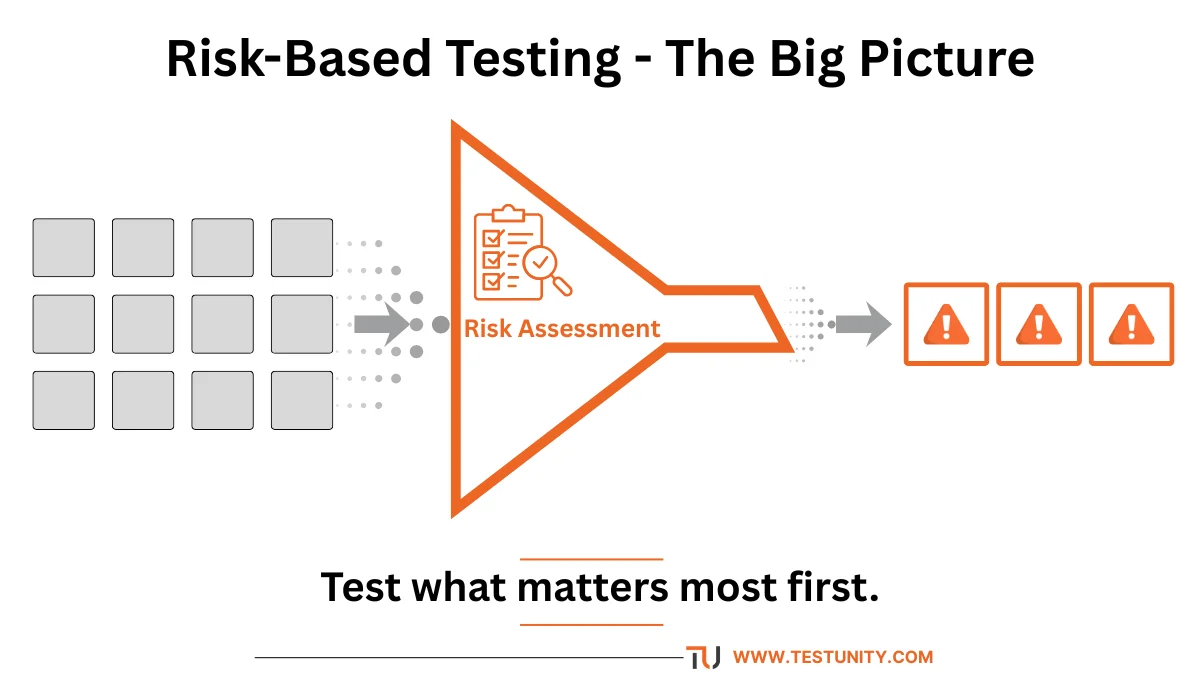
Risk based testing is a testing strategy that prioritizes test activities based on the identified risks associated with a software application. Instead of testing everything equally, you focus your efforts on areas where a failure would cause the most significant business impact or where the probability of failure is highest.
In simple terms: Test what matters most first.
Key elements of risk based testing:
-
Identify potential risks (what could go wrong).
-
Assess each risk’s probability (how likely it is to happen) and impact (how bad it would be).
-
Prioritize testing on high‑probability, high‑impact areas.
-
Allocate more test cycles, automation, and exploratory time to high‑risk features.
-
Use lower‑risk areas for light or regression‑only testing.
Example: In an e‑commerce app, the checkout and payment processing are high risk (failure = lost revenue, angry customers). The “about us” page is low risk (failure = minor embarrassment). Risk based testing directs most testing to checkout.
Q2: Why Is Risk‑Based Testing Important?
Answer:
No team can test everything exhaustively. Risk based testing helps you make the best use of limited resources. Here’s why it matters:
| Benefit | Explanation |
|---|---|
| Efficient resource allocation | Spend time where it reduces the most risk. |
| Faster time‑to‑market | Stop wasting cycles on low‑risk areas. Release sooner with confidence. |
| Better defect detection | Focus on complex, high‑risk code where bugs are most likely. |
| Demonstrates business value | Link testing efforts directly to business impact (revenue, compliance, safety). |
| Enhanced stakeholder communication | Use risk language that executives understand, not technical test coverage. |
| Proactive quality culture | Move from “find all bugs” to “prevent high‑impact failures.” |
Without risk based testing: Teams often test the easiest or most interesting parts first, leaving critical defects for later – or worse, for production.
Q3: How Do You Identify Risks for Testing?
Answer:
Risk identification is the first step in risk based testing. Gather input from multiple sources:
1. Stakeholder Workshops
Bring together developers, product owners, QA, operations, security, and business representatives. Ask:
-
Which features, if broken, would cost the most money?
-
Which failures would damage our brand or violate regulations?
-
Where has the most complex or frequently changed code been written?
2. Historical Data
Look at past projects:
-
Which modules had the highest defect density?
-
Where did production incidents occur?
-
What types of bugs caused the most downtime?
3. Code and Architecture Analysis
-
Complex modules (high cyclomatic complexity) are riskier.
-
Newly written or frequently changed code is riskier.
-
Third‑party integrations (payment gateways, APIs) are risk points.
4. Business Impact Analysis (BIA)
Identify business functions and assess the impact of their failure:
-
Critical: Cannot operate without it (e.g., login, checkout, patient records).
-
Important: Major inconvenience but workaround exists (e.g., report generation).
-
Nice‑to‑have: Minor annoyance (e.g., color theme preferences).
5. Regulatory and Compliance Requirements
If your industry has regulations (HIPAA, PCI‑DSS, GDPR), non‑compliance is a severe risk. Prioritize features that handle sensitive data.
Output: A list of risks, each with a brief description, affected component, and potential consequences.
Q4: How Do You Assess and Prioritize Risks?
Answer:
Once risks are identified, assess each on two dimensions: probability (likelihood of failure) and impact (severity of consequences). This is the core of risk based test prioritization.
Step 1: Define Scales
Probability (Likelihood)
| Level | Description | Example |
|---|---|---|
| High | Failure is very likely (>50% chance) | Newly written payment integration with known bugs. |
| Medium | Failure possible but not probable (10‑50%) | Feature that works in staging but has complex real‑world data. |
| Low | Unlikely to fail (<10%) | Stable, unchanged legacy code that has run for years. |
Impact (Severity)
| Level | Description | Example |
|---|---|---|
| High | Significant financial loss, safety issue, legal violation | Payment processing failing; medical device wrong dosage. |
| Medium | Major inconvenience, some revenue loss, brand damage | Search feature broken; users frustrated but can find products manually. |
| Low | Minor annoyance, cosmetic issue | Misaligned logo on a low‑traffic page. |

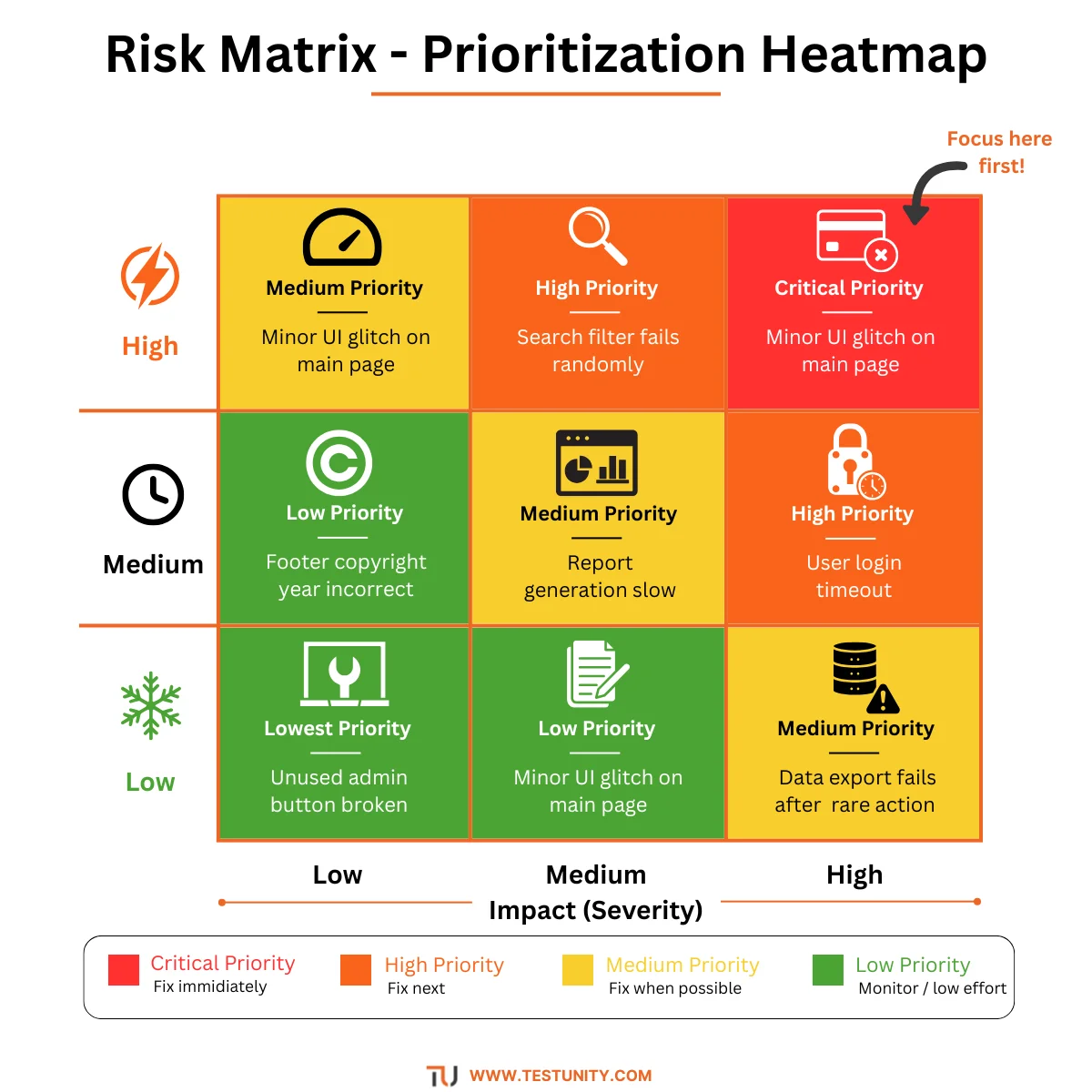
Step 2: Create a Risk Matrix
Place each risk in a 3×3 matrix. The highest priority is High Probability + High Impact (top‑right cell).
| Low Impact | Medium Impact | High Impact | |
|---|---|---|---|
| High Probability | Medium Priority | High Priority | Critical Priority |
| Medium Probability | Low Priority | Medium Priority | High Priority |
| Low Probability | Lowest Priority | Low Priority | Medium Priority |
Step 3: Assign Risk Priority Numbers (RPN)
For more granularity, use a numeric scale (e.g., 1–5 for probability, 1–5 for impact). Multiply them: Risk Score = Probability × Impact (max 25).
Example:
| Risk | Probability (1‑5) | Impact (1‑5) | Score |
|---|---|---|---|
| Payment gateway downtime | 4 | 5 | 20 |
| User login failure | 3 | 5 | 15 |
| Search relevance algorithm bug | 4 | 3 | 12 |
| Footer copyright year incorrect | 2 | 1 | 2 |
Higher score = higher testing priority.

Q5: How Do You Translate Risk Priorities Into a Test Plan?
Answer:
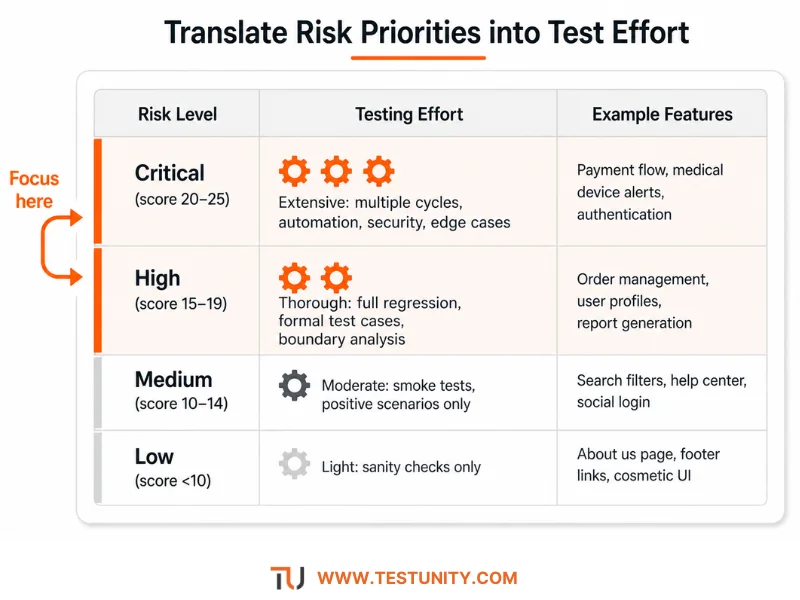
Once you have risk scores, allocate your testing efforts proportionally. This is where risk based testing becomes actionable.
| Risk Level | Testing Effort | Examples |
|---|---|---|
| Critical (score 20‑25) | Extensive testing: multiple cycles, automation + exploratory, negative testing, performance, security, edge cases. | Payment flow, medical device alerts, authentication. |
| High (15‑19) | Thorough testing: full regression, some automation, formal test cases, boundary value analysis. | Order management, user profile updates, report generation. |
| Medium (10‑14) | Moderate testing: smoke tests, positive scenarios only, lightweight regression. | Search filters, help center, social login. |
| Low (5‑9) | Light testing: sanity check only, or cover by high‑level smoke tests. | About us page, footer links, non‑critical static content. |
| Lowest (<5) | Minimal testing: include only if time permits. Or rely on development unit tests. | Cosmetic UI elements on internal admin pages. |
Integration with test cycles:
-
Sprint testing: Test high‑risk features first. If time runs short, low‑risk features wait.
-
Regression suite: Automate critical and high‑risk paths. Include medium‑risk as smoke tests. Exclude low‑risk.
-
Exploratory testing: Focus charter on high‑risk areas.
Q6: How Do You Handle Changing Risks Over Time?
Answer:
Risks are not static. Risk based testing must be dynamic. Reassess risks at each major milestone or when these events occur:
-
New features added – fresh code introduces new risks.
-
Major refactoring – even existing features become riskier.
-
Production incidents – the component where a bug escaped is now higher risk (add regression tests there).
-
Business priority changes – a feature that was low impact may become critical (e.g., a new promotion campaign).
-
Environmental changes – moving to a new cloud provider or database increases integration risk.
Practical cadence:
-
Weekly or bi‑weekly as part of sprint planning: update risk scores for features in the current sprint.
-
Every release (monthly/quarterly): full risk reassessment with stakeholders.
-
After every major production incident: review and adjust.
Q7: What Are Common Risk Assessment Models?
Answer:
Several models can support risk based testing. Choose one that fits your context.
| Model | Description | Best For |
|---|---|---|
| Qualitative (Low/Med/High) | Simple subjective scales for probability and impact. | Agile teams, small projects, early risk assessment. |
| Quantitative (1‑5 or 1‑10 scores) | Numeric scores multiplied (P × I = risk score). | Teams that need to compare risks numerically, create heatmaps. |
| FMEA (Failure Mode and Effects Analysis) | Systematic method: identify failure modes, causes, effects, and calculate Risk Priority Number (severity × occurrence × detection). | Safety‑critical systems (medical, automotive, aerospace). |
| ISO 31000 | Enterprise risk management standard. Adapt to software testing. | Large organizations with formal risk management frameworks. |
| Heuristic‑based | Use experience‑based checklists (e.g., “areas with many defects in last 3 months are high risk”). | Teams without formal risk data. |
Recommendation: Start with a simple qualitative matrix (Low/Med/High). As you mature, add numeric scoring.
Q8: How Does Risk‑Based Testing Differ from Traditional Testing?
Answer:
Traditional (exhaustive or ad‑hoc) testing treats all features equally. Risk based testing intentionally differentiates.
| Aspect | Traditional Testing | Risk‑Based Testing |
|---|---|---|
| Prioritization | All test cases are equal; often test easy things first. | Focus on high‑probability, high‑impact areas first. |
| Coverage goal | 100% test coverage (often unattainable or wasteful). | “Sufficient” coverage based on risk threshold. |
| Resource allocation | Spread evenly across features. | Concentrated on high‑risk features. |
| Regression testing | Run all regression tests every time (slow, expensive). | Run high‑risk regression every build; low‑risk less frequently. |
| Defect acceptance | All defects treated similarly. | High‑impact defects must be fixed; low‑impact may be postponed. |
| Exit criteria | “All test cases passed” (often unrealistic). | “All critical and high‑risk tests passed; medium risks accepted with mitigation.” |
Result: Risk‑based testing achieves higher quality at lower cost for the same effort.

Q9: How Do You Combine Risk‑Based Testing with Automation?
Answer:
Automation makes risk based testing even more powerful. Automate the high‑risk, repetitive parts.
Strategy:
| Risk Level | Automation Approach |
|---|---|
| Critical & High | Automate all regression scenarios. Run in CI/CD on every commit. Include performance and security automation for these paths. |
| Medium | Automate only the happy path and key integrations. Run nightly or on demand. |
| Low | No automation (or minimal smoke tests). Test manually during pre‑release only. |
Example: In a banking app:
-
High risk: money transfer, bill payment – full end‑to‑end automated regression.
-
Medium risk: viewing transaction history – automated API test only.
-
Low risk: changing password hint question – manual test once per release.
Also, use risk scores to prioritize which automated tests to fix when they become flaky. Fix a high‑risk flaky test immediately; a low‑risk test can wait.
Q10: How Do You Measure the Effectiveness of Risk‑Based Testing?
Answer:
Measure whether your risk based testing is working with these test metrics (see our Essential Test Metrics & KPIs guide for details).
| Metric | What It Measures | Target |
|---|---|---|
| Defect escape rate by risk level | Percentage of high‑risk defects found in production vs. total high‑risk defects. | Lower escape rate for high‑risk than low‑risk. |
| Time to test high‑risk areas | How quickly you complete testing on critical features. | Should be faster and sooner in the cycle. |
| Defect distribution | Where defects are found (high‑risk vs. low‑risk areas). | Majority of defects should be found in high‑risk areas (good sign). |
| Testing cost per risk level | Cost to test a high‑risk feature vs. low‑risk feature. | High‑risk may cost more per feature, but that’s acceptable. |
| Stakeholder satisfaction | Do business owners feel the most important parts are well‑tested? | Survey score >4/5. |
Regularly review: After each release, compare predicted risk (from your assessment) with actual defects found. Learn where you underestimated or overestimated risk, then adjust your assessment model.
Q11: What Are Common Pitfalls in Risk‑Based Testing?
Answer:
Avoid these mistakes to make your risk based testing successful.
| Pitfall | Solution |
|---|---|
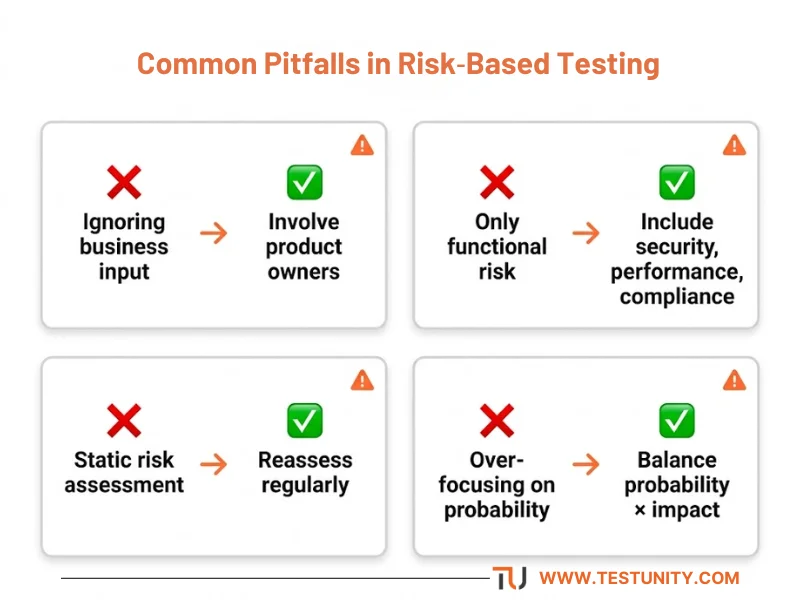
| Ignoring business input | Involve product owners and business stakeholders in risk assessment. They know impact better than QA. |
| Only considering functional risk | Also include performance, security, usability, and compliance risks. |
| Static risk assessment | Update risks regularly – they change as the software evolves. |
| Not documenting rationale | Without documentation, you cannot revisit why a risk was rated high or low. |
| Over‑focusing on probability, ignoring impact | A low‑probability but catastrophic risk (e.g., data corruption) still deserves testing. |
| De‑prioritizing low‑risk areas completely | Even low‑risk areas should get minimal smoke testing. Completely ignoring them can still bite you. |
| Using risk as an excuse to skip testing | Risk‑based testing is about smart prioritization, not skipping. Test everything – but intensity varies. |
Q12: How Do You Start Implementing Risk‑Based Testing?
Answer:
You don’t need a perfect process to begin. Follow these steps for a lightweight start.
Phase 1: Lightweight Qualitative (1‑2 weeks)
-
Gather a small group (QA lead, product owner, lead developer).
-
List 10–20 features or modules.
-
Rate each as High/Medium/Low for probability and impact.
-
Create a simple matrix; identify top 5 risks.
-
Write test cases or add exploratory charters for those top risks.
Phase 2: Quantitative Scoring (1–2 months)
-
Switch to 1–5 scales for probability and impact.
-
Calculate risk scores (P × I).
-
Define thresholds (e.g., >15 = critical, 10–15 = high, etc.).
-
Allocate test effort percentages according to risk levels.
-
Begin tracking defect escapes by risk level.
Phase 3: Continuous Improvement (ongoing)
-
Automate regression for critical and high‑risk features.
-
Schedule monthly risk reviews.
-
Use FMEA for safety‑critical parts.
-
Integrate risk scores into your test management tool (e.g., custom field in Jira).
Tooling: You can use spreadsheets initially. Later, consider test management tools that support risk‑based testing (e.g., TestRail with custom fields, Xray by risk, or Qase).

Conclusion: Start Testing Smarter, Not Harder
Risk based testing transforms QA from a cost center into a strategic value driver. By focusing your limited testing resources on what truly matters, you reduce the chance of catastrophic failures, accelerate delivery, and prove the business value of your testing efforts.
Start small – identify your top five risks this week. Then gradually build a more sophisticated process. The result: better software, happier stakeholders, and less wasted effort.
At TestUnity, we help QA teams implement risk based testing tailored to their unique product and business context. From risk assessment workshops to test prioritisation and automation alignment, our Quality Assurance Consulting services guide you every step of the way.
Ready to prioritize what matters most? Contact TestUnity today to discuss how we can help you adopt risk‑based testing.
Related Resources
-
How to Choose the Right Testing Types for Your Project – Risk is a key factor.
-
Build a Testing Strategy: Comprehensive Framework – A strategy must be risk‑based.
-
Chaos Testing Guide: Build Resilient Systems – Focus chaos experiments on high‑risk areas.
-
Essential Test Metrics and KPIs – Measure your risk‑based testing effectiveness.

TestUnity is a leading software testing company dedicated to delivering exceptional quality assurance services to businesses worldwide. With a focus on innovation and excellence, we specialize in functional, automation, performance, and cybersecurity testing. Our expertise spans across industries, ensuring your applications are secure, reliable, and user-friendly. At TestUnity, we leverage the latest tools and methodologies, including AI-driven testing and accessibility compliance, to help you achieve seamless software delivery. Partner with us to stay ahead in the dynamic world of technology with tailored QA solutions.



The distinction made in Q8 between risk-based testing and traditional methods really highlights why shifting focus to impact and likelihood is crucial for managing limited QA resources. I particularly found the phased approach in Q12 helpful, as moving from lightweight qualitative assessment to quantitative scoring seems like a practical way to implement this without overwhelming a team. Starting with stakeholder workshops to identify true business impact, as mentioned in the risk identification section, feels like the essential first step before even looking at the risk matrix.
Thank you for your comment! We appreciate your insights on the importance of shifting focus to impact and likelihood in QA. The phased approach in Q12 and starting with stakeholder workshops are indeed crucial steps for effective risk management. Your thoughts add great value to the discussion!
The section on combining stakeholder workshops with historical data for risk identification really highlights how practical Risk-Based Testing can be when resources are tight. I particularly appreciate the phased implementation approach, as moving from lightweight qualitative steps to quantitative scoring seems like a much more sustainable path for teams than trying to overhaul everything at once.
Thank you for your insightful comment! We’re glad to hear that you found the section on Risk-Based Testing practical and relevant, especially in resource-constrained environments. The phased implementation approach is indeed designed to make transitions smoother and more manageable for teams. Your feedback is greatly appreciated, and we hope to continue providing valuable content that resonates with our readers!
The structured timeline in Phase 1 for implementing lightweight qualitative risk assessment is a practical takeaway, especially for teams hesitant to jump straight into complex scoring models. I particularly appreciate how the post emphasizes the need to re-evaluate risks continuously rather than treating the assessment as a one-time upfront activity. This dynamic approach ensures testing remains aligned with shifting business priorities and regulatory requirements.
Thank you for your insightful feedback! We’re glad to hear that you found the structured timeline in Phase 1 for implementing lightweight qualitative risk assessment practical, especially for teams that may be hesitant about complex scoring models.
Your appreciation for the emphasis on continuous re-evaluation of risks is noted; it’s crucial for ensuring that testing stays aligned with changing business priorities and regulatory requirements. We aim to provide a dynamic approach that adapts to the evolving landscape, and your feedback reinforces the importance of this perspective. If you have any further thoughts or questions, we’d love to hear them!