

Choosing the right test automation framework is one of the most critical decisions your QA team will make. Pick the wrong one, and you’ll fight flaky tests, slow execution, and high maintenance. Pick the right one, and your automation becomes a reliable asset that accelerates delivery and catches regressions instantly.
With so many options—Selenium, Cypress, Playwright, Puppeteer, TestCafe, and more—how do you decide? This guide provides a comprehensive, side‑by‑side comparison of the leading test automation framework options. You’ll learn their strengths, weaknesses, ideal use cases, and a practical decision framework to choose the best framework for your project.
Table of Contents
ToggleWhat Is a Test Automation Framework?
A test automation framework is a set of guidelines, tools, libraries, and best practices that provide a structured foundation for creating and running automated tests. It handles common tasks like:
-
Locating UI elements (selectors)
-
Simulating user actions (clicks, typing, navigation)
-
Waiting for elements to appear
-
Asserting expected outcomes
-
Generating reports and logs
-
Integrating with CI/CD pipelines
A good test automation framework reduces boilerplate code, promotes reusability, and makes tests more maintainable. The framework you choose will shape your team’s productivity and the long‑term health of your test suite.
Overview of the Top Test Automation Frameworks
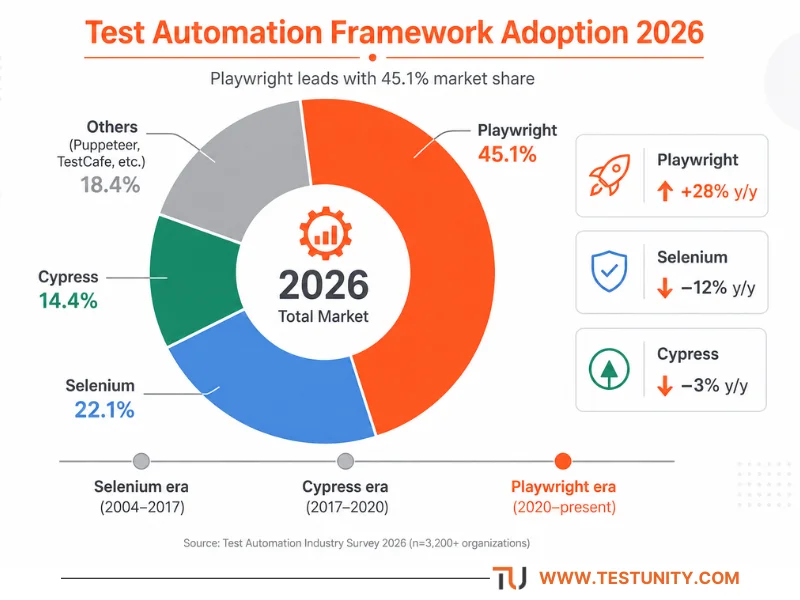
We’ll focus on the three most popular and powerful frameworks for web application testing: Selenium, Cypress, and Playwright. We’ll also briefly mention other notable options.
| Framework | Primary Language | Architecture | Best For |
|---|---|---|---|
| Selenium WebDriver | Java, Python, C#, JS, Ruby | Cross‑browser, external driver | Large enterprises, legacy apps, broad browser support |
| Cypress | JavaScript / TypeScript | In‑browser, event‑driven | Modern web apps (React, Angular, Vue), developer‑friendly |
| Playwright | JavaScript, Python, Java, .NET | Cross‑browser, single API | High‑speed, reliable cross‑browser testing, modern features |
Let’s dive into each.
Selenium WebDriver: The Veteran Workhorse
Selenium has been the industry standard for over a decade. It is not a single tool but a suite: Selenium WebDriver (the core), Selenium IDE (record and playback), and Selenium Grid (distributed execution).
Architecture
Selenium WebDriver interacts with browsers through a browser‑specific driver (ChromeDriver, GeckoDriver, etc.). The driver communicates with the browser using the WebDriver Wire Protocol (or the newer W3C protocol). Your test script runs outside the browser and sends commands over HTTP.
Pros
-
Mature and stable: Battle‑tested in thousands of projects.
-
Multi‑language support: Write tests in Java, Python, C#, Ruby, JavaScript, Kotlin.
-
Cross‑browser: Chrome, Firefox, Safari, Edge, Internet Explorer (legacy).
-
Mobile support: Appium (for mobile) is built on WebDriver.
-
Large ecosystem: Thousands of plugins, cloud providers (Sauce Labs, BrowserStack), and community resources.
Cons
-
Slow execution: Each command is an HTTP request, and waits are often implicit or explicit.
-
Flaky waits: Requires careful explicit waiting; no auto‑wait for elements.
-
No built‑in retry or visual debugging: You need third‑party tools.
-
Complex setup: Need to manage browser drivers and their versions.
-
Limited shadow DOM support: Works but requires custom code.
Best for
-
Large enterprises with existing Selenium investments.
-
Teams that need to support many browsers, including legacy IE.
-
Projects where language flexibility is important (e.g., Java backend teams).
-
When you need mobile testing via Appium.
Example (Python with pytest)
from selenium import webdriver
from selenium.webdriver.common.by import By

driver = webdriver.Chrome()
driver.get("https://example.com/login")
driver.find_element(By.ID, "username").send_keys("testuser")
driver.find_element(By.ID, "password").send_keys("Pass123")
driver.find_element(By.CSS_SELECTOR, "button[type='submit']").click()
assert "Dashboard" in driver.title
driver.quit()
Cypress: The Developer‑First Framework
Cypress emerged as a response to Selenium’s pain points. It runs directly inside the browser, giving it direct access to the DOM and network layer.
Architecture
Cypress operates in the same run loop as your application. It uses a proxy server to intercept all network requests, enabling native commands like cy.request() and cy.intercept(). Because it runs in the browser, it can automatically wait for elements without explicit sleeps.
Pros
-
Incredibly fast and reliable: Auto‑waiting, retries, and real‑time reloading.
-
Time travel debugging: See screenshots of each step; inspect DOM state at that moment.
-
Network control: Stub, mock, or spy on API requests easily.
-
Excellent developer experience: Clear error messages, interactive test runner.
-
Built‑in retries and flake reduction.
Cons
-
JavaScript only: No support for other languages (though TypeScript works).
-
Limited browser support: Chrome family (Chrome, Edge, Electron) and Firefox (newer). No Safari (limited support) or legacy IE.
-
No multi‑tab or multi‑domain support: You cannot drive two different domains in one test (e.g., if your app redirects to a third‑party payment gateway on another domain).
-
No native iframe support (improving).
-
Shadow DOM requires plugins or experimental flags.
Best for
-
Modern web apps built with React, Angular, Vue, or plain JavaScript.
-
Teams comfortable with JavaScript/TypeScript.
-
Projects that do not require Safari or multi‑domain workflows.
-
Developers who want to write and debug tests without switching contexts.
Example (JavaScript with Cypress)
describe('Login Test', () => {
  it('should log in successfully', () => {
    cy.visit('https://example.com/login')
    cy.get('#username').type('testuser')
    cy.get('#password').type('Pass123')
    cy.get('button[type="submit"]').click()
    cy.url().should('include', '/dashboard')
    cy.contains('Welcome, testuser')
  })
})
Playwright: The Modern Cross‑Browser Challenger
Playwright, developed by Microsoft, is the newest of the three. It shares some ideas with Puppeteer (Chrome‑only) but extends them to all major browsers with a single, fast API.
Architecture
Playwright communicates directly with browser engines via the Chrome DevTools Protocol (CDP) for Chromium, and similar protocols for Firefox and WebKit. Unlike Selenium, it does not use a generic WebDriver protocol, which makes it faster and more reliable. Tests run outside the browser but control it via a high‑speed channel.
Pros
-
Single API for all browsers: Chromium, Firefox, WebKit (Safari) – same code works everywhere.
-
Extremely fast: Auto‑waiting, parallel execution, and context isolation.
-
Modern features: Native shadow DOM support, network interception, geolocation, device emulation, file uploads, downloads.
-
Multi‑page and multi‑context: You can run multiple pages, handle popups, and even simulate multiple devices in one test.
-
Reliable selectors: Playwright auto‑waits for elements to be ready, and selectors can be text, CSS, XPath, or role‑based.
-
Codegen and inspector: Great for generating test code from manual actions.
-
Supports multiple languages: JavaScript, TypeScript, Python, Java, .NET.
Cons
-
Younger ecosystem: Fewer third‑party integrations than Selenium, but growing fast.
-
Resource usage: Can be heavier than Cypress for simple tests, but parallel execution mitigates.
-
Learning curve: The API is powerful but has more concepts (contexts, pages, fixtures).
Best for
-
Teams needing true cross‑browser testing (Chrome, Firefox, Safari) with one codebase.
-
Modern web applications with complex interactions (iframes, shadow DOM, multiple tabs).
-
Performance‑sensitive projects where test speed matters.
-
Teams that prefer TypeScript or Python for test automation.
Example (TypeScript with Playwright)
import { test, expect } from '@playwright/test';

test('valid login', async ({ page }) => {
  await page.goto('https://example.com/login');
  await page.fill('#username', 'testuser');
  await page.fill('#password', 'Pass123');
  await page.click('button[type="submit"]');
  await expect(page).toHaveURL(/.*dashboard/);
  await expect(page.locator('.welcome')).toHaveText('Welcome, testuser');
});
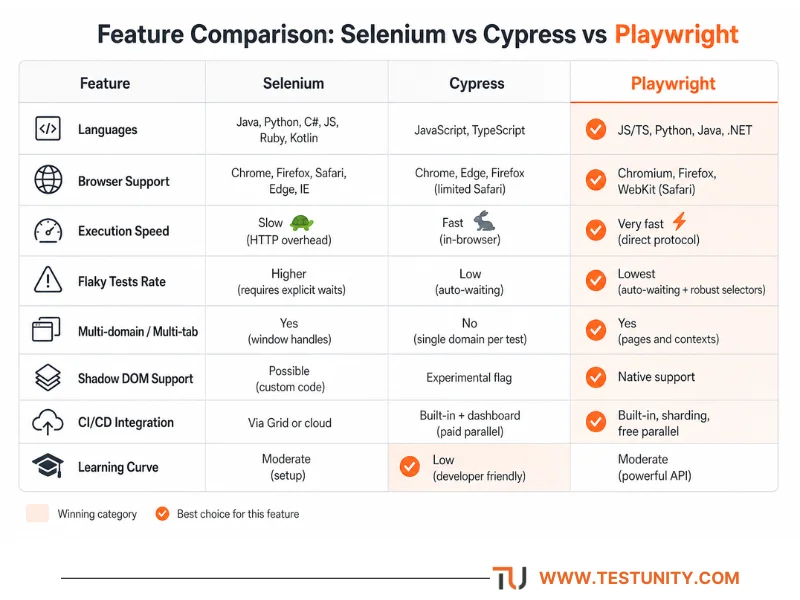
Head‑to‑Head Comparison: Selenium vs Cypress vs Playwright
| Feature | Selenium | Cypress | Playwright |
|---|---|---|---|
| Primary Languages | Java, Python, C#, JS, Ruby, Kotlin | JavaScript, TypeScript | JS/TS, Python, Java, .NET |
| Browser Support | Chrome, Firefox, Safari, Edge, IE | Chrome, Edge, Firefox (limited Safari) | Chromium, Firefox, WebKit (Safari) |
| Speed (execution) | Slow (HTTP overhead) | Fast (in‑browser) | Very fast (direct protocol) |
| Auto‑waiting | Manual explicit waits | Built‑in, automatic | Built‑in, automatic |
| Network Control | Requires proxy or extra tools | Native cy.intercept() |
Native page.route() |
| Multi‑domain / Multi‑tab | Yes (with window handles) | No (single domain per test) | Yes (pages and contexts) |
| Shadow DOM | Possible (custom code) | Experimental flag | Native support |
| Visual Debugging | Screenshots (manual) | Time‑travel, snapshots | Trace viewer, video |
| Parallel Execution | Via Grid or cloud | Via dashboard (paid) or split spec | Built‑in, sharding |
| Learning Curve | Moderate (setup) | Low (developer friendly) | Moderate (powerful API) |
| Community / Ecosystem | Huge (15+ years) | Large and growing | Fast‑growing (Microsoft backed) |
Other Test Automation Frameworks Worth Mentioning
-
Puppeteer: Chrome/Chromium only, great for web scraping and PDF generation, but less suited for cross‑browser testing.
-
TestCafe: No WebDriver dependency, runs on Node.js, supports multiple browsers, but slower than Playwright.
-
WebDriverIO: Built on Selenium WebDriver but adds many utilities, better developer experience than raw Selenium.
-
Robot Framework: Keyword‑driven, good for non‑programmers, but less flexible for complex UI automation.
For most new projects, the decision comes down to Cypress (if you are JavaScript‑only and don’t need Safari or multi‑domain) or Playwright (if you need true cross‑browser and modern features). Selenium remains a solid choice for legacy projects or when you must support Internet Explorer.
How to Choose the Right Test Automation Framework for Your Project

Follow this decision framework to select your test automation framework.
Step 1: Assess Your Application and Requirements
| Question | Leads toward |
|---|---|
| Do you need to test on Safari (macOS/iOS)? | Playwright (best) or Selenium (OK). Cypress has very limited Safari support. |
| Does your app use multiple domains or open new tabs? | Playwright or Selenium. Cypress struggles here. |
| Is your app built with React, Angular, or Vue? | Cypress or Playwright (both have great dev tools). |
| Does your team know JavaScript/TypeScript well? | Cypress or Playwright. |
| Does your team prefer Java or Python? | Selenium or Playwright (both support Python/Java). Cypress is JS only. |
| Do you need to test legacy browsers like IE11? | Selenium only. |
| Is test execution speed critical? | Playwright or Cypress (both fast; Playwright slightly faster for cross‑browser). |
| Do you need extensive network mocking? | Cypress (cy.intercept) or Playwright (page.route). |
| Do you need to run tests in CI/CD on every commit? | All three work, but Playwright and Cypress have better container support. |
| Is there an existing large Selenium suite? | Stick with Selenium unless you have a compelling reason to migrate. |
Step 2: Evaluate Team Skills and Training
-
If your team is already proficient in JavaScript, Cypress and Playwright will feel natural.
-
If your team is Java‑heavy, Selenium is the path of least resistance (though Playwright has a Java binding).
-
Consider the learning curve: Cypress is the easiest for beginners, Playwright is more powerful but steeper, Selenium requires understanding of drivers and waits.
Step 3: Consider Long‑Term Maintenance
-
Selenium has high maintenance if you rely on fragile XPath or CSS selectors. But with Page Object Model and good practices, it’s manageable.
-
Cypress encourages good patterns but can be tricky with async behavior if not careful.
-
Playwright’s auto‑waiting and robust selectors reduce flakiness, leading to lower maintenance over time.
Step 4: Run a Small Proof of Concept
Before committing, take one critical user journey and automate it in each candidate framework. Measure:
-
How long it took to write.
-
How reliable it is (run 10 times).
-
How easy it is to debug a failure.
-
How well it integrates with your CI/CD.
Step 5: Consider Integration with Your Ecosystem
-
Does the framework have a test runner that fits your stack (Jest, Mocha, pytest, JUnit)?
-
Can it produce reports in formats your team uses (JUnit XML, HTML, JSON)?
-
Does it support parallel execution across multiple machines (important for large suites)?
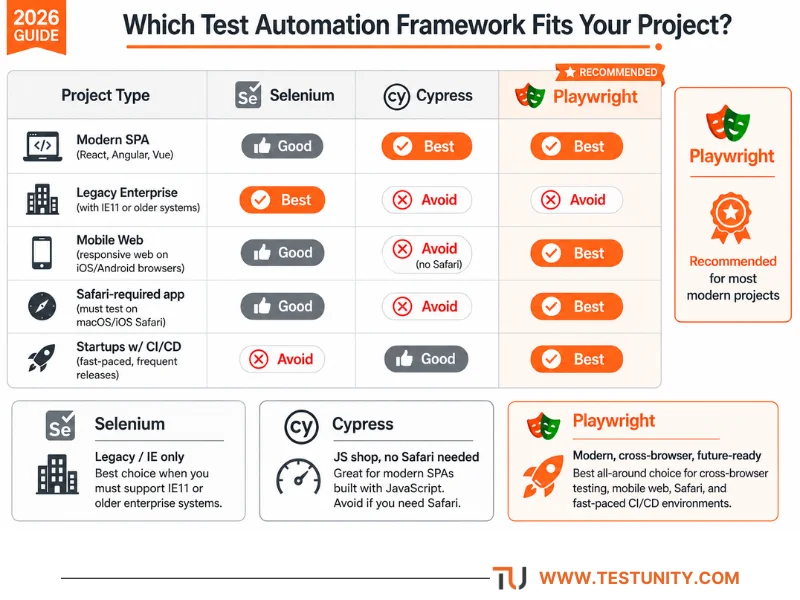
Real‑World Recommendation by Project Type
| Project Type | Recommended Test Automation Framework |
|---|---|
| Modern single‑page app (SPA) – React, Angular, Vue, no Safari requirement | Cypress |
| Modern SPA – must test on Safari and Chrome/Firefox | Playwright |
| Large enterprise app with legacy IE support | Selenium |
| Mobile web + desktop web (same codebase) | Playwright (with device emulation) |
| Microservices frontend with multiple domains | Playwright or Selenium |
| Team with strong Python or Java skills, no JS | Selenium or Playwright (both support) |
| Startup wanting fast, reliable CI/CD with minimal flakiness | Playwright |
| Project that already uses Selenium (large suite) | Stay with Selenium, but consider Playwright for new features |
Common Mistakes When Choosing a Test Automation Framework
-
Choosing based on popularity alone: Selenium is still popular, but Cypress and Playwright may be better for your specific needs.
-
Ignoring browser requirements: “We need to test on Safari” – that rules out Cypress for now.
-
Underestimating the learning curve: Selenium’s explicit waits cause many flaky tests for beginners.
-
Not testing the framework with your actual application: A framework that works perfectly on a demo site may fail on your complex, iframe‑heavy, shadow‑DOM‑ridden app.
-
Overlooking CI/CD integration: Does the framework run headless? Can it record videos on failure? Is it easy to parallelize?
Conclusion: Your Next Test Automation Framework
The best test automation framework is the one that fits your application, team, and long‑term goals. Today, Playwright offers the most modern, reliable, and cross‑browser capable solution for most teams. Cypress remains excellent for JavaScript‑only projects that don’t need Safari. Selenium is still a workhorse for enterprises with legacy requirements.
Don’t be afraid to use different frameworks for different parts of your system. For example, use Playwright for end‑to‑end web tests and a separate framework for API tests. The key is to make a deliberate, informed choice.
At TestUnity, we help organizations select, implement, and scale the right test automation framework for their unique context. Our Test Automation Services include framework selection guidance, proof‑of‑concept development, and full‑suite implementation.
Ready to choose and implement your ideal framework? Contact TestUnity today to discuss your project and get expert advice.
Related Resources

TestUnity is a leading software testing company dedicated to delivering exceptional quality assurance services to businesses worldwide. With a focus on innovation and excellence, we specialize in functional, automation, performance, and cybersecurity testing. Our expertise spans across industries, ensuring your applications are secure, reliable, and user-friendly. At TestUnity, we leverage the latest tools and methodologies, including AI-driven testing and accessibility compliance, to help you achieve seamless software delivery. Partner with us to stay ahead in the dynamic world of technology with tailored QA solutions.







Leave a Reply