

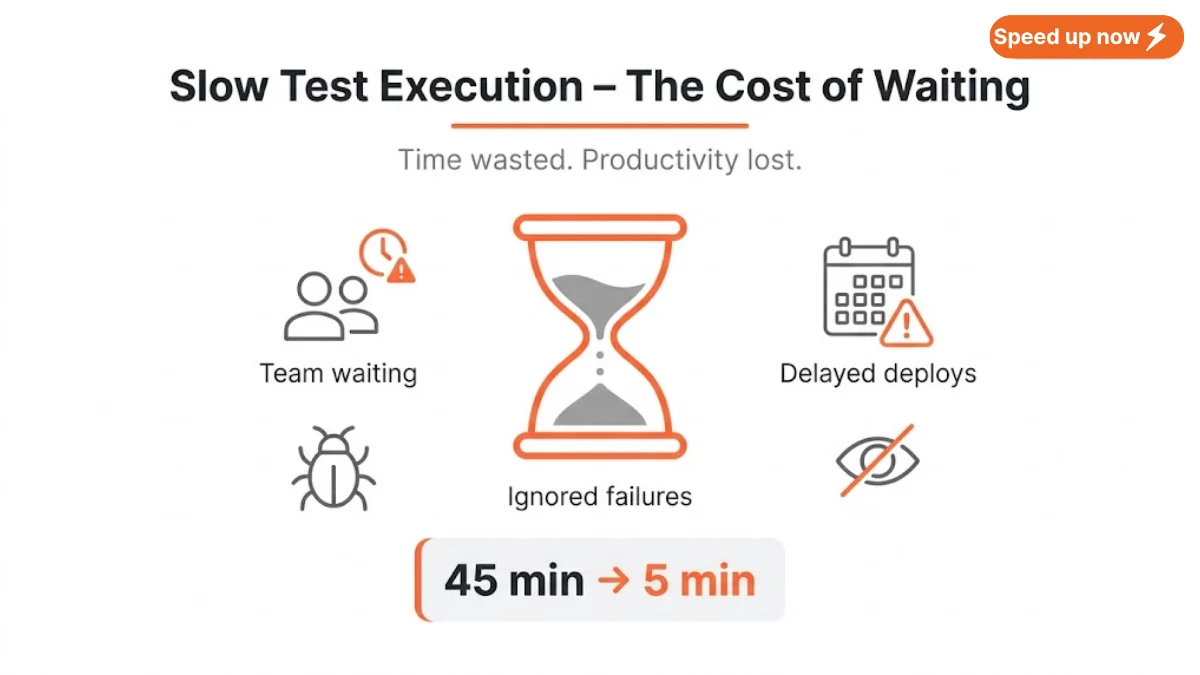
You run your test suite. It takes 45 minutes. You make a one‑line code change – run again – another 45 minutes. Your team is waiting. Deploys are delayed. Coffee runs out. Motivation drains.
Slow test execution is one of the top frustrations in QA and development. It kills productivity, encourages developers to skip tests, and makes people ignore test failures. A slow suite also breaks the feedback loop in CI/CD – instead of knowing within minutes if a change broke something, you find out an hour later, after context switching.
The good news: you don’t need a complete rewrite. You don’t need to buy bigger servers. Most slow test execution problems can be fixed with smart, incremental changes.
Here are 7 quick fixes you can apply today to eliminate slow test execution and get fast, reliable feedback.
Table of Contents
ToggleThe Short Answer
To fix slow test execution, run tests in parallel, remove redundant checks, replace UI tests with API tests, use smart waits, run only relevant tests, optimize database calls, and improve test data setup. Start with the easiest fixes first – you’ll see results in hours, not weeks.

Fix 1: Run Tests in Parallel to Combat Slow Test Execution
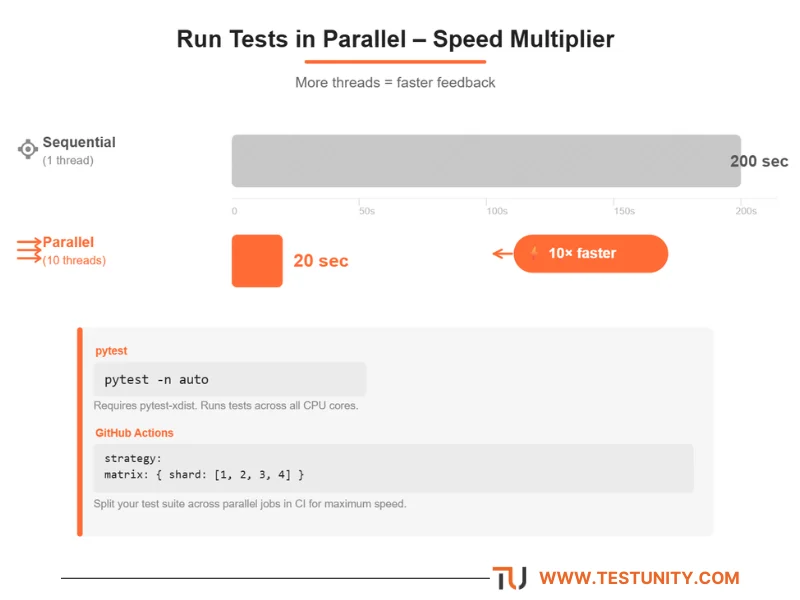
Slow test execution often happens because tests run one after another. Most test runners can run multiple tests at the same time. If you have 100 tests and each takes 2 seconds, running them one by one takes 200 seconds. With 10 parallel threads, it takes only 20 seconds.
How to implement:
| Tool | Command / Setting |
|---|---|
| pytest | pytest -n auto (requires pytest-xdist) |
| JUnit / Maven | <parallel>methods</parallel> + threadCount |
| Cypress | cypress run --record --parallel |
| Playwright | workers: 4 in config |
| GitHub Actions | strategy.matrix or jobs.<id>.strategy |
Example (GitHub Actions):
strategy:
  matrix:
    shard: [1, 2, 3, 4]
Example (pytest):
pytest -n auto tests/
Warning: Make sure your tests are independent – no shared state or database collisions. Use unique test data per thread (e.g., append thread ID to usernames).
Impact on slow test execution: Up to 75% reduction (4 threads = 4x faster).
Fix 2: Stop Testing the Same Thing Twice
Slow test execution is often caused by redundant tests. Many test suites have accidental overlap. A UI test might also test API logic that’s already covered by a much faster API test. An integration test might duplicate a unit test. Each duplicate adds execution time without new value.
How to find duplicates:
-
Review test names and descriptions for similar wording.
-
Use code coverage tools – if two tests cover the exact same lines, one is redundant.
-
Map tests to requirements – if two tests verify the same requirement, keep only the fastest.
What to do:
-
Keep the fastest test that covers the scenario (usually unit tests).
-
Remove or move redundant tests to a slower, less frequent run (e.g., nightly or weekly regression).
Example:
Don’t have a UI test that checks 2+2=4 if you already have a unit test for the calculator function. The UI test adds minutes; the unit test adds milliseconds.
Impact on slow test execution: 5–30% reduction in suite size.
Fix 3: Use API Tests Instead of UI Tests for Logic
UI tests (Selenium, Cypress, Playwright) are 10–100x slower than API tests. A UI login test might take 10 seconds (browser launch, navigation, typing, waiting). An API login test takes 0.2 seconds (single HTTP request). Slow test execution is almost guaranteed if your suite is UI‑heavy.
Rule of thumb:
Test business logic via API whenever possible. Use UI tests only for actual user interface behavior – layout, navigation, end‑to‑end flows that span multiple pages or involve complex UI interactions.
Example: UI login test (slow)
cy.visit('/login');
cy.get('#username').type('user');
cy.get('#password').type('pass');
cy.get('button').click();
cy.url().should('include', '/dashboard');
Example: API login test (fast)
cy.request('POST', '/api/login', { username: 'user', password: 'pass' })
  .its('status').should('eq', 200);
Impact on slow test execution: 10 seconds → 0.5 seconds (20x faster). If you have 100 UI tests that could be API tests, that’s 16 minutes saved per run.

Fix 4: Replace Hard Waits with Smart Waits to Fix Slow Test Execution
Hard waits (sleep(5), time.sleep(5), Thread.sleep(5000)) are the #1 cause of unnecessarily slow test execution. You wait 5 seconds even when the element appears in 0.5 seconds. Multiply that by hundreds of tests, and you waste hours.
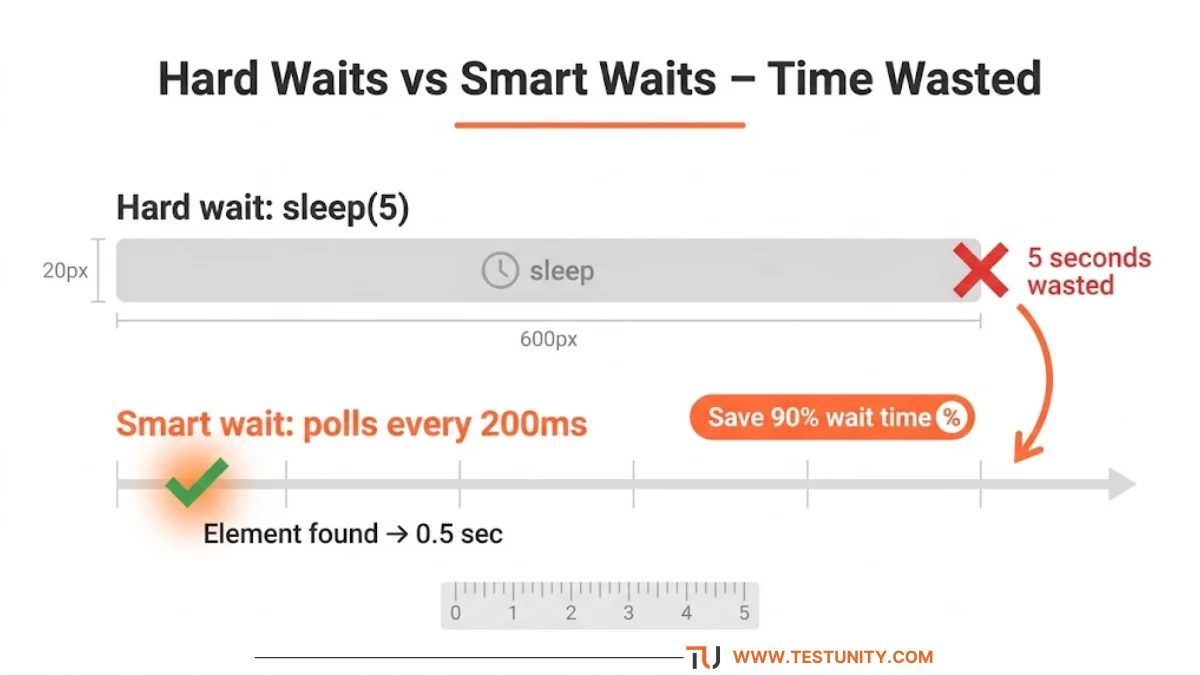
Solution: Use built‑in smart waits that poll for the condition every few hundred milliseconds.
| Tool | Smart Wait Method |
|---|---|
| Selenium | WebDriverWait + ExpectedConditions |
| Cypress | Auto‑retry by default (avoid cy.wait(5000)) |
| Playwright | Auto‑waiting for elements (page.click() waits) |
| Puppeteer | page.waitForSelector() or page.waitForFunction() |
Bad (hard wait):
time.sleep(5)
driver.find_element(By.ID, "submit")
Good (smart wait):
WebDriverWait(driver, 10).until(
    EC.visibility_of_element_located((By.ID, "submit"))
)
Impact on slow test execution: Each smart wait reduces wait time from 5 seconds to ~0.5 seconds average. For 200 such waits, that’s 15 minutes saved.
Fix 5: Run Only Relevant Tests (Selective Testing)
Why run all 2000 regression tests when you only changed a single API endpoint? Running everything is a major cause of slow test execution with no benefit. Instead, run only the tests that touch the changed code.
Implementation approaches:
-
Test impact analysis (TIA): Tools automatically detect which tests cover changed code.
-
pytest:
pytest-testmon -
Jest:
jest --findRelatedTests
-
-
Manual tagging: Tag tests by feature (
@smoke,@critical,@api,@slow). Run only relevant tags on feature branches.bashpytest -m "smoke or api" # runs only smoke and api tests
-
CI/CD triggers: Run full suite only on main branch. On feature branches, run only smoke tests + tests in changed directories.
Example (GitHub Actions conditional):
if: github.ref == 'refs/heads/main'
run: pytest tests/
Impact on slow test execution: From 1 hour to 5 minutes on a feature branch.
Fix 6: Speed Up Database and External Calls
Slow test execution is often caused by tests that hit a real database or external API. Each call adds network latency (10–100ms), database processing (10–500ms), and potential locking/contention.
Fixes (in order of effectiveness):
-
Use an in‑memory database for tests (H2, SQLite, MongoDB in‑memory). It runs in the same process – no network, no disk I/O.
-
Mock external APIs with tools like WireMock, MockServer, or nock. Responses are instant.
-
Use test fixtures (pre‑loaded data) instead of creating new data for each test. Load once, reuse.
-
Use transactions and rollback – Spring
@Transactional, DjangoTransactionTestCase, or manualBEGIN/ROLLBACK. This avoids expensive cleanup. -
Disable unnecessary features in test mode (e.g., email sending, logging, background jobs).
Example (pytest with in‑memory DB):
DATABASES = {
    'default': {
        'ENGINE': 'django.db.backends.sqlite3',
        'NAME': ':memory:',
    }
}
Impact on slow test execution: Database tests go from 500ms to 20ms (25x faster).
Fix 7: Optimize Test Data Setup
Creating test data from scratch for every test is a hidden driver of slow test execution. If each test creates a new user, a new order, a new payment, and a new shipment, you waste minutes.

Better approaches:
-
Pre‑seed common data once before the test run (e.g., default users, products, configs). Use
setup_classorbeforeAll. -
Clone a database snapshot instead of running migrations for each test.
-
Use object factories (FactoryBot, Faker) but cache where possible. Don’t create the same parent objects repeatedly.
-
Use synthetic test data generated once and shared across tests (read‑only).
Example (pytest fixtures with scope):
@pytest.fixture(scope="session")
def shared_user():
    return User.objects.create_user("shared@example.com")
Impact on slow test execution: 2 seconds per test × 500 tests = 16 minutes.
Bonus Fix: Apply the Test Automation Pyramid
If you’ve tried all seven fixes and slow test execution persists, you may have too many high‑level tests. The test automation pyramid says:
-
Many unit tests (fast, cheap)
-
Fewer integration tests (medium)
-
Very few UI / end‑to‑end tests (slow, expensive)
If your pyramid is inverted (lots of UI tests, few unit tests), no amount of optimization will make it fast. You need to restructure: add unit tests and reduce UI tests.
Goal: 70% unit, 20% integration, 10% UI.
What If Nothing Works?
You’ve tried all seven fixes (and the bonus). Slow test execution is still hurting your team. Sometimes the problem is deeper: legacy architecture, tangled dependencies, poorly designed tests that need a professional overhaul, or a testing culture that never prioritized speed.
That’s where TestUnity comes in. Our Test Automation Services include:
-
Test suite health assessment – we identify bottlenecks causing slow test execution.
-
Parallel execution implementation – even for complex suites.
-
UI to API conversion – move slow UI tests to fast API tests.
-
Selective testing integration – run only what matters.
You get fast, reliable feedback without rebuilding everything yourself.
Ready to eliminate slow test execution? Contact TestUnity today for a free test suite consultation. We’ll show you how to cut your test execution time by 50–80%.
Related Resources
-
Performance Testing: Tools, Metrics & Best Practices – Deep dive into performance metrics.
-
Integrating Testing into Your CI/CD Pipeline – Run fast tests in your pipeline.
-
Essential Test Metrics and KPIs – Track execution time trends.
-
Test Automation Strategy: How to Plan, Execute, and Scale – Build a maintainable, fast suite.

TestUnity is a leading software testing company dedicated to delivering exceptional quality assurance services to businesses worldwide. With a focus on innovation and excellence, we specialize in functional, automation, performance, and cybersecurity testing. Our expertise spans across industries, ensuring your applications are secure, reliable, and user-friendly. At TestUnity, we leverage the latest tools and methodologies, including AI-driven testing and accessibility compliance, to help you achieve seamless software delivery. Partner with us to stay ahead in the dynamic world of technology with tailored QA solutions.



Leave a Reply