

You’ve written your tests. They pass perfectly on your machine. You push your changes with confidence. The CI pipeline runs… and fails. The same tests that worked locally are now failing in CI.
This is one of the most common and frustrating problems in test automation and CI/CD . Every SDET has faced this: Tests pass locally Fail in CI . In most cases, these failures expose real differences between your local environment and the CI environment – or hidden assumptions in your tests themselves . Understanding why tests pass locally but fail in CI is essential for building reliable pipelines.
The Short Answer
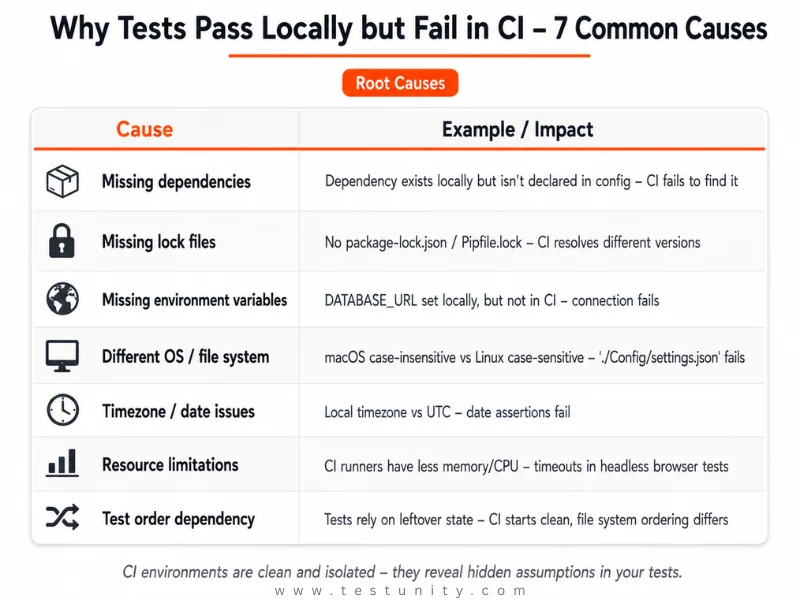
Tests pass locally but fail in CI because local and CI environments are different. Local environments accumulate cached dependencies, globally installed tools, and leftover state over time. CI environments start clean and isolated on every run. CI failures often reveal: missing or mismatched dependencies, different OS or file systems, missing environment variables, timezone differences, resource limitations, test order dependencies, or unreliable third‑party services.
The Core Problem: Local vs. CI Environments Are Not the Same
Local development environments are rarely clean. Over time, they accumulate cached dependencies, globally installed tools, background services, and leftover state. CI environments are intentionally the opposite .
Why tests pass locally but fail in CI is usually because CI platforms run each job in a clean, isolated environment with:
-
Explicitly defined operating systems and runtimes
-
No hidden state unless configured
-
Only declared dependencies
-
Known machine types and resource limits
This difference is intentional. CI environments are designed to be reproducible. When something fails in CI but passes locally, CI is often revealing a real issue – not the other way around.
Why Tests Pass Locally but Fail in CI: 7 Common Causes
Here are the seven most common reasons tests pass locally but fail in CI, along with practical solutions for each.
Fix 1: Missing or Undeclared Dependencies
The Problem: A dependency exists on your local machine (installed globally or as a leftover) but isn’t declared in your project’s configuration. CI installs dependencies from scratch, so the dependency isn’t found .

Example:
-
Locally: Tests pass because
uuidpackage is installed -
CI: Fails with
Error: Cannot find module 'uuid'
Fix: Declare all dependencies explicitly in your configuration file:
{
  "dependencies": {
    "uuid": "^9.0.0"
  }
}
Fix 2: Missing Lock Files or Dependency Drift
The Problem: Even with declared dependencies, builds can behave differently if lock files are missing. Without package-lock.json, yarn.lock, Pipfile.lock, or Gemfile.lock, package managers resolve version ranges dynamically.
Why This Matters: CI pipelines install dependencies from scratch. If no lock file is present, CI may resolve newer dependency versions than those installed locally – leading to unexpected failures.
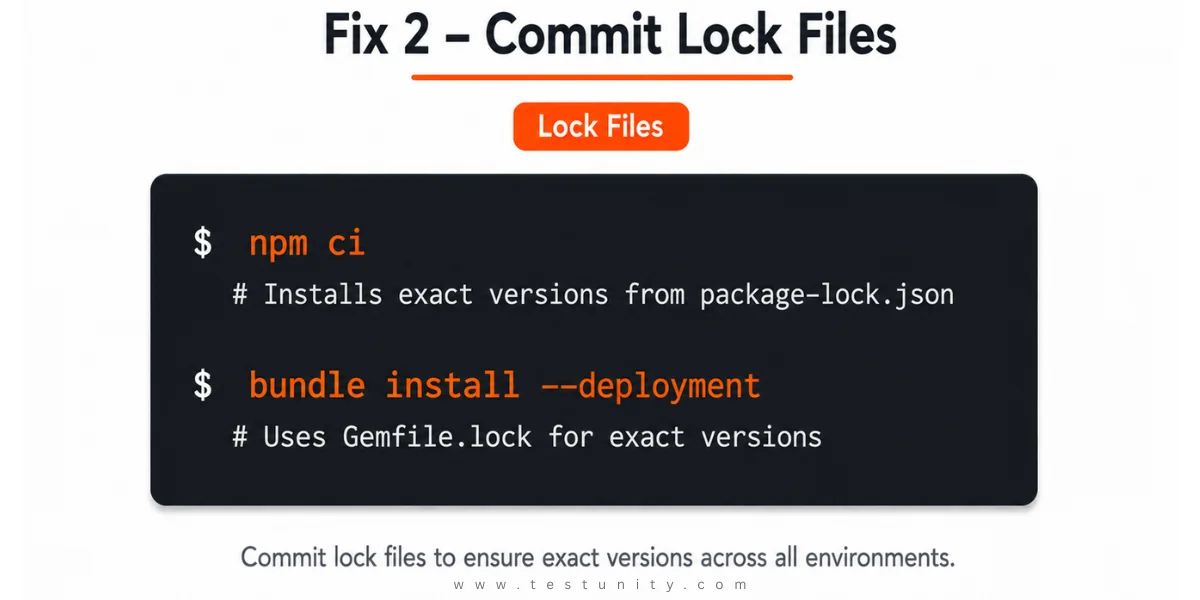
Fix: Commit lock files and use deterministic install commands:
npm ci  # instead of npm install
# or
bundle install --deployment
Fix 3: Missing Environment Variables
The Problem: Tests often rely on configuration via environment variables. Your local machine has them set. CI starts empty.
Fix: Define environment variables in your CI/CD platform (GitHub Secrets, GitLab CI variables, etc.):
# GitHub Actions example
env:
  DATABASE_URL: postgres://user:pass@localhost/db
  API_KEY: ${{ secrets.API_KEY }}

Fix 4: Different OS and File System Behavior
The Problem: Local machines often run macOS or Windows, while CI environments run Linux. File system case sensitivity is a common source of failure.
Example:
Error: Cannot find module './Config/settings.json'
On macOS this may work, but on Linux it fails because Config vs config.
Fix: Use consistent naming conventions. Don’t rely on case insensitivity. Use path resolution that works across platforms:
const path = require('path');
const config = require(path.join(__dirname, 'config', 'settings.json'));
Fix 5: Timezone and Date Issues
The Problem: CI machines may have different timezone settings. If your tests use dates and assume a specific timezone, they’ll fail.
Example: A test checking that a date on a page matches the current date might assume U.S. Pacific Time and fail when run in a different timezone.
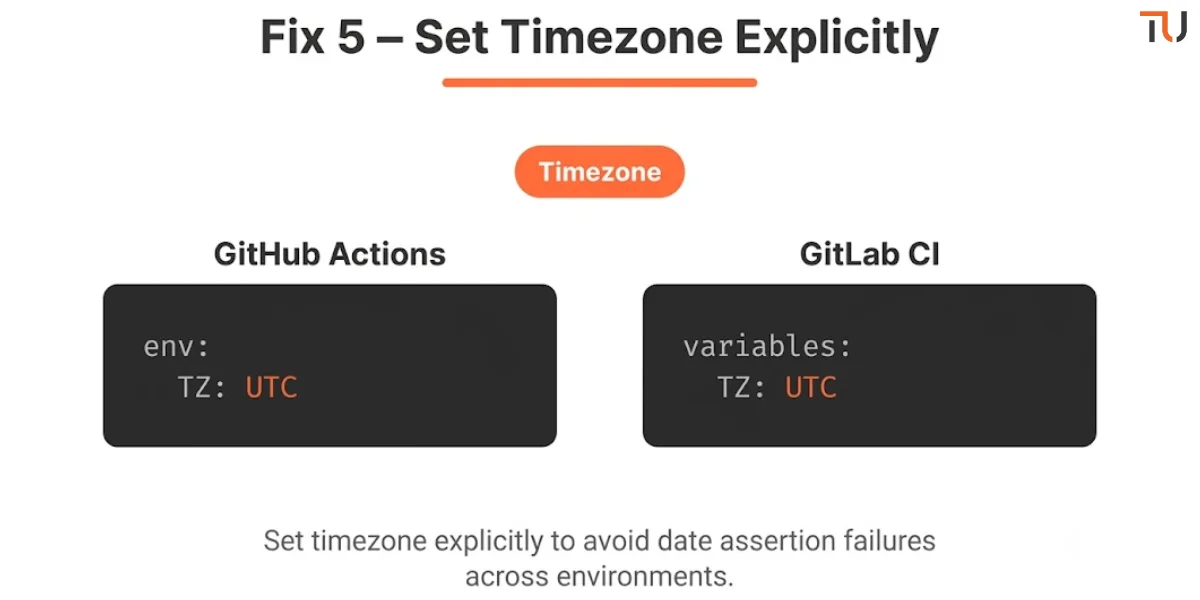
Fix: Set timezone explicitly in CI:
# GitHub Actions
env:
  TZ: UTC
# GitLab CI
variables:
  TZ: UTC
Fix 6: Resource Limitations (Memory, CPU, Timeouts)
The Problem: CI services often use lower-powered servers with fewer resources than a developer’s machine. Web-based tests loading a browser in “headless” mode may time out due to resource constraints.
Fix:
-
Increase timeout values for CI runs
-
Use smaller test datasets
-
Run fewer parallel jobs
-
Monitor memory usage in CI logs
Fix 7: Test Order Dependency
The Problem: Tests rely on leftover state from previous runs locally, but CI starts clean every run. File system ordering differences can also cause issues – local filesystems maintain ordered file structures, while CI containers are unordered.
Fix: Make tests independent – each test should run successfully alone. Use setup/teardown methods to ensure a clean state before each test.

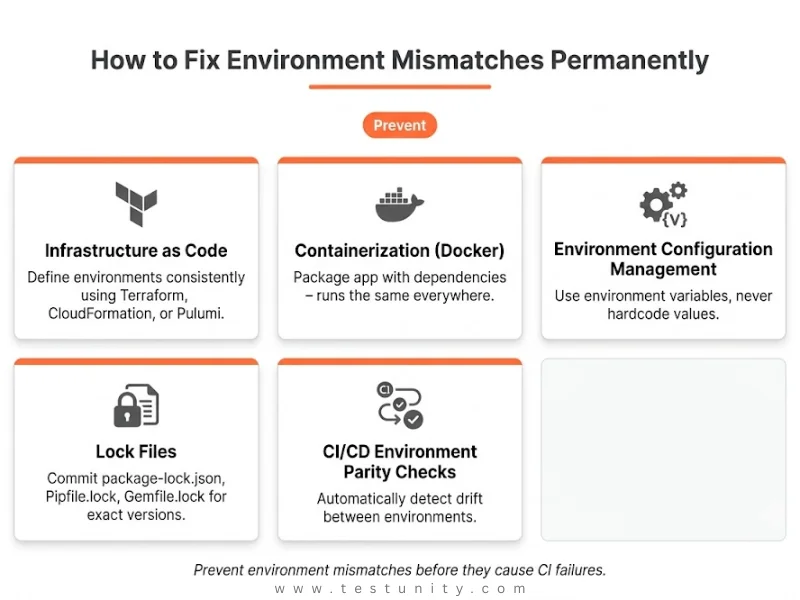
How to Fix Environment Mismatches Permanently
When tests pass locally but fail in CI due to environment mismatches, these permanent fixes will help:
| Practice | How It Helps |
|---|---|
| Infrastructure as Code (IaC) | Define environments consistently (Terraform, CloudFormation) |
| Containerization (Docker) | Package applications with dependencies – runs the same everywhere |
| Environment Configuration Management | Use environment variables, not hardcoded values |
| Lock Files | Ensure exact dependency versions |
Use Containerization (Docker)
Docker packages your application with all its dependencies so it runs the same everywhere.
Basic Dockerfile:
FROM node:16-alpine
WORKDIR /app
COPY package*.json ./
RUN npm install
COPY . .
EXPOSE 3000
CMD ["npm", "start"]
With this, your application runs in the same container environment whether it’s on a developer’s laptop or in CI.
Quick Diagnosis Checklist
When tests pass locally but fail in CI, work through this checklist:
| Check | Action |
|---|---|
| Dependency versions | Compare package-lock.json / Pipfile.lock |
| Environment variables | Are they set in CI? |
| OS differences | Check case sensitivity, path separators |
| Timezone | Set TZ=UTC in CI |
| Resource limits | Check memory/CPU in CI logs |
| Test order | Run tests with --random-order locally |
| Third-party services | Is the service reachable from CI? |

What If You’re Still Stuck?
You’ve checked dependencies, environment variables, timezone, and resource limits. The failure still happens. Some environment mismatches are subtle – legacy infrastructure, complex microservice dependencies, or deep configuration drift.
That’s where TestUnity’s Test Automation Services help. We specialize in diagnosing CI environment failures, implementing environment parity strategies, and building reliable test pipelines.
Need expert help? Contact TestUnity today for a free consultation.
Related Resources
-
Integrating Testing into Your CI/CD Pipeline – CI/CD testing best practices
-
Continuous Testing: The Backbone of Modern DevOps – CI/CD context
-
My CI Pipeline Fails Because of Tests – Stop test failures in CI

TestUnity is a leading software testing company dedicated to delivering exceptional quality assurance services to businesses worldwide. With a focus on innovation and excellence, we specialize in functional, automation, performance, and cybersecurity testing. Our expertise spans across industries, ensuring your applications are secure, reliable, and user-friendly. At TestUnity, we leverage the latest tools and methodologies, including AI-driven testing and accessibility compliance, to help you achieve seamless software delivery. Partner with us to stay ahead in the dynamic world of technology with tailored QA solutions.



Leave a Reply