

You write a test. It passes. You run it again an hour later – it fails. Nothing changed in your code. The reason? The test data was deleted, modified, or used by someone else. Sound familiar?
Knowing how to manage test data is one of the most underrated skills in software testing. Without a solid test data management strategy, your tests become unreliable, your team wastes hours debugging data issues, and your confidence in the test suite plummets.
This guide gives you a simple, practical strategy to achieve stable test data – without expensive tools or complex processes. Follow these 7 steps, and you’ll finally manage test data like a pro.
The Short Answer
To manage test data effectively, stop creating data from scratch for every test. Instead, use a shared read‑only dataset for common scenarios, seed data once before test runs, isolate test data by test case using unique identifiers, and automate data refresh from a known good state. That’s your core test data management strategy.
Why Test Data Keeps Breaking (And Why You Need a Strategy)
Before we fix the problem, let’s understand why how to manage test data feels so difficult. Common test data problems include:
| Symptom | Root Cause |
|---|---|
| Test passes alone, fails in suite | Tests share data and interfere with each other |
| Test fails after a new deployment | Environment reset, but data wasn’t re‑seeded |
| Test fails intermittently | Data modified by other tests or manual testers |
| Test fails in CI but not locally | CI uses a fresh database without seed data |
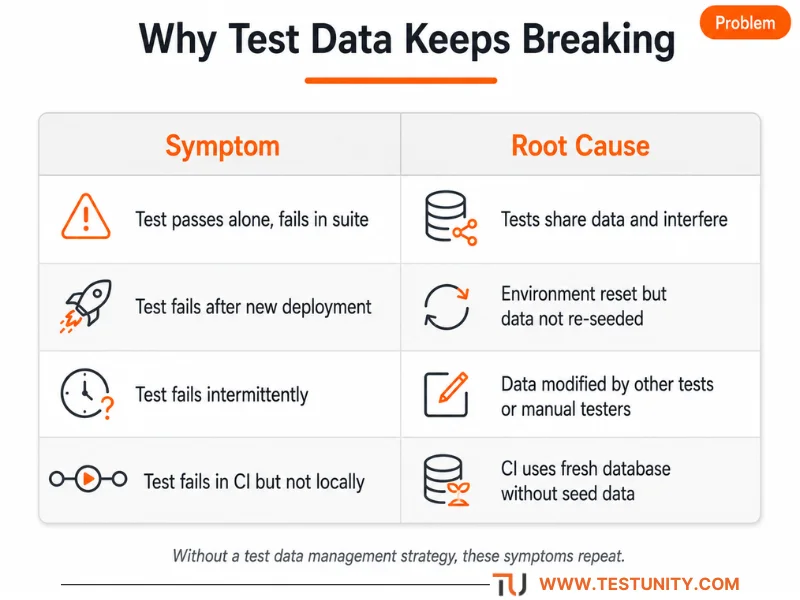
Without a clear test data management strategy, these symptoms will keep recurring. The good news: all these problems have simple solutions. Learning how to manage test data means applying consistent patterns – not buying expensive tools.
The 7-Step Test Data Management Strategy

Step 1: Understand Your Test Data Requirements
Before you can manage test data, know what your tests actually need. Different test types require different data:
| Test Type | Data Needed |
|---|---|
| Unit tests | Small, isolated datasets (often in‑memory) |
| Integration tests | Realistic data with relationships (databases, APIs) |
| End‑to‑end tests | Production‑like data across multiple systems |
Action: Audit your test suite. List every test and the data it depends on. You’ll likely find duplicates and unnecessary dependencies.
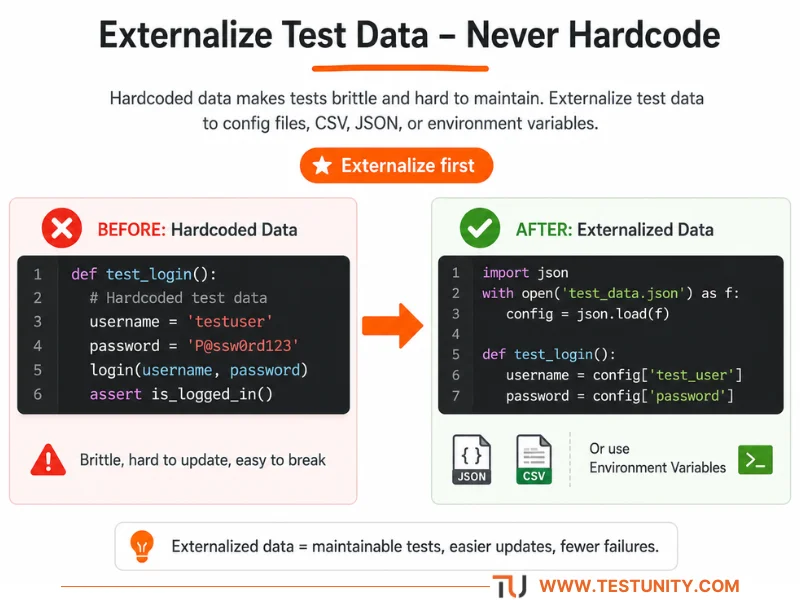
Step 2: Externalize Your Test Data (Never Hardcode)
One of the most important rules for how to manage test data is: never hardcode data in your test scripts.
Why externalize?
-
Update data without touching code
-
Same script works across environments (dev, QA, staging)
-
Easier to review and version control
How to implement:
-
Store test data in JSON, CSV, or YAML files
-
Use environment variables for environment‑specific values
-
Create data factories (like FactoryBot or Faker) to generate data on the fly
Step 3: Isolate Test Data by Test Case
The #1 cause of broken tests is sharing. When two tests use the same database row, one test can delete or modify it, breaking the other. To achieve stable test data, isolation is non‑negotiable.
Solution: Every test should create its own data – and clean it up. Use unique identifiers so tests never collide.
Patterns for isolation:
-
Append a unique ID to usernames, emails, or order numbers (e.g.,
user_{uuid4()}@example.com) -
Use test‑specific database schemas (e.g., schema per test class)
-
Wrap each test in a transaction that rolls back at the end

Example (JUnit with @Transactional):
@Test
@Transactional  // rolls back after test
public void testCreateOrder() {
    User user = new User("test_" + UUID.randomUUID());
    userRepository.save(user);
    // test logic... cleanup happens automatically
}
Result: Tests become independent. One test cannot break another. This is the foundation of any good test data management strategy.
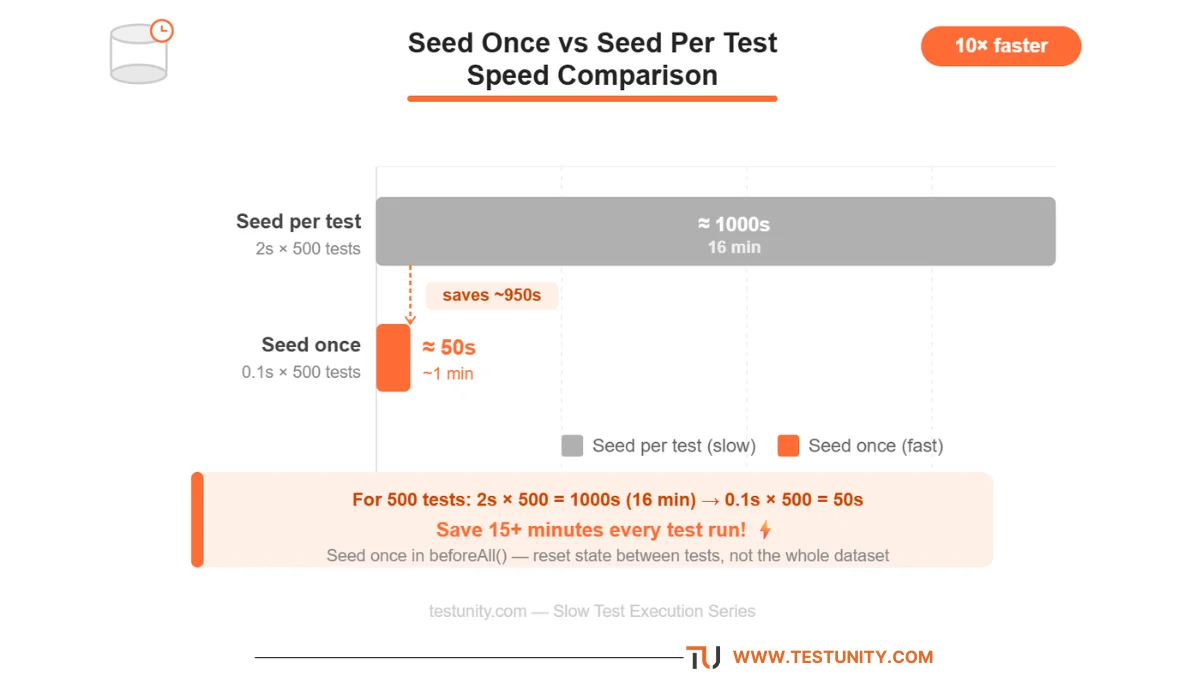
Step 4: Seed Your Database Once, Not Per Test
Many test suites spend most of their time creating the same data repeatedly – users, products, orders. This is slow and unnecessary. A better way to manage test data is to pre‑seed a baseline dataset once before the entire test run.
How to implement:
-
Use your database migration tool to load seed data (
db:seedin Rails,loaddatain Django) -
For tests, restore a database snapshot before the test run
-
Use
setUpTestDatain Django – creates data once per test class
Example (Django):
class MyTests(TestCase):
    @classmethod
    def setUpTestData(cls):
        # Runs once for the whole test class
        cls.admin = User.objects.create_user("admin", is_staff=True)
        cls.product = Product.objects.create(name="Laptop", price=999)
Step 5: Refresh and Reuse Test Data Smartly
Knowing when to refresh data and when to reuse it is key to how to manage test data efficiently.
| Approach | When to Use |
|---|---|
| Reuse data | Read‑only reference data (countries, product categories) |
| Refresh per test | Tests that modify data (create, update, delete) |
| Refresh per suite | Long‑running test suites (nightly regression) |
Techniques for refreshing:
-
Database transactions that roll back after each test (fastest)
-
Database snapshots restored before the test run
-
Docker containers with ephemeral databases
Step 6: Protect Sensitive Data (Compliance First)
If you use production data for testing, you must protect sensitive information. Regulations like GDPR, HIPAA, and CCPA have strict rules. A mature test data management strategy always includes data protection.
Test data protection techniques:
| Technique | What It Does |
|---|---|
| Data masking | Replaces sensitive data with realistic but fake values |
| Data subsetting | Takes a smaller, representative slice of production data |
| Synthetic data generation | Creates artificial datasets from scratch |
Pro tip: When learning how to manage test data for compliance, start with synthetic data for one critical workflow. It’s safe, repeatable, and under your control.
Step 7: Automate Test Data Provisioning
Manual test data provisioning takes days or even weeks. Automation is the key to scaling. This is where you move from “fixing data manually” to a true test data management strategy.
Signs you need automation:
-
Teams wait for the DBA to restore data
-
Tests fail due to data inconsistency, not code bugs
-
Data‑related test failures trend up, not down
How to automate:
-
Use self‑service data provisioning – teams get data on demand
-
Integrate with your CI/CD pipeline – refresh data automatically before test runs
-
Adopt TDM tools like Katalon, Tricentis Tosca, or open‑source alternatives
How to Manage Test Data: Quick Reference Table
| Principle | Action | Prevents |
|---|---|---|
| Externalize data | Store in JSON/CSV files | Hardcoded values, script changes |
| Isolate per test | Use unique IDs, transactions | Test‑to‑test interference |
| Seed once | Load baseline data at suite start | Slow test setup |
| Use dedicated environment | Docker or ephemeral database | Production/staging corruption |
| Automate refresh | Transactions or snapshots | Stale data in long runs |
| Protect sensitive data | Masking, synthetic generation | Compliance violations |
| Clean up automatically | @After or addCleanup |
Leftover data pollution |
This table alone gives you a complete test data management strategy that you can implement today.

Real‑World Example: Putting It All Together
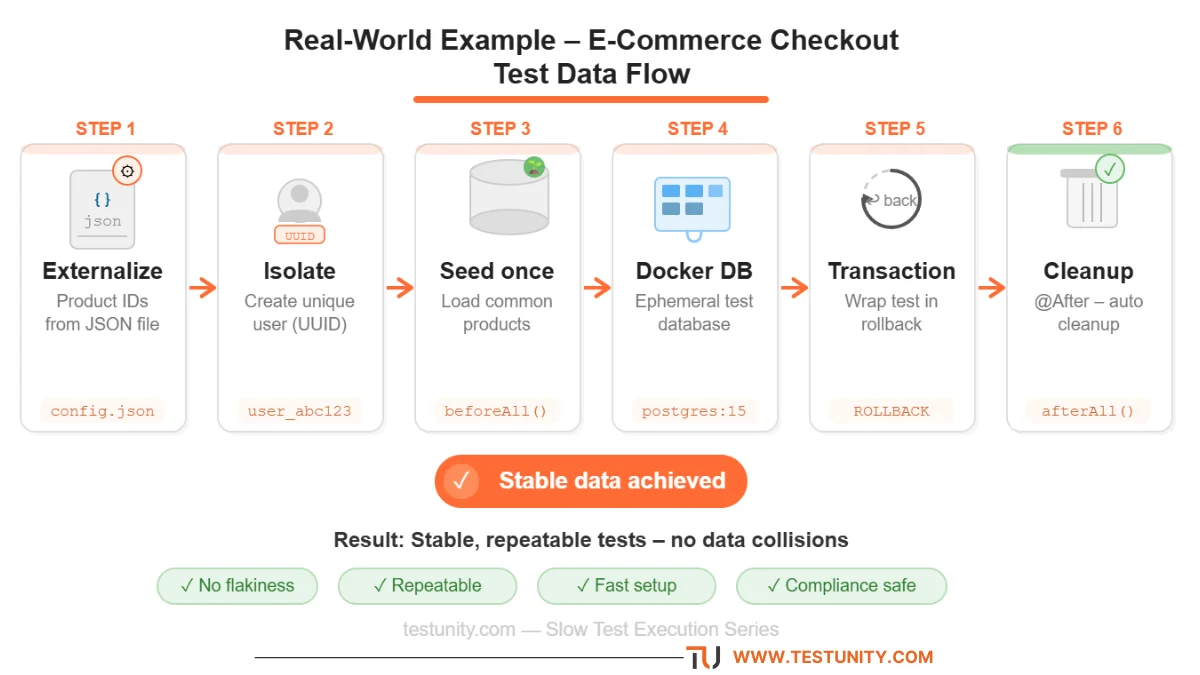
Let’s say you’re testing an e‑commerce checkout flow. Here’s how you would manage test data for this scenario:
-
Externalize product IDs and discount codes in a JSON file.
-
Isolate each test by creating a unique user and cart using UUIDs.
-
Seed the database once with common products and tax rates.
-
Use a dedicated Docker database for the test run.
-
Automate refresh by wrapping each test in a transaction.
-
Protect any customer data by using synthetic names and addresses.
-
Clean up automatically with
@Afterto delete the test user.
Result: The test passes every time, no data collisions, no manual cleanup. That’s stable test data.
What If You Need More Help?
Even with a solid test data management strategy, some situations are complex:
-
Large legacy databases with hundreds of tables
-
Test data that must be realistic and compliant (GDPR, HIPAA)
-
Distributed systems where data spans multiple services
That’s where TestUnity’s Test Automation Services come in. We help you design isolated, refreshable, and realistic test data pipelines – so you can finally manage test data without the headache.
Need expert help with test data? Contact TestUnity today for a free consultation.
Related Resources
-
Integration Testing: The Complete Guide – Test data is critical for integration tests.
-
Test Automation Strategy: How to Plan, Execute, and Scale – Data strategy is part of automation.
-
How to Debug a Failing Test – Many failures are data‑related.

TestUnity is a leading software testing company dedicated to delivering exceptional quality assurance services to businesses worldwide. With a focus on innovation and excellence, we specialize in functional, automation, performance, and cybersecurity testing. Our expertise spans across industries, ensuring your applications are secure, reliable, and user-friendly. At TestUnity, we leverage the latest tools and methodologies, including AI-driven testing and accessibility compliance, to help you achieve seamless software delivery. Partner with us to stay ahead in the dynamic world of technology with tailored QA solutions.





I am usually to running a blog and i actually respect your content. The article has really peaks my interest. I am going to bookmark your web site and hold checking for brand new information.
Thank you for your kind words! I’m thrilled to hear that you appreciate the content and that it has piqued your interest. Bookmarking the site is a great idea, and I hope you find the upcoming information valuable as well. If you have any specific topics or questions in mind that you’d like to see covered in future posts, don’t hesitate to let me know. Your support means a lot!
I needed to post you that little bit of observation just to give many thanks over again for these amazing thoughts you’ve shared here. It has been quite extremely open-handed with you in giving unreservedly just what most of us could possibly have supplied as an ebook in order to make some cash for themselves, certainly now that you might have done it if you considered necessary. The points also served to provide a good way to comprehend other people online have the identical interest just like my personal own to understand way more pertaining to this problem. I know there are a lot more enjoyable opportunities in the future for folks who check out your blog.
Thank you for your thoughtful message! I truly appreciate your gratitude and am glad to hear that the insights shared have been valuable to you. It’s rewarding to know that the content resonates with others who share similar interests. Your encouragement about future opportunities is also inspiring! If you have any further questions or topics you’d like to explore, don’t hesitate to reach out. Your support is greatly appreciated!
Rattling instructive and superb complex body part of content material, now that’s user friendly (:.
Thank you for your enthusiastic feedback! I’m glad to hear that you found the content instructive and user-friendly. Making complex topics accessible is a key goal, and it’s great to know that it’s resonating with you. If you have any specific areas you’d like to delve deeper into or suggestions for future content, feel free to share! Your input is always appreciated!