

You’ve been asked to pick a test automation framework. Three names keep coming up: Selenium, Cypress, Playwright.
Your team wants to move fast. Nobody wants to spend months rewriting flaky tests. And you definitely don’t want to pick a framework that will make you cry in a year.
This guide gives you a brutally honest comparison of Selenium, Cypress, and Playwright. No marketing fluff. Just what matters: speed, cost, cross-browser support, debugging, and which one will actually make your life easier in 2026.
The Short Answer
Choose Playwright for most new projects in 2026. It’s faster, cheaper to run in CI, supports all major browsers with a single API, and has the highest developer satisfaction . Cypress is still great for frontend-heavy JavaScript teams who prioritize local debugging. Selenium remains essential for legacy browsers, native mobile testing, and multi-language enterprise teams .
Let’s break down why.
The Data: What Teams Are Actually Choosing
Before we dive into features, look at what’s happening in the industry.
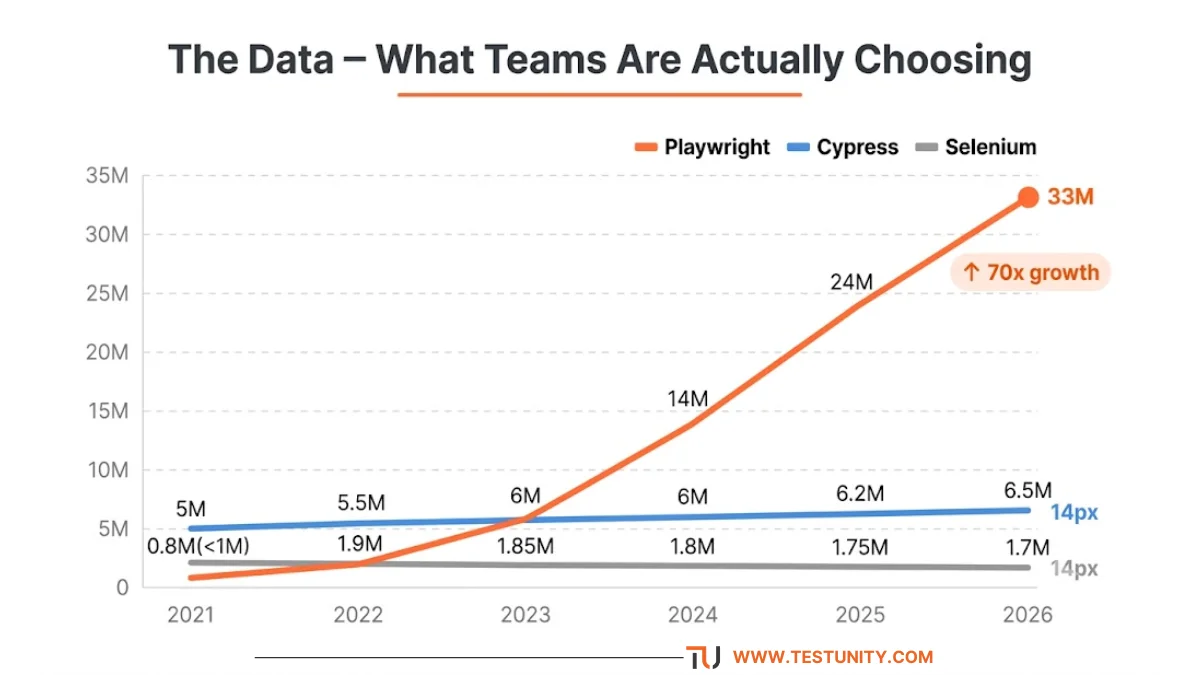
Playwright has gone from under 1 million weekly npm downloads in 2021 to over 33 million in early 2026 – a 70x increase in five years . It’s the fastest-growing testing framework the npm registry has ever recorded.
Cypress has held steady between 5 and 6.5 million weekly downloads during the same period . It plateaued – not dying, but not growing.
Selenium WebDriver’s npm downloads have drifted downward from 2 million to around 1.7 million. But that’s misleading – most Selenium usage happens in Java and Python ecosystems, not npm .
The data says: Playwright is the default choice for new JavaScript/TypeScript projects, while Selenium and Cypress remain strong in their niches .
Head-to-Head Comparison Table
| Feature | Selenium | Cypress | Playwright |
|---|---|---|---|
| Languages | Java, Python, C#, JS, Ruby, Kotlin | JavaScript, TypeScript | JS/TS, Python, Java, .NET |
| Browsers | All major + legacy | Chrome, Edge, Firefox (WebKit experimental) | Chromium, Firefox, WebKit (Safari) |
| Mobile (native) | Via Appium | No | No |
| Auto‑wait | Manual waits required | Built‑in | Built‑in |
| Parallel execution | Selenium Grid (setup overhead) | Cypress Cloud (paid) | Built‑in, free |
| Debugging | Screenshots, logs | Time‑travel debugger | Trace viewer with DOM snapshots |
| Test speed (200 E2E tests) | ~42 minutes | ~28 minutes | ~18 minutes |
| Speed with 4 workers | ~14 minutes | ~9 minutes (paid) | ~6 minutes (free) |
| Learning curve | Steep (3‑4 weeks) | Gentle (1‑2 weeks) | Moderate (2‑3 weeks) |
| Total cost of ownership | Variable – infra cost | Low upfront, paid scaling | Lowest – free scaling |
| Developer satisfaction | ~45% retention | ~66% retention | 94% retention |

Speed and Performance: Why It Matters
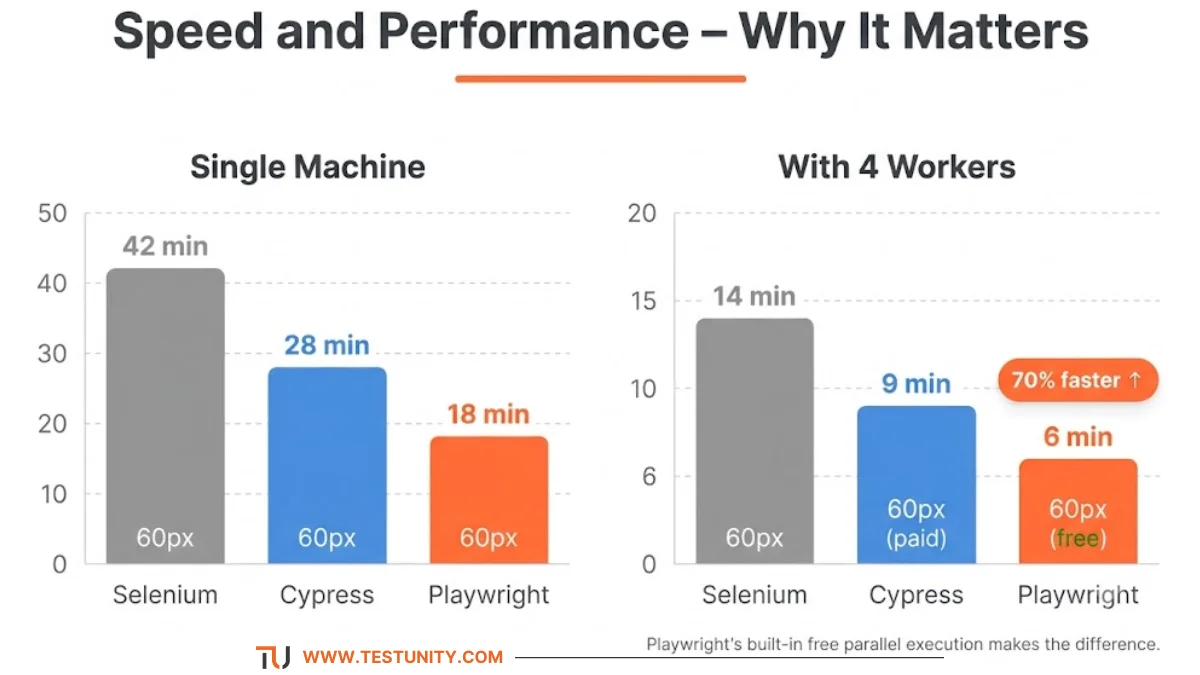
Slow tests kill productivity. Here’s how the frameworks compare on real‑world performance :
Running 200 E2E tests on a single machine:
-
Selenium: ~42 minutes
-
Cypress: ~28 minutes
-
Playwright: ~18 minutes
With 4 workers (parallel execution):
-
Selenium (Grid): ~14 minutes
-
Cypress (Cloud, paid): ~9 minutes
-
Playwright (built‑in, free): ~6 minutes
Playwright communicates with browsers via WebSocket/CDP, bypassing the WebDriver layer that makes Selenium slower . This architecture difference translates to real time saved every day.
Teams have reported 70% reductions in CI testing time after switching to Playwright .
Cross-Browser Testing: Who Actually Covers Safari?
If you need to test on Safari (WebKit), this is where frameworks diverge dramatically.
-
Playwright: Native WebKit support out of the box. Run the same tests on Chromium, Firefox, and Safari with one API .
-
Cypress: Supports Chrome, Edge, and Firefox. WebKit support is experimental – you’ll need external services like BrowserStack for reliable Safari testing .
-
Selenium: Supports all major browsers including Safari, but requires driver management. Selenium Manager (v4+) simplifies this, but it’s still more work .
Bottom line: If Safari coverage matters, Playwright is your only modern choice that doesn’t require paid cloud services.

Architecture: Why Playwright Is Faster and More Stable
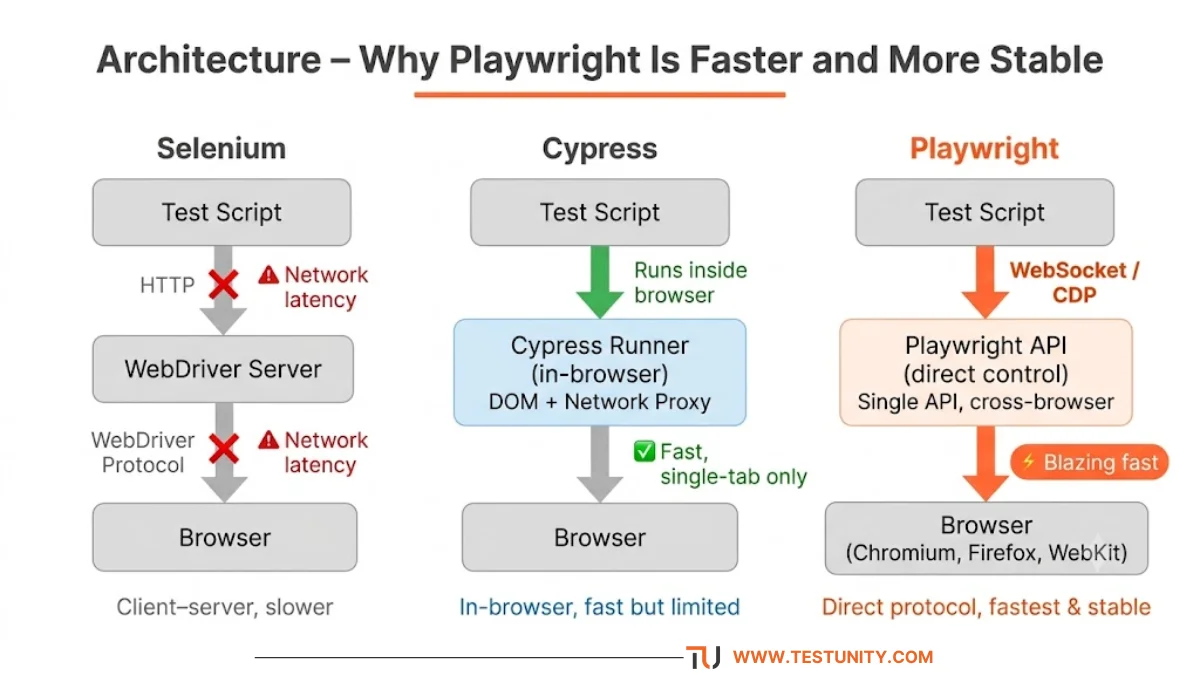
The architectural differences explain most of the performance gap :
Selenium (Client‑Server): Your test script sends commands via HTTP to a WebDriver server, which translates them to browser actions. Each command has network latency. Modern Selenium v4 uses the BiDi protocol to improve this, but the overhead remains.
Cypress (In‑Browser): Tests run directly inside the browser, alongside your application. This gives it fast, real‑time debugging but limits it to a single browser tab. It can’t handle multi‑tab or cross‑origin scenarios well .
Playwright (Out‑of‑Process): Tests run outside the browser but control it via a persistent WebSocket. This gives it the speed of Cypress while supporting all browsers and complex scenarios (multi‑tab, iframes, network interception) .
Debugging: Where Cypress Shines, Where Playwright Wins
Cypress’s superpower is the time‑travel debugger. You can see exactly what the DOM looked like at each step. It runs in real‑time, and you can step through commands interactively. This makes local development incredibly fast .
Playwright’s answer is the Trace Viewer. It captures DOM snapshots, network logs, and console output into a portable HTML file. When a test fails in CI, you can download the trace and replay it locally – even if you weren’t there when it failed .
Selenium relies on screenshots and logs. You’ll need third‑party tools for anything more.
If you value local debugging, Cypress is unbeatable. If you value post‑failure CI debugging, Playwright wins.

Cost: The Hidden Factor
Frameworks aren’t free to run at scale. Here’s the real cost breakdown :
| Framework | Parallel Execution Cost | Hidden Costs |
|---|---|---|
| Selenium | Free if you manage your own Grid | Infrastructure setup, maintenance, driver management |
| Cypress | Requires Cypress Cloud (paid) | No free parallelisation at scale |
| Playwright | Built‑in, free sharding | None – run as many workers as you want |
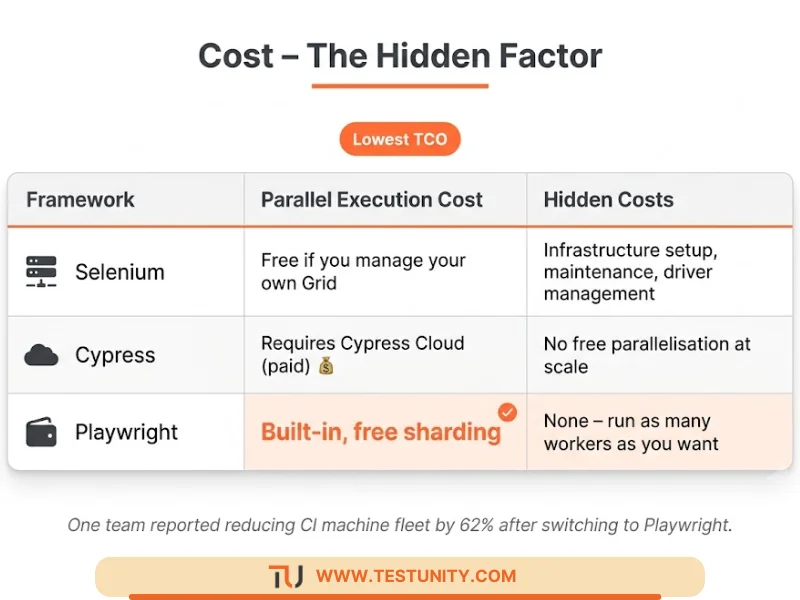
One team reported reducing their CI machine fleet by 62% after switching to Playwright . Another team noted that Playwright’s architecture is more resource‑efficient, consuming significantly less CPU and memory per test run.
If you’re running thousands of tests daily, this cost difference adds up fast.
Choosing by Use Case: A Decision Framework
Choose Selenium If:
-
You need to test native mobile apps (iOS/Android) via Appium .
-
Your organization requires testing on legacy browsers (IE11) .
-
Your team is heavily invested in Java, Python, Ruby, or C# and wants a mature ecosystem .
-
You already have a Selenium Grid infrastructure and a large existing suite .
Choose Cypress If:
-
Your team is strictly JavaScript/TypeScript and wants the fastest learning curve .
-
You prioritize local debugging and developer experience over everything else .
-
You primarily test modern SPAs (React, Vue, Angular) and need component testing .
-
You don’t need full Safari/WebKit or multi‑tab testing .
Choose Playwright If:
-
You’re starting a greenfield project in 2026 – it’s the default recommendation .
-
You need reliable cross‑browser testing on Chromium, Firefox, and WebKit .
-
You want free, built‑in parallel execution without paying for cloud services .
-
Your tests involve multi‑tab, multi‑origin, or iframe‑heavy scenarios .
-
Your team uses multiple languages – Playwright has feature parity across JS, Python, Java, and .NET .
The “Don’t Make Me Cry” Decision Flowchart
Start here:
-
Do you need native mobile app testing? Yes → Selenium + Appium
-
Do you need legacy browser (IE) support? Yes → Selenium
-
Is your team strictly JavaScript/TypeScript with a frontend focus? Yes → Cypress (for local debugging speed)
-
Default choice for everything else: Playwright
As one engineering team put it: “Playwright allows testing more reliably and faster scenarios without needing third‑party libraries” .

What If You’re Already Invested?
If you already have hundreds of tests in Selenium or Cypress, migration is expensive – 3‑6 months of engineering time .
When to stay:
-
Your existing suite works well and covers your critical flows.
-
You don’t hit the limitations (e.g., Safari for Cypress, multi‑tab for Cypress).
-
You have deep expertise and a stable maintenance process.
When to consider migrating:
-
Your maintenance costs are exploding (flaky tests, slow CI).
-
You’re hitting framework limitations (e.g., need Safari coverage).
-
You’re starting new features that the current framework handles poorly.
Many teams adopt parallel adoption – keep the existing suite and use Playwright for new features .
The Bottom Line: Which One Won’t Make You Cry?
Playwright is the safest bet for most teams in 2026. It’s faster, cheaper, supports all browsers, and has the highest developer satisfaction .
Cypress is still a great choice if you’re a frontend JavaScript team that values local debugging above all else.
Selenium remains essential for legacy systems and native mobile testing. It’s not dead – it’s just no longer the default choice for new projects.
If you’re still unsure, run a proof of concept on one critical user journey. Measure setup time, test speed, and debugging experience. Let the data – not the hype – decide .
Need help choosing or implementing a test automation framework? TestUnity’s Test Automation Services include framework selection guidance, proof‑of‑concept development, and full‑suite implementation.
Ready to pick the right framework? Contact TestUnity today for expert guidance.
Quick Reference: Selenium vs Cypress vs Playwright
| Factor | Selenium | Cypress | Playwright |
|---|---|---|---|
| Best for | Legacy, mobile, multi‑language | JS frontend, local debugging | Modern cross‑browser, scaling |
| Speed (4 workers) | ~14 min (Grid) | ~9 min (paid) | ~6 min (free) |
| Safari support | Yes (manual) | Experimental | Native |
| Parallel execution | Free (you manage) | Paid | Free (built‑in) |
| Learning curve | Steep | Gentle | Moderate |
| Developer retention | ~45% | ~66% | 94% |
| Default choice for new projects? | No – only for specific needs | No – unless JS‑frontend focused | Yes |
Related Resources
-
Selecting the Right Test Automation Framework – Detailed technical comparison
-
Test Automation Strategy: How to Plan, Execute, and Scale – Framework selection as part of automation strategy
-
Why Are My Tests So Slow? 7 Quick Fixes – Speed up whichever framework you choose

TestUnity is a leading software testing company dedicated to delivering exceptional quality assurance services to businesses worldwide. With a focus on innovation and excellence, we specialize in functional, automation, performance, and cybersecurity testing. Our expertise spans across industries, ensuring your applications are secure, reliable, and user-friendly. At TestUnity, we leverage the latest tools and methodologies, including AI-driven testing and accessibility compliance, to help you achieve seamless software delivery. Partner with us to stay ahead in the dynamic world of technology with tailored QA solutions.



Leave a Reply