

You run your test suite. 100 tests pass. 3 fail. You rerun – now only 1 fails. You rerun again – all pass. Nothing changed in your code. Your confidence is shot.
This is the reality of flaky tests – automated tests that pass or fail intermittently without any code changes . They’re one of the most frustrating problems in test automation, and they’re eroding trust in your entire test suite.
But fix flaky tests is possible. Here’s what to do first.
The Short Answer
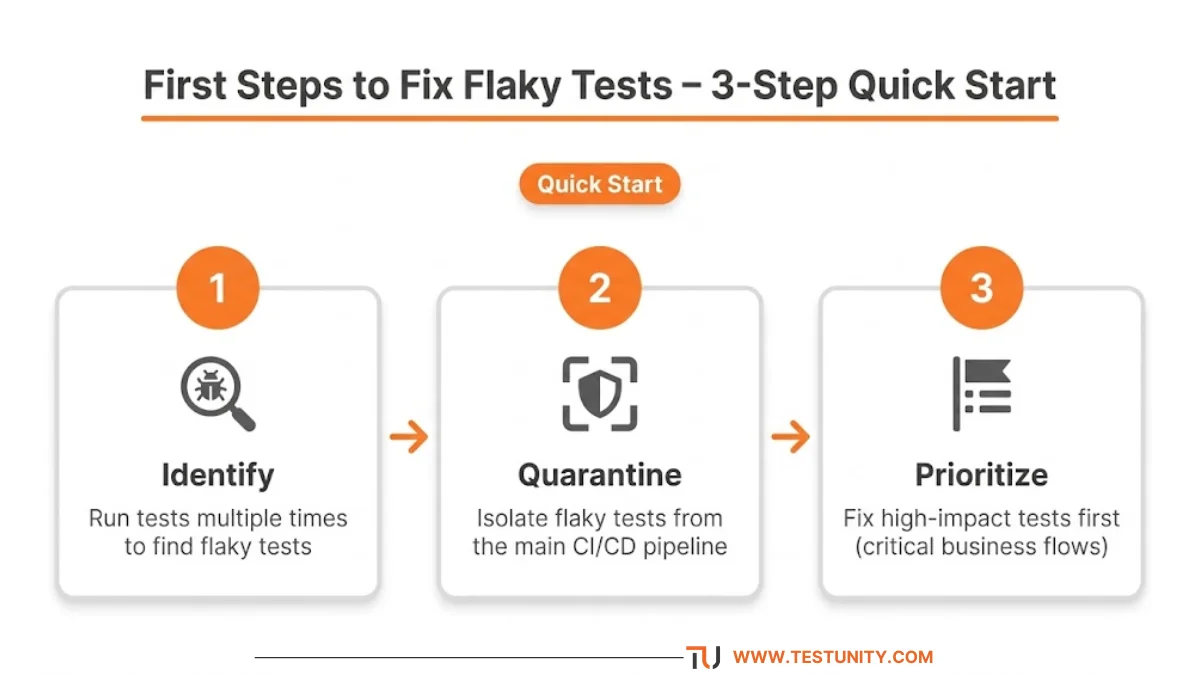
To fix flaky tests, start by identifying them systematically, then quarantine them from your main CI/CD pipeline. Prioritize fixing tests that cover critical business workflows. Common causes include timing issues, race conditions, environment differences, and unreliable external dependencies .
What Are Flaky Tests?
A flaky test is an automated test that produces inconsistent results – sometimes passing, sometimes failing – even when the code hasn’t changed .
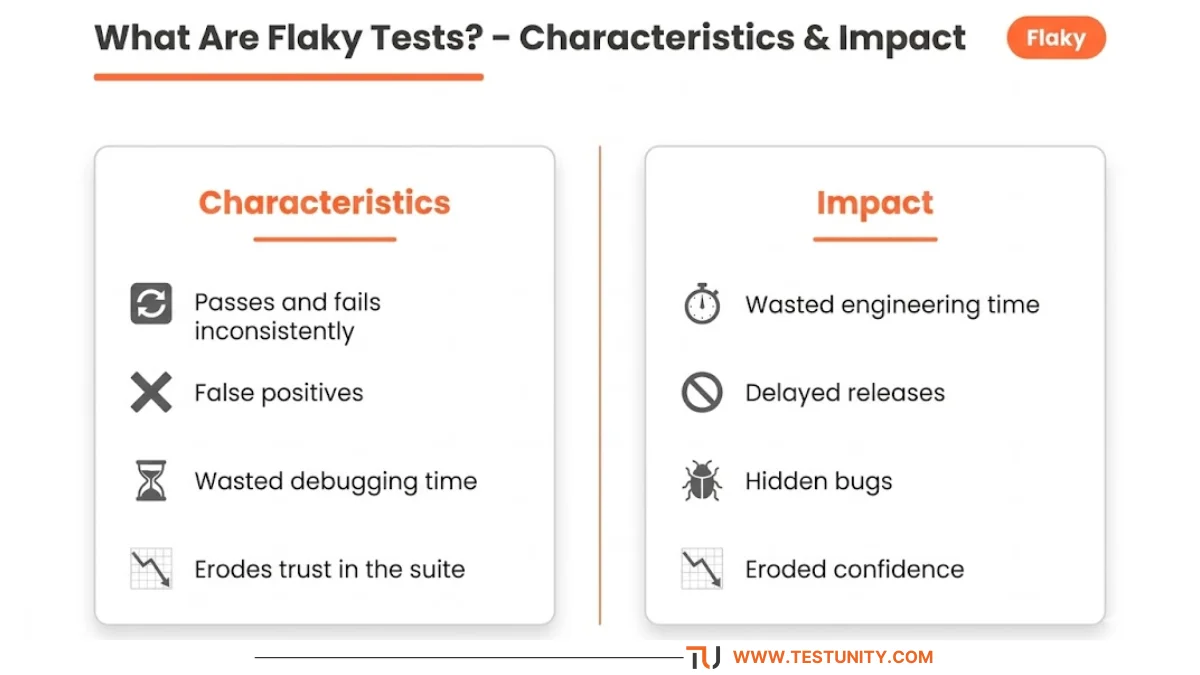
Key characteristics:
-
Passes and fails seemingly without cause
-
Fails inconsistently across runs
-
Creates false positives that waste debugging time
-
Undermines confidence in the entire test suite
“Flaky tests are some of the most problematic issues that testers face in their automated test suites.”
Why Flaky Tests Are Dangerous
Flaky tests aren’t just annoying – they’re costly.
| Impact | Consequence |
|---|---|
| Eroded trust | Developers ignore failures, assuming tests are “just flaky” |
| Wasted time | Engineers rerun pipelines and investigate false positives |
| Delayed releases | Flaky tests block CI/CD pipelines |
| Hidden bugs | Real defects get missed among the noise |
At companies like Kong, flaky tests consumed engineering time to the point where engineers could only fix two flaky tests per day . When test suites run thousands of tests across multiple architectures, flakiness can bring development to a crawl .
What Causes Flaky Tests?
To fix flaky tests, you need to understand the root causes.

1. Timing Issues (Most Common)
Tests that rely on hardcoded delays like sleep(5) are flaky by design. If the system takes 5.1 seconds to respond, the test fails .
Fix: Use explicit waits – wait for conditions like “element is visible” or “API response received” instead of arbitrary delays .
2. Race Conditions & Concurrency
When multiple tests run simultaneously, they can interfere with each other by sharing files, memory, or database state .
Fix: Isolate tests – each test should create its own data and clean up afterward.
3. Test Order Dependency
Some tests pass only when run in a specific order. When the order changes, they fail .
Fix: Make tests independent – each test should run successfully alone.
4. Environment Differences
A test might pass locally but fail in CI due to OS differences, network latency, or hardware variations .
Fix: Use containerized environments (Docker) for consistency.
5. Unreliable Third-Party Dependencies
External APIs can be slow, rate‑limited, or temporarily unavailable .
Fix: Mock or stub external dependencies for deterministic testing .
6. Element Locator Issues
Fragile selectors (XPath, CSS) break when UI changes, causing intermittent failures .
Fix: Use stable selectors – prefer IDs and data attributes over dynamic XPath .
7. Tests That Don’t Clean Up
Leaking state (cache, database records, preferences) affects subsequent tests .
Fix: Always clean up – use transactions that roll back after each test .
Your First Steps to Fix Flaky Tests
Step 1: Identify Which Tests Are Flaky
You can’t fix flaky tests if you don’t know which ones they are.
Methods:
-
Run tests multiple times – if a test passes sometimes and fails sometimes, it’s flaky
-
Analyze historical test data – look for patterns in CI/CD tools like Jenkins, GitHub Actions, or Bitbucket Pipelines
-
Use flaky test detection tools – pytest-rerunfailures, Jest retry plugins, or QMetry’s flaky score feature
-
Monitor execution time – tests with large time variations are often flaky
Bitbucket Pipelines example: The test summary view aggregates per-test data across up to 250 executions, highlighting intermittent failures and high variance .

Step 2: Quarantine Flaky Tests
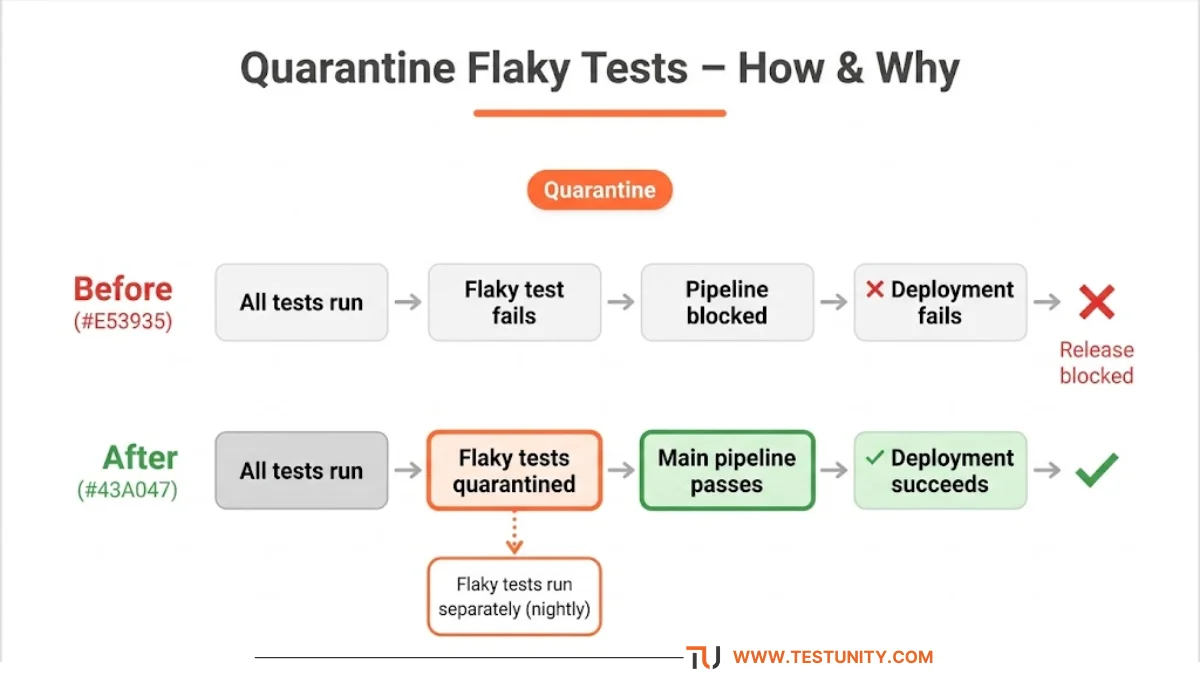
When you fix flaky tests, isolate them from your main CI/CD pipeline first.
Why quarantine matters:
-
Prevents flaky tests from blocking deployments
-
Ensures that when a test fails, it’s investigated as a potential defect
-
Removes bottlenecks from the CI pipeline
How to quarantine:
-
Tag flaky tests (e.g.,
@flaky) and exclude them from the main test run -
Move them to a separate, non‑blocking test suite
-
Run quarantined tests nightly or with alerts only
“Just one flaky test has the potential to contaminate the entire test suite. Quarantining eliminates those bottlenecks.”
Step 3: Prioritize Which Flaky Tests to Fix
Not all flaky tests are equal. Prioritize using these criteria:
| Priority | Criterion |
|---|---|
| High | Tests covering critical business workflows |
| High | Tests that disrupt the CI/CD pipeline |
| Medium | Tests that fail frequently (>10% flake rate) |
| Low | Tests covering rarely used features |
“If a problematic test validates a feature that customers seldom use, then fixing it should be a low priority.”

Step 4: Investigate and Fix the Root Cause
Step‑by‑step root cause analysis:
-
Reproduce the flake – run the test many times in different conditions
-
Eliminate external causes – run with a clean environment and stubbed dependencies
-
Examine the automation script – look for concurrency issues, time issues, and asynchrony
-
Check test data – ensure data is in the correct state before each run
-
Apply a fix – then validate with multiple reruns
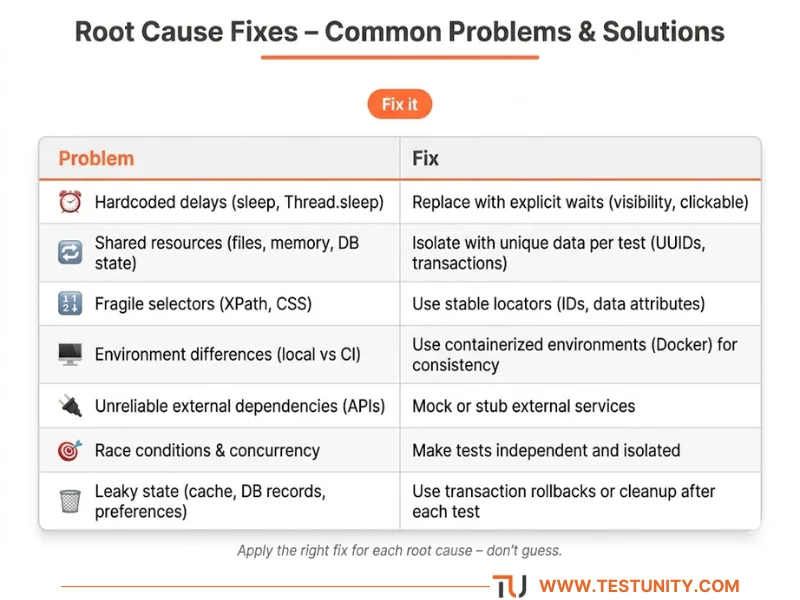
Common fixes:
| Problem | Fix |
|---|---|
| Hardcoded delays | Replace with explicit waits |
| Shared resources | Isolate with unique data per test |
| Fragile selectors | Use stable locators (IDs, data attributes) |
| External dependencies | Mock or stub |
| Leaky state | Use transaction rollbacks |
Step 5: Validate Your Fix
Because flaky tests fail intermittently, running the fixed test once proves nothing. You need multiple reruns.
Validation approach:
-
Run the fixed test 100+ times in the same environment
-
Use tools like
pytest-rerunfailuresor CI retry plugins -
Only consider it fixed when you achieve 100% pass rate over many runs
Step 6: Prevent Future Flakiness
The best way to fix flaky tests is to prevent them.
Prevention best practices:
-
Write focused tests – each test should test one thing
-
Follow the test automation pyramid – more unit tests, fewer UI tests
-
Use mocks for unstable services – never rely on flaky external APIs
-
Keep tests independent – no test should depend on another test’s result
-
Run tests in a clean environment – use containers
-
Monitor flake rates – build alerts into your CI system
Real‑World Example: How Kong Fixed 12 of Their Flakiest Tests
At Kong, engineers used an agentic AI workflow to fix flaky tests. The process:
-
Identify – Used a Datadog dashboard to identify the 15 flakiest tests
-
Investigate – AI agents scanned logs and code to find root causes
-
Fix – The agents produced fixes, often without touching test files
-
Verify – Agents ran the tests repeatedly to confirm the fix worked
Results:
-
Fixed 12 of 15 flaky tests in under 2 weeks
-
Uncovered two genuine bugs in the codebase
-
A 5‑year‑old flaky test was permanently fixed
What If You’re Still Stuck?
You’ve identified the flaky test, quarantined it, investigated the root cause – but you’re still stuck. Some flaky tests are genuinely difficult to diagnose.
That’s where TestUnity’s Test Automation Services help. We specialize in fixing flaky test suites, identifying root causes, and implementing prevention strategies. We’ll help you restore confidence in your automation suite.
Need expert help with flaky tests? Contact TestUnity today for a free consultation.
Quick Reference: How to Fix Flaky Tests
| Step | Action |
|---|---|
| 1 | Run tests multiple times to identify flaky tests |
| 2 | Quarantine flaky tests from the main CI/CD pipeline |
| 3 | Prioritize tests by business impact and failure frequency |
| 4 | Investigate root cause (timing, environment, dependencies) |
| 5 | Apply fix (explicit waits, isolation, mocks) |
| 6 | Validate with 100+ reruns |
| 7 | Implement prevention practices |
Related Resources
-
Test Automation Strategy: How to Plan, Execute, and Scale – Flakiness is a key challenge in automation
-
Essential Test Metrics and KPIs – Track flakiness rate as a key metric
-
Why Are My Tests So Slow? 7 Quick Fixes – Speed up your test suite after fixing flakiness
-
How to Debug a Failing Test – Some flaky tests are actually bugs in disguise

TestUnity is a leading software testing company dedicated to delivering exceptional quality assurance services to businesses worldwide. With a focus on innovation and excellence, we specialize in functional, automation, performance, and cybersecurity testing. Our expertise spans across industries, ensuring your applications are secure, reliable, and user-friendly. At TestUnity, we leverage the latest tools and methodologies, including AI-driven testing and accessibility compliance, to help you achieve seamless software delivery. Partner with us to stay ahead in the dynamic world of technology with tailored QA solutions.





Leave a Reply